
YT-DLP GUI
YT-DLP GUI: A capable open-source GUI for YouTube and Instagram downloads, editing, and conversion. Ranked #53 of 135 in Video Downloaders by our editors (3.3/10); pricing: Free plan; best for youTube and Instagram downloads on desktop.
At a glance
- Editor score3.3 / 10
- PricingFree plan
- Best forYouTube and Instagram downloads on desktop
- Free planYes
- Paid fromFree
- Maximum video quality4k
- Facts checked21 Sep 2026
Where it wins
- Free, MIT-licensed desktop app for Windows, macOS, and Linux
- 4K video presets plus MP4, MKV, WebM, and audio exports
- Subtitles, clipping, GIF conversion, history, and dependency setup
Where it doesn't
- Stated source coverage is limited to YouTube and Instagram
- Playlist and batch downloading are outside its stated workflow
- macOS and Linux use source-based runs rather than a listed installer
Our verdict on YT-DLP GUI
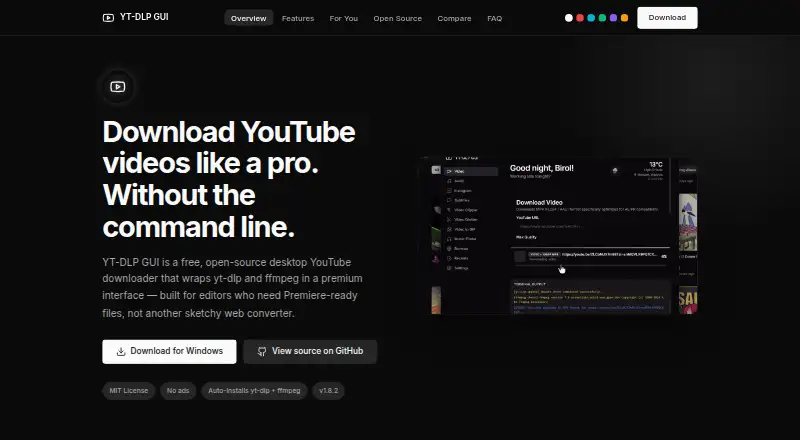
YT-DLP GUI is a free, MIT-licensed desktop application that puts yt-dlp and ffmpeg behind a graphical interface. It is aimed at video editors, content creators, and power users who want local downloads from YouTube and Instagram without relying on command-line workflows. Video can be saved in MP4, MKV, or WebM, while audio can be extracted to MP3, M4A, WAV, or FLAC. Quality presets reach 4K, and subtitles can be exported in SRT or VTT formats.
The workflow extends beyond downloading. A video clipper supports start and end markers, local video-to-GIF conversion is included, and file division is part of the application’s broader media workflow. Automatic installation of yt-dlp and ffmpeg reduces the initial dependency work on supported setups. Download history and configurable save locations add practical organization for repeated desktop use. The published platform details list Windows, macOS, and Linux; Windows has an installer, while macOS and Linux are described as source-based runs.
Its main trade-off is focus. The stated source coverage centers on YouTube and Instagram, including Instagram Reels, posts, and IGTV, rather than a broad collection of services. Playlist and batch downloading are not part of the stated workflow, so users managing large collections or requiring wider source coverage should choose a different downloader. For individual videos, audio extraction, subtitles, short clips, and GIF preparation, YT-DLP GUI is a strong fit for users comfortable with a desktop application and platform-specific setup.
Your product? Our editors can test YT-DLP GUI in depth and publish a review, labelled as paid · from $149/mo →
YT-DLP GUI pricing
YT-DLP GUI fact sheet
| Free plan | Yes |
|---|---|
| Paid from | Free |
| Maximum video quality | 4k |
| Supported sources | YouTube, Instagram |
| Output formats | MP4, MKV, WebM, MP3, M4A, WAV, FLAC |
| Playlist downloads | Not verified |
| Subtitle downloads | Yes |
| Batch downloads | Not verified |
| Device platforms | Windows, macOS, Linux |
| Deployment | Desktop |
| Platforms | Windows, macOS, Linux |
| Built for | Solo, Small business, Mid-market (editorial estimate) |
| Integrations | 4 integrations: Adobe Premiere Pro, Adobe After Effects, AcoustID, ACRCloud |
| Pricing | Free plan |
| Website | ytdlpgui.birol.tech |
| Facts checked | 21 Sep 2026 |
YT-DLP GUI integrations
YT-DLP GUI lists 4 integrations on its own site.
- Adobe Premiere Pro
- Adobe After Effects
- AcoustID
- ACRCloud
Alternatives to YT-DLP GUI
- yt-dlpMaximum control for users comfortable with command-line downloading and automation.9.4
- EaseUS Video DownloaderA broad Windows and macOS downloader with playlists, livestreams, subtitles, and 8K support.9.2
- 4K Video Downloader+A broad desktop downloader with a free starter plan and a $60 Pro option.9.0


See all YT-DLP GUI alternatives →
Used YT-DLP GUI? Be the first to review it
The editor score above is our own research. What this page doesn't have yet is a reader's view — what you used YT-DLP GUI for, what worked and what didn't. No stars are seeded and no review is paid for; an editor reads every one before it appears.
Write a reviewTwo minutes · verified accounts only · read by an editor before it appears
Featured on iTechGuides

YT-DLP GUI is listed in our Video Downloaders directory. Add the badge to your site — it links back to this page.
<a href="https://www.itechguides.com/products/yt-dlp-gui/"><img src="https://www.itechguides.com/best/badge/yt-dlp-gui.svg" alt="Featured on iTechGuides" width="230" height="46"></a>
Reviewed by iTechGuides Editors · Editorial team · Updated Oct 2026
Advertiser disclosure: iTechGuides is reader-supported. Vendors can pay for top positions in our rankings and for a place on other products' pages, and we may earn a commission when you click some links. Bought places stand at the number bought; this page and our disclosure say so. Paying vendors may get a fuller, more detailed review from our editors, and that review can change their score. How we rank.
Last updated · How we research and update