YDL GUI
YDL GUI: A configurable graphical downloader with queues, playlists, subtitles, and format conversion. Ranked #40 of 135 in Video Downloaders by our editors (4.7/10); pricing: Open source; best for users wanting a configurable graphical interface.
At a glance
- Editor score4.7 / 10
- PricingOpen source
- Best forUsers wanting a configurable graphical interface
- Paid fromFree
- Facts checked21 Sep 2026
Where it wins
- Queues, playlists, pause/resume controls, and concurrent downloads
- Subtitle extraction, trimming, thumbnails, and format conversion
- Windows, macOS, Linux, plus Chrome and Edge browser integration
Where it doesn't
- Maximum supported video quality is not stated
- Requires a separate desktop app for browser-extension handoff
- The broad feature set may feel excessive for simple downloads
Our verdict on YDL GUI
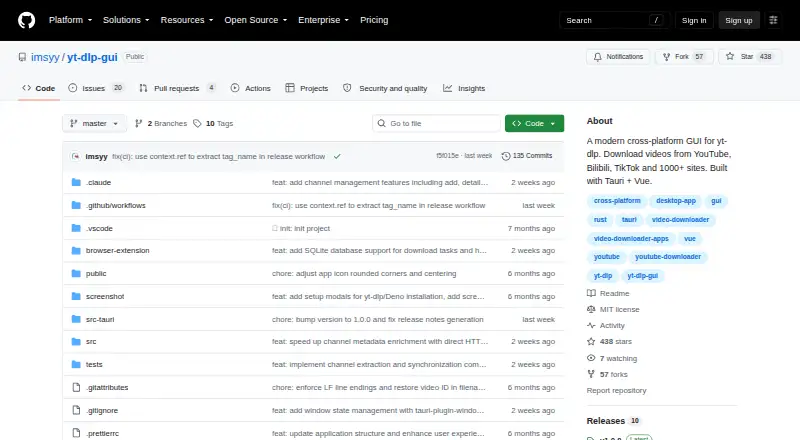
YDL GUI is an open-source desktop application that provides a graphical interface for yt-dlp. It is aimed at users who want more control than a basic URL downloader, including format selection, video-only or audio-only downloads, playlists, subtitles, and organized download management. The application runs on Windows, macOS, and Linux, while a browser extension sends supported URLs and cookies from Chrome or Edge to the desktop app.
Its main strength is the breadth of controls exposed through the interface. Users can preview a video's title, thumbnail, duration, and available formats before downloading. Queues include pause, resume, and cancel controls, while playlist downloads can include every item or selected items. Configurable concurrent downloads and fragment threading add further control for larger jobs. The yt-dlp foundation provides access to YouTube, Bilibili, Twitter/X, Twitch, Vimeo, TikTok, Instagram, Facebook, Reddit, SoundCloud, and more than 1000 sites. SponsorBlock integration and browser handoff extend that workflow beyond the desktop window.
YDL GUI also covers processing tasks that are often separate from downloading: subtitle extraction in SRT, VTT, ASS, and LRC, thumbnail downloads, time-range trimming, metadata embedding, proxy support, live-chat archiving, and re-encoding to MP4, MKV, WebM, MP3, AAC, FLAC, and more. That breadth suits users managing playlists or building repeatable media workflows. It is less appropriate for people who want a minimal downloader or prefer a command-line workflow, since its value comes from configurable graphical controls and its range of options.
Your product? Our editors can test YDL GUI in depth and publish a review, labelled as paid · from $149/mo →
YDL GUI pricing
YDL GUI fact sheet
| Free plan | Not verified |
|---|---|
| Paid from | Free |
| Maximum video quality | Not verified |
| Supported sources | YouTube, Bilibili, Twitter/X, Twitch, Vimeo, TikTok, Instagram, Facebook, Reddit, SoundCloud, and 1000+ sites |
| Output formats | MP4, MKV, WebM, MP3, AAC, FLAC, and more |
| Playlist downloads | Yes |
| Subtitle downloads | Yes |
| Batch downloads | Yes |
| Device platforms | Windows, macOS, Linux |
| Deployment | Desktop, Browser extension |
| Platforms | Windows, macOS, Linux, Chrome extension |
| Built for | Solo, Small business (editorial estimate) |
| Integrations | 3 integrations: yt-dlp, SponsorBlock, Chrome/Edge browser extension |
| Pricing | Open source |
| Website | github.com |
| Facts checked | 21 Sep 2026 |
YDL GUI integrations
YDL GUI lists 3 integrations on its own site.
- yt-dlp
- SponsorBlock
- Chrome/Edge browser extension
Alternatives to YDL GUI
- yt-dlpMaximum control for users comfortable with command-line downloading and automation.9.4
- EaseUS Video DownloaderA broad Windows and macOS downloader with playlists, livestreams, subtitles, and 8K support.9.2
- 4K Video Downloader+A broad desktop downloader with a free starter plan and a $60 Pro option.9.0


See all YDL GUI alternatives →
Used YDL GUI? Be the first to review it
The editor score above is our own research. What this page doesn't have yet is a reader's view — what you used YDL GUI for, what worked and what didn't. No stars are seeded and no review is paid for; an editor reads every one before it appears.
Write a reviewTwo minutes · verified accounts only · read by an editor before it appears
Featured on iTechGuides

YDL GUI is listed in our Video Downloaders directory. Add the badge to your site — it links back to this page.
<a href="https://www.itechguides.com/products/ydl-gui/"><img src="https://www.itechguides.com/best/badge/ydl-gui.svg" alt="Featured on iTechGuides" width="230" height="46"></a>
Reviewed by iTechGuides Editors · Editorial team · Updated Sep 2026
Advertiser disclosure: iTechGuides is reader-supported. Vendors can pay for top positions in our rankings and for a place on other products' pages, and we may earn a commission when you click some links. Bought places stand at the number bought; this page and our disclosure say so. Paying vendors may get a fuller, more detailed review from our editors, and that review can change their score. How we rank.
Last updated · How we research and update