
XConvert Image Compressor
XConvert Image Compressor: Browser-based image compression with batch ZIP downloads and a public API. Ranked #24 of 85 in Image Compression Software by our editors (7.1/10); pricing: Free plan; best for large-format web compression and API jobs.
At a glance
- Editor score7.1 / 10
- PricingFree plan
- Best forLarge-format web compression and API jobs
- Free planYes
- Paid from$49.99/yr
- Compression modesBoth
- Facts checked24 Sep 2026
Where it wins
- Choose percentage, target file size, or quality for compression.
- Batch images and download results individually or as a ZIP.
- Resize automatically and output to formats including WebP, AVIF, and HEIC.
Where it doesn't
- The free compressor limits each file to 300 MB.
- Paid plan limits apply site-wide rather than specifically to the compressor.
- Metadata handling varies by format and compression mode.
Our verdict on XConvert Image Compressor
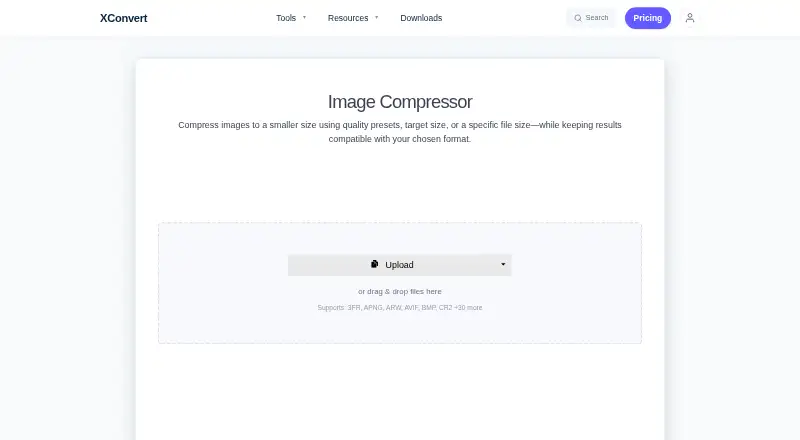
XConvert Image Compressor is a browser-based service for reducing image file sizes, aimed at people handling batches of web images and developers automating compression jobs. It works without an account and lets users set compression by percentage, target size, or quality, with automatic dimension scaling as an option. The service runs on XConvert’s servers, and supports uploads from a computer, Google Drive, or Dropbox. A public API is available for programmatic jobs, giving it a path beyond one-off browser uploads.
Its controls make it more adaptable than a simple quality slider: users can select output formats such as JPG, WebP, AVIF, PNG, and HEIC, and choose lossless processing for formats including PNG and WebP. It supports batch processing with individual downloads or a ZIP, and accepts a broad range of formats, including GIF, TIFF, RAW formats, and others. These options suit varied source libraries and target workflows. Metadata behavior is format-dependent: JPEG and HEIC compression typically discards metadata, while lossless PNG and WebP output preserves ancillary chunks.
The published plans show a free option, with the compressor page stating a 300 MB per-file limit for free users. Basic costs $4.99 monthly or $49.99 annually, with no ads, a 1 GB file-size limit, and advanced encoders. Pro costs $9.99 monthly or $99.99 annually, adding a 4 GB limit, fastest file upload, and high compression encoders. The plans are site-wide rather than specific to the compressor, so the limit difference matters for large files. XConvert fits users who need target-size controls, batch output, or API jobs; those wanting a desktop workflow or predictable metadata retention across formats should look elsewhere.
Your product? Our editors can test XConvert Image Compressor in depth and publish a review, labelled as paid · from $149/mo →
XConvert Image Compressor pricing
All 2 XConvert Image Compressor plans and prices →
XConvert Image Compressor fact sheet
| Free plan | Yes |
|---|---|
| Paid from | $49.99/yr |
| Compression modes | Both |
| Batch processing | Yes |
| API access | Yes |
| Max upload size | 300 MB |
| Image resizing | Yes |
| Supported formats | JPG, JPEG, JFIF, PNG, WebP, HEIC, AVIF, GIF, BMP, TIFF, ICO, PPM, EPS, RAW formats (CR2, NEF, DNG, ARW, ORF, RAF, RW2) |
| Metadata controls | Yes |
| Deployment | Cloud, Browser extension |
| Platforms | Web |
| Compliance & security | GDPR |
| Support | |
| Built for | Solo, Small business (editorial estimate) |
| Integrations | 2 integrations: Google Drive, Dropbox |
| Pricing | Free plan (source) |
| Website | xconvert.com |
| Facts checked | 24 Sep 2026 |
XConvert Image Compressor integrations
XConvert Image Compressor lists 2 integrations on its own site.
- Google Drive
- Dropbox
Alternatives to XConvert Image Compressor
- TinyPNGA flexible compressor for web workflows, batch processing, and automated image pipelines.9.3
- OptimoleA strong WordPress-focused optimizer for responsive images, modern formats, and CDN delivery.9.2
- ThumborA self-hosted image service with URL transformations, smart cropping, and format selection.9.1


See all XConvert Image Compressor alternatives →
Used XConvert Image Compressor? Be the first to review it
The editor score above is our own research. What this page doesn't have yet is a reader's view — what you used XConvert Image Compressor for, what worked and what didn't. No stars are seeded and no review is paid for; an editor reads every one before it appears.
Write a reviewTwo minutes · verified accounts only · read by an editor before it appears
Featured on iTechGuides

XConvert Image Compressor is listed in our Image Compression Software directory. Add the badge to your site — it links back to this page.
<a href="https://www.itechguides.com/products/xconvert-image-compressor/"><img src="https://www.itechguides.com/best/badge/xconvert-image-compressor.svg" alt="Featured on iTechGuides" width="230" height="46"></a>
Reviewed by iTechGuides Editors · Editorial team · Updated Oct 2026
Advertiser disclosure: iTechGuides is reader-supported. Vendors can pay for top positions in our rankings and for a place on other products' pages, and we may earn a commission when you click some links. Bought places stand at the number bought; this page and our disclosure say so. Paying vendors may get a fuller, more detailed review from our editors, and that review can change their score. How we rank.
Last updated · How we research and update