
Writing Wizard
Writing Wizard: A flexible print-handwriting app with tracing, customization, rewards, and progress tools. Ranked #15 of 27 in Handwriting Practice Apps by our editors (7.7/10); pricing: Free plan; best for children and families practicing print handwriting.
At a glance
- Editor score7.7 / 10
- PricingFree plan
- Best forChildren and families practicing print handwriting
- Free planYes
- Age levelsAll_ages
- Founded2010 · Roquefort les Pins, France
- Facts checked21 Sep 2026
Where it wins
- Covers letters, numbers, shapes, words, phonics, and letter names
- Supports custom word lists, adjustable tracing, and multiple profiles
- Adds progress reports, printable worksheets, rewards, and four games
Where it doesn't
- Practice is focused on print handwriting rather than multiple writing modes
- The free version limits available letters, words, and numbers
- Desktop and mobile versions may suit different family workflows
Our verdict on Writing Wizard
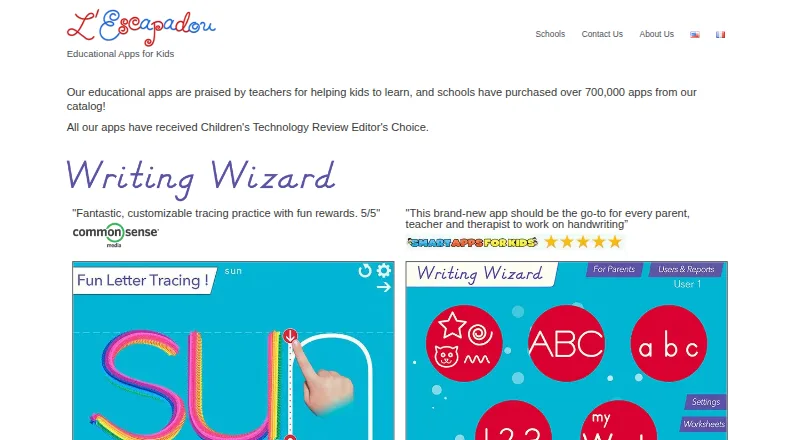
Writing Wizard is a print-handwriting practice app for toddlers, preschoolers, kindergarten children, early learners, and first-grade students. It guides learners through uppercase and lowercase letters, numbers, shapes, and words, with stroke demonstrations, phonics, letter names, and adjustable tracing difficulty. Families, teachers, and schools can use multiple user profiles to support more than one learner across Windows, iOS, and Android.
Its strongest area is the breadth of practice for early learners. Children can trace letters and numbers, work on shapes, enter their own words, and create custom word lists. Display settings and tracing difficulty can be adjusted, while progress reports include replay and exportable tracings. Animated rewards and four tracing-related games add variety without moving the product away from its handwriting focus. Printable PDF worksheets extend practice beyond the app, which can help families and classrooms combine screen-based and paper activities.
The freemium structure provides a Free version with a limited selection of letters, words, and numbers. The Writing Wizard - Handwriting plan expands practice to letters, numbers, words, shapes, custom word lists, and printable worksheets. iCloud Drive and email are listed integrations, supporting file handling and sharing rather than a broad classroom or productivity ecosystem. Writing Wizard is a good fit for families and educators seeking guided print practice with customization and progress visibility. It is less suitable for learners or programs looking for handwriting modes beyond print or a wider integration environment.
Your product? Our editors can test Writing Wizard in depth and publish a review, labelled as paid · from $149/mo →
Writing Wizard pricing
All 2 Writing Wizard plans and prices →
Writing Wizard fact sheet
| Free plan | Yes |
|---|---|
| Paid from | Not verified |
| Writing modes | |
| Age levels | All_ages |
| Pen-control exercises | Yes |
| Custom word practice | Yes |
| Progress tracking | Yes |
| Supported platforms | ios, android, windows |
| Deployment | Desktop, Mobile |
| Platforms | Windows, iOS, Android |
| Compliance & security | GDPR |
| Support | Email, Docs |
| Built for | Solo, Small business, Mid-market (editorial estimate) |
| Integrations | 2 integrations: iCloud Drive, email |
| Pricing | Free plan (source) |
| Website | lescapadou.com |
| Facts checked | 21 Sep 2026 |
Writing Wizard integrations
Writing Wizard lists 2 integrations on its own site.
- iCloud Drive
Alternatives to Writing Wizard
- Hanzi WriterAn all-round Chinese handwriting app with structured courses, review tools, and offline practice.9.4
- ZishuA free iOS app with structured practice, grading, and spaced review.9.2
- SkritterA focused handwriting app for serious Chinese and Japanese learners.9.0


See all Writing Wizard alternatives →
Used Writing Wizard? Be the first to review it
The editor score above is our own research. What this page doesn't have yet is a reader's view — what you used Writing Wizard for, what worked and what didn't. No stars are seeded and no review is paid for; an editor reads every one before it appears.
Write a reviewTwo minutes · verified accounts only · read by an editor before it appears
Featured on iTechGuides

Writing Wizard is listed in our Handwriting Practice Apps directory. Add the badge to your site — it links back to this page.
<a href="https://www.itechguides.com/products/writing-wizard/"><img src="https://www.itechguides.com/best/badge/writing-wizard.svg" alt="Featured on iTechGuides" width="230" height="46"></a>
Reviewed by iTechGuides Editors · Editorial team · Updated Oct 2026
Advertiser disclosure: iTechGuides is reader-supported. Vendors can pay for top positions in our rankings and for a place on other products' pages, and we may earn a commission when you click some links. Bought places stand at the number bought; this page and our disclosure say so. Paying vendors may get a fuller, more detailed review from our editors, and that review can change their score. How we rank.
Last updated · How we research and update