Workday Resource Scheduling
Workday Resource Scheduling: A focused scheduling tool for skills-based staffing and capacity planning. Ranked #23 of 25 in Resource Management Software by our editors (7.0/10); pricing: Pricing on request; best for workforce teams using skills-based scheduling.
At a glance
- Editor score7.0 / 10
- PricingPricing on request
- Best forWorkforce teams using skills-based scheduling
- Capacity planningYes
- Founded2005 · Pleasanton, California, United States
- Facts checked20 Sep 2026
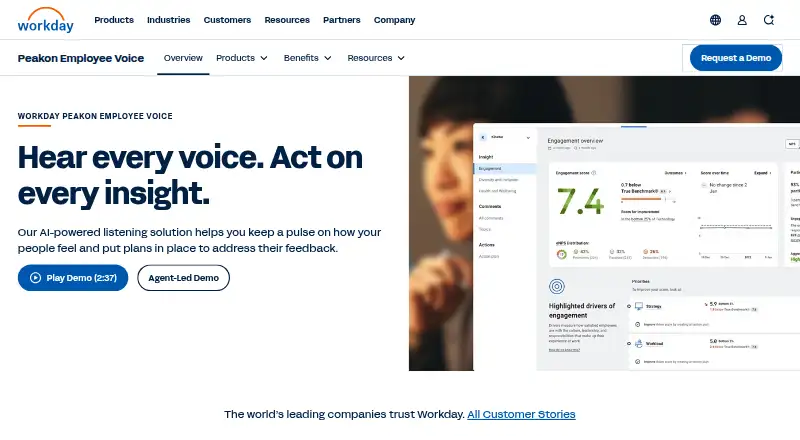
Where it wins
- Matches workers by skills, expertise, fit, location, language, and availability
- Shows real-time capacity, workload trends, balances assignments, and flags conflicts
- Models alternative schedules by toggling projects on and off
Where it doesn't
- Pricing requires contacting sales
- Available on the web only
- Designed for professional services organizations rather than broad workforce use
Our verdict on Workday Resource Scheduling
Workday Resource Scheduling is a resource scheduling application for professional services organizations. It gives staffing teams one workflow for viewing project demand, workforce capacity, open roles, and staffing needs. Its core planning granularity is weekly, with support for capacity planning, workload management, skills matching, and scenario planning. Teams that need to align people with project requirements and availability will find the product’s focus well defined.
The scheduling workflow goes beyond a basic assignment list. Smart matching uses requirements and availability, while worker search can filter by skills, expertise, fit, location, and language. Managers can add notes, track workload trends over weeks or months, balance assignments across available capacity, and identify and resolve scheduling conflicts. Scenario scheduling adds a practical planning layer by allowing projects to be toggled on and off when evaluating alternative schedules. This makes the product a fit for staffing teams that need both individual matching and broader capacity visibility.
Pricing is handled through a Contact Sales model, so organizations should expect a sales-led evaluation rather than published plan-by-plan pricing. The product is positioned within Workday’s Professional Services Automation offering and uses real-time Human Capital Management and PSA data. It is available on the web, which suits browser-based staffing workflows but narrows the platform choice. Choose Workday Resource Scheduling when skills-based matching, workload balancing, and scenario planning are central requirements; consider another option if you need public pricing, broader platform coverage, or a use case outside professional services.
Your product? Our editors can test Workday Resource Scheduling in depth and publish a review, labelled as paid · from $149/mo →
Workday Resource Scheduling pricing
Workday Resource Scheduling fact sheet
| Free plan | Not verified |
|---|---|
| Paid from | Not verified |
| Capacity planning | Yes |
| Workload management | Yes |
| Skills matching | Yes |
| Scenario planning | Yes |
| Planning granularity | Weekly |
| Resource requests | Not verified |
| Deployment | Cloud |
| Platforms | Web |
| Support | Tickets, Community, Docs · 24/7 |
| Built for | Mid-market, Enterprise (editorial estimate) |
| Pricing | Pricing on request |
| Website | workday.com |
| Facts checked | 20 Sep 2026 |
Alternatives to Workday Resource Scheduling
- NaptaA deep resource-planning suite for complex professional-services staffing operations.9.3
- Tempus ResourceA broad planning suite for complex portfolios and enterprise integrations.9.1
- EG SilverbucketDeep planning, skills matching and forecasting for mature project teams.9.0



See all Workday Resource Scheduling alternatives →
Used Workday Resource Scheduling? Be the first to review it
The editor score above is our own research. What this page doesn't have yet is a reader's view — what you used Workday Resource Scheduling for, what worked and what didn't. No stars are seeded and no review is paid for; an editor reads every one before it appears.
Write a reviewTwo minutes · verified accounts only · read by an editor before it appears
Featured on iTechGuides

Workday Resource Scheduling is listed in our Resource Management Software directory. Add the badge to your site — it links back to this page.
<a href="https://www.itechguides.com/products/workday-resource-scheduling/"><img src="https://www.itechguides.com/best/badge/workday-resource-scheduling.svg" alt="Featured on iTechGuides" width="230" height="46"></a>
Reviewed by iTechGuides Editors · Editorial team · Updated Oct 2026
Advertiser disclosure: iTechGuides is reader-supported. Vendors can pay for top positions in our rankings and for a place on other products' pages, and we may earn a commission when you click some links. Bought places stand at the number bought; this page and our disclosure say so. Paying vendors may get a fuller, more detailed review from our editors, and that review can change their score. How we rank.
Last updated · How we research and update