WinShell
WinShell: A focused, free Windows editor for LaTeX projects, with useful document tools and external dependencies. Ranked #25 of 31 in LaTeX Editors by our editors (5.8/10); pricing: Free plan; best for basic Windows LaTeX project editing.
At a glance
- Editor score5.8 / 10
- PricingFree plan
- Best forBasic Windows LaTeX project editing
- Free planYes
- Paid fromFree
- Editor typeDesktop
- Facts checked20 Sep 2026
Where it wins
- Project tools organize documents, figures, tables and bibliographies
- Forward and inverse search connects source files with PDF or DVI
- Portable distribution, spellchecking, BibTeX and table creation included
Where it doesn't
- Windows-only, with support listed from Windows 7 SP1 and higher
- Requires a separate LaTeX package and PDF viewer
- Not open source and focused mainly on core LaTeX editing workflows
Our verdict on WinShell
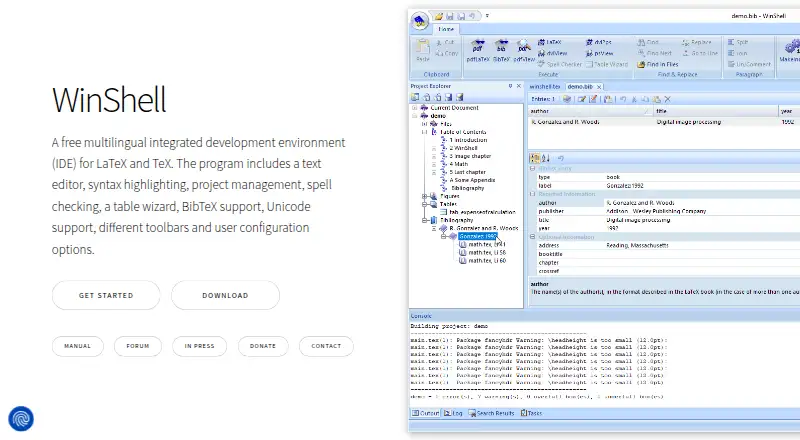
WinShell is a free, multilingual desktop integrated development environment for editing LaTeX and TeX documents on Windows. It is aimed at users who want a focused editor for documents, figures, tables and bibliographies rather than a complete LaTeX distribution. The core editor provides syntax highlighting, Unicode and multibyte support, spellchecking through Hunspell, BibTeX editing, user-defined programs and macros, and a table wizard. It is available as either an installed application or a portable distribution, making it suitable for basic Windows LaTeX project editing.
Setup requires more than installing WinShell. The product is an editor and front end, so users must install a separate LaTeX package such as TeX Live or MiKTeX, along with a PDF viewer. That dependency makes WinShell a better fit for users who are comfortable assembling a desktop LaTeX workflow than for anyone looking for an all-in-one writing environment. Its forward and inverse search features connect source files with PDF or DVI output, while project organization keeps related document assets together.
WinShell’s feature set is broad within straightforward desktop LaTeX editing: spellchecking, BibTeX, table creation, macros, Unicode, project management and custom tools are all included without a paid tier. Its main boundary is focus. It is Windows-only, and the stated compatibility baseline differs between Windows 7 SP1 and higher and Windows 10 or higher. Choose WinShell if you need a free Windows editor with project structure and document-production utilities. Consider another option if you need a complete LaTeX system in one package, a cross-platform editor, or a workflow beyond core desktop project editing.
Your product? Our editors can test WinShell in depth and publish a review, labelled as paid · from $149/mo →
WinShell pricing
WinShell fact sheet
| Free plan | Yes |
|---|---|
| Paid from | Free |
| Editor type | Desktop |
| Real-time collaboration | Not verified |
| Offline editing | Not verified |
| Visual editor | Not verified |
| Git integration | Not verified |
| Supported platforms | Windows 7 SP1 and higher |
| Deployment | Desktop |
| Platforms | Windows |
| Support | Email, Docs |
| Built for | Solo, Small business (editorial estimate) |
| Pricing | Free plan |
| Website | winshell.org |
| Facts checked | 20 Sep 2026 |
Alternatives to WinShell
- OverleafA capable collaborative LaTeX workspace for teams that need editing, review, and citations together.9.3
- TeXstudioA capable free LaTeX desktop editor with strong document-production tools.9.1
- LyXA capable LaTeX-based editor for academic, mathematical, and technical documents.8.9

See all WinShell alternatives →
Used WinShell? Be the first to review it
The editor score above is our own research. What this page doesn't have yet is a reader's view — what you used WinShell for, what worked and what didn't. No stars are seeded and no review is paid for; an editor reads every one before it appears.
Write a reviewTwo minutes · verified accounts only · read by an editor before it appears
Featured on iTechGuides

WinShell is listed in our LaTeX Editors directory. Add the badge to your site — it links back to this page.
<a href="https://www.itechguides.com/products/winshell/"><img src="https://www.itechguides.com/best/badge/winshell.svg" alt="Featured on iTechGuides" width="230" height="46"></a>
Reviewed by iTechGuides Editors · Editorial team · Updated Oct 2026
Advertiser disclosure: iTechGuides is reader-supported. Vendors can pay for top positions in our rankings and for a place on other products' pages, and we may earn a commission when you click some links. Bought places stand at the number bought; this page and our disclosure say so. Paying vendors may get a fuller, more detailed review from our editors, and that review can change their score. How we rank.
Last updated · How we research and update