
WCAGWatch
WCAGWatch: A low-cost way to scan public pages and track recurring accessibility issues. Ranked #67 of 129 in Website Accessibility Tools by our editors (3.0/10); pricing: Free plan; best for simple low-cost recurring site checks.
At a glance
- Editor score3.0 / 10
- PricingFree plan
- Best forSimple low-cost recurring site checks
- Free planYes
- Paid from$19/mo
- WCAG versionWcag 2.2
- Facts checked21 Sep 2026
Where it wins
- Free manual scans with accessibility scores and common issue checks
- Recurring monitoring, scheduled scans, and issue history
- PDF and CSV reports with Shopify and WordPress checkers
Where it doesn't
- Verified limit of 10 scans or pages
- No API or CI/CD support
- Automated findings are not legal certification or a complete audit
Our verdict on WCAGWatch
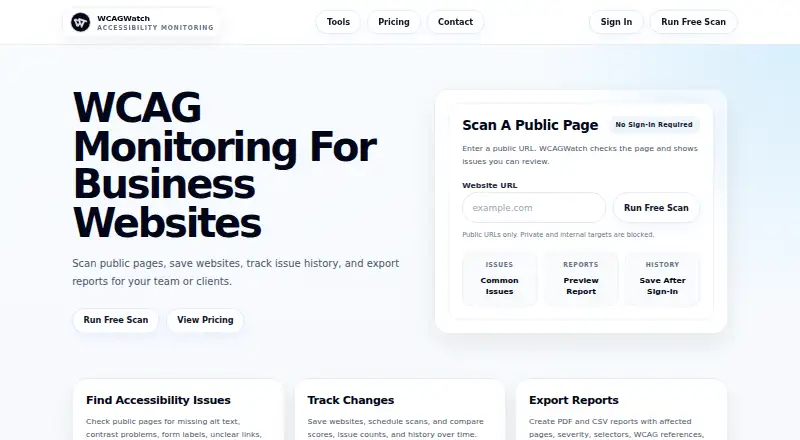
WCAGWatch is a web-based accessibility scanning and monitoring tool for teams, agencies, storefront owners, developers, and organizations maintaining public websites. It checks public pages for issues such as missing alternative text, contrast problems, form-label errors, unclear links, heading issues, and ARIA or markup problems. Its focused checkers cover WCAG-related issues, Shopify, WordPress, ecommerce pages, images, contrast, and forms. The free plan provides a manual URL scan, accessibility score, common issue checks, and a preview report.
Pricing is structured for gradual expansion. Free scans cost $0 per scan. Starter costs $19 per month and adds issue history, PDF reports, and recurring monitoring through saved websites. Pro costs $39 per month and adds PDF and CSV reports plus issue triage. Business costs $79 per month and adds higher report limits, critical issue alerts, full mapping, and read-only repository synchronization. Agency costs $149 per month and adds priority scan capacity, client-ready reports, priority alerts, and client repository setup. Scheduled scans are available, and the verified limit is 10 scans or pages.
WCAGWatch fits buyers who want public-page checks, recurring monitoring, status tracking, and exportable reports without moving to a higher-cost accessibility platform. Its ecommerce checkers and website-focused workflow make it relevant for Shopify, WordPress, and other public sites. The main boundary is technical depth: there is no API or CI/CD support, and automated findings do not provide legal certification or a complete accessibility audit. Choose it for straightforward recurring checks and reporting; choose an alternative when developer pipeline integration or a broader audit workflow is required.
Your product? Our editors can test WCAGWatch in depth and publish a review, labelled as paid · from $149/mo →
WCAGWatch pricing
All 5 WCAGWatch plans and prices →
WCAGWatch fact sheet
| Free plan | Yes |
|---|---|
| Paid from | $19/mo |
| WCAG version | Wcag 2.2 |
| Scan scope | Site |
| Scan limit | 10 pages |
| Scheduled scans | Yes |
| Browser extension | Not verified |
| CI/CD integration | Not verified |
| API access | Not verified |
| Deployment | Cloud |
| Platforms | Web |
| Support | Tickets |
| Built for | Small business, Mid-market, Enterprise (editorial estimate) |
| Pricing | Free plan (source) |
| Website | wcagwatch.com |
| Facts checked | 21 Sep 2026 |
Alternatives to WCAGWatch
- Octopus Scanner (formerly A11y Scanner)A free desktop scanner for detailed local audits of complex websites.9.3
- WAVEA flexible accessibility suite spanning free page checks, browser extensions, APIs, and CI workflows.9.1
- IBM Equal Access Accessibility CheckerA technically focused toolkit for browser, batch, and CI/CD accessibility checks.9.0


See all WCAGWatch alternatives →
Used WCAGWatch? Be the first to review it
The editor score above is our own research. What this page doesn't have yet is a reader's view — what you used WCAGWatch for, what worked and what didn't. No stars are seeded and no review is paid for; an editor reads every one before it appears.
Write a reviewTwo minutes · verified accounts only · read by an editor before it appears
Featured on iTechGuides

WCAGWatch is listed in our Website Accessibility Tools directory. Add the badge to your site — it links back to this page.
<a href="https://www.itechguides.com/products/wcagwatch/"><img src="https://www.itechguides.com/best/badge/wcagwatch.svg" alt="Featured on iTechGuides" width="230" height="46"></a>
Reviewed by iTechGuides Editors · Editorial team · Updated Oct 2026
Advertiser disclosure: iTechGuides is reader-supported. Vendors can pay for top positions in our rankings and for a place on other products' pages, and we may earn a commission when you click some links. Bought places stand at the number bought; this page and our disclosure say so. Paying vendors may get a fuller, more detailed review from our editors, and that review can change their score. How we rank.
Last updated · How we research and update