
WBS Schedule Pro
WBS Schedule Pro: A focused Windows scheduler combining WBS, network and Gantt views for a one-time license. Ranked #26 of 46 in Gantt Chart Software by our editors (6.8/10); pricing: Paid; best for windows teams centered on WBS and network diagrams.
At a glance
- Editor score6.8 / 10
- PricingPaid
- Best forWindows teams centered on WBS and network diagrams
- Free planNo
- Paid from$199/user one-time
- Task dependenciesYes
- Facts checked24 Sep 2026
Where it wins
- Combines WBS, network and Gantt charts with task sheets
- Linked tasks show dependencies and identify the critical path automatically
- Can be used on its own or integrated with Microsoft Project
Where it doesn't
- Full WBS Schedule Pro license costs $349 per license, one-time
- Runs on Windows as desktop software
- Reduced versions omit major chart types
Our verdict on WBS Schedule Pro
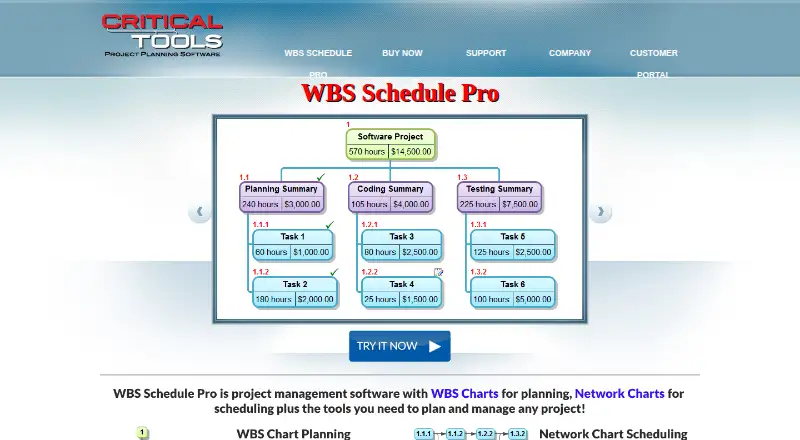
WBS Schedule Pro is Windows desktop project planning and scheduling software for teams that organize work through a Work Breakdown Structure and network diagrams. Its chart set also includes Gantt views and task sheets, giving schedulers multiple ways to represent project structure and timing. The product is suited to small and mid-market organizations whose planning centers on those views, rather than teams looking for a broader platform or a free plan.
A notable scheduling capability is the ability to link tasks to define dependencies; from those links, the software automatically identifies the critical path. WBS charts break projects into manageable pieces, while network charts visualize task workflows and Gantt charts provide a schedule view. Microsoft Project integration is listed, and the product can be used on its own or integrated with Microsoft Project. Buyers who need these connected chart types and dependency-based scheduling have a focused toolset; teams whose workflows depend on other integrations should weigh that fit before buying.
The published plans show three one-time, per-license options. WBS Schedule Pro costs $349 and includes WBS, network and Gantt charts. The WBS Version costs $199 but excludes network and Gantt charts; the PERT Version also costs $199 and excludes WBS and Gantt charts. This makes the reduced versions a choice for buyers who need only a narrower subset, while the full version is needed for all three chart types. There is no free plan, so the product is a better fit for teams prepared for a paid desktop license than for those seeking free or Windows-independent scheduling software.
Your product? Our editors can test WBS Schedule Pro in depth and publish a review, labelled as paid · from $149/mo →
WBS Schedule Pro pricing
All 3 WBS Schedule Pro plans and prices →
WBS Schedule Pro fact sheet
| Free plan | No |
|---|---|
| Paid from | $199/user one-time |
| Task dependencies | Yes |
| Milestones | Not verified |
| Critical path | Yes |
| Baseline tracking | Not verified |
| Resource management | Not verified |
| Workload view | Not verified |
| Deployment | Desktop |
| Platforms | Windows |
| Support | Email, Phone |
| Built for | Small business, Mid-market (editorial estimate) |
| Integrations | 1 integrations: Microsoft Project |
| Pricing | Paid (source) |
| Website | criticaltools.com |
| Facts checked | 24 Sep 2026 |
WBS Schedule Pro integrations
WBS Schedule Pro lists 1 integrations on its own site.
- Microsoft Project
Alternatives to WBS Schedule Pro
- Oracle Primavera CloudA broad planning suite for capital programs that need scheduling, risk, resources, and portfolios.9.3
- Primavera P6 ProfessionalCPM scheduling and multi-project controls for teams that can work within a Windows desktop setup.9.2
- Autodesk Forma ScheduleConstruction scheduling with Gantt views, version comparisons, and weekly work plans.9.1



See all WBS Schedule Pro alternatives →
Used WBS Schedule Pro? Be the first to review it
The editor score above is our own research. What this page doesn't have yet is a reader's view — what you used WBS Schedule Pro for, what worked and what didn't. No stars are seeded and no review is paid for; an editor reads every one before it appears.
Write a reviewTwo minutes · verified accounts only · read by an editor before it appears
Featured on iTechGuides

WBS Schedule Pro is listed in our Gantt Chart Software directory. Add the badge to your site — it links back to this page.
<a href="https://www.itechguides.com/products/wbs-schedule-pro/"><img src="https://www.itechguides.com/best/badge/wbs-schedule-pro.svg" alt="Featured on iTechGuides" width="230" height="46"></a>
Reviewed by iTechGuides Editors · Editorial team · Updated Oct 2026
Advertiser disclosure: iTechGuides is reader-supported. Vendors can pay for top positions in our rankings and for a place on other products' pages, and we may earn a commission when you click some links. Bought places stand at the number bought; this page and our disclosure say so. Paying vendors may get a fuller, more detailed review from our editors, and that review can change their score. How we rank.
Last updated · How we research and update