Wavosaur
Wavosaur: A focused free waveform editor with batch tools, VST support, and analysis features. Ranked #111 of 128 in Audio Editing Software by our editors (3.0/10); pricing: Free plan; best for free Windows waveform and batch processing.
At a glance
- Editor score3.0 / 10
- PricingFree plan
- Best forFree Windows waveform and batch processing
- Free planYes
- Paid fromFree
- Third-party pluginsYes
- Facts checked20 Sep 2026
Where it wins
- Free portable Windows app with 32-bit and 64-bit versions
- Batch processing, conversion, recording, and waveform editing
- VST, ASIO, MIDI-controller commands, and audio analysis tools
Where it doesn't
- Windows-only platform support
- No multitrack editing or MIDI sequencing
- Noise removal relies on the ReaFIR VST plugin
Our verdict on Wavosaur
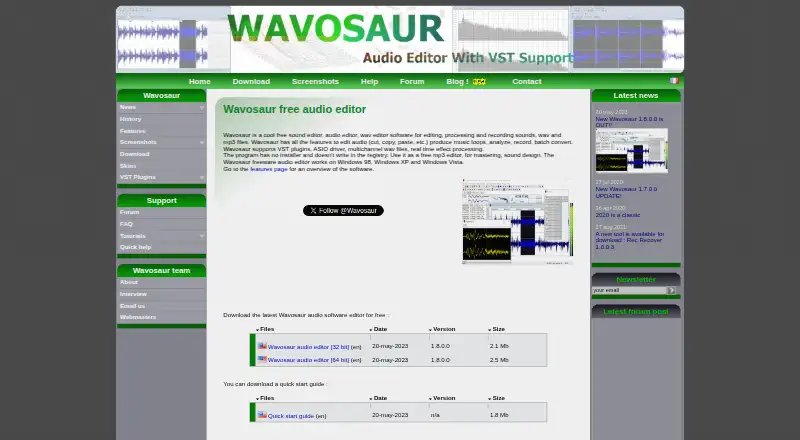
Wavosaur is a free desktop audio editor for Windows, aimed at users who need waveform editing, recording, processing, batch conversion, loop creation, mastering, or sound design without a multitrack workstation. Its portable executable does not require an installer, and it is available in 32-bit and 64-bit versions. The feature set suits focused editing and utility work, including users handling multichannel WAV files or working with ASIO-compatible audio setups.
Its strongest area is the combination of waveform tools and processing depth. Wavosaur covers cut, copy, paste, trim, crop, fade, normalize, recording from soundcard, line-in, or microphone inputs, and batch processing of audio files. VST support adds effect loading, chaining, preset management, and real-time processing. ASIO, Windows MME, spectrum analysis, sonogram, oscilloscope, waveform generation, and external MIDI-controller commands broaden its usefulness for technical editing, sound analysis, and repeatable processing tasks.
The trade-off is a narrow platform and editing scope. Wavosaur runs on Windows, does not provide multitrack editing or MIDI sequencing, and does not include native noise reduction; its documented noise-removal workflow uses the ReaFIR VST plugin. Users who want a free Windows waveform editor with batch conversion, plugin processing, and analysis tools should find the focus appropriate. Those who need multitrack production, built-in noise reduction, MIDI sequencing, or support beyond Windows should choose software designed around those requirements instead.
Your product? Our editors can test Wavosaur in depth and publish a review, labelled as paid · from $149/mo →
Wavosaur pricing
Wavosaur fact sheet
| Free plan | Yes |
|---|---|
| Paid from | Free |
| Supported platforms | Windows |
| Multitrack editing | No |
| MIDI sequencing | No |
| Third-party plugins | Yes |
| Noise reduction | No |
| Video synchronization | Not verified |
| Cloud collaboration | Not verified |
| Deployment | Desktop |
| Platforms | Windows |
| Support | Email, Community, Docs |
| Built for | Solo, Small business (editorial estimate) |
| Integrations | 3 integrations: VST, ASIO, Windows MME |
| Pricing | Free plan |
| Website | wavosaur.com |
| Facts checked | 20 Sep 2026 |
Wavosaur integrations
Wavosaur lists 3 integrations on its own site.
- VST
- ASIO
- Windows MME
Alternatives to Wavosaur
- Pro ToolsA broad workstation for studios spanning music production, audio post, and immersive mixing.9.4
- REAPERA flexible desktop DAW with broad audio and MIDI tools and a one-time license from $60.9.3
- Logic ProA broad audio and MIDI workstation for Apple-based producers and video composers.9.2


See all Wavosaur alternatives →
Also Ranked In
Wavosaur is ranked in 2 of our directories.
Used Wavosaur? Be the first to review it
The editor score above is our own research. What this page doesn't have yet is a reader's view — what you used Wavosaur for, what worked and what didn't. No stars are seeded and no review is paid for; an editor reads every one before it appears.
Write a reviewTwo minutes · verified accounts only · read by an editor before it appears
Featured on iTechGuides

Wavosaur is listed in our Audio Editing Software directory. Add the badge to your site — it links back to this page.
<a href="https://www.itechguides.com/products/wavosaur/"><img src="https://www.itechguides.com/best/badge/wavosaur.svg" alt="Featured on iTechGuides" width="230" height="46"></a>
Reviewed by iTechGuides Editors · Editorial team · Updated Oct 2026
Advertiser disclosure: iTechGuides is reader-supported. Vendors can pay for top positions in our rankings and for a place on other products' pages, and we may earn a commission when you click some links. Bought places stand at the number bought; this page and our disclosure say so. Paying vendors may get a fuller, more detailed review from our editors, and that review can change their score. How we rank.
Last updated · How we research and update