
Watermark & Resize Studio
Watermark & Resize Studio: A practical browser tool with generous batch features and a low-cost lifetime upgrade. Ranked #15 of 33 in Photo Watermarking Software by our editors (7.7/10); pricing: Free plan · paid from $28.99; best for browser users needing watermarking plus resizing.
At a glance
- Editor score7.7 / 10
- PricingFree plan · paid from $28.99
- Best forBrowser users needing watermarking plus resizing
- Free planYes
- Paid from$28.99 one-time
- Facts checked20 Sep 2026
Where it wins
- Free tier supports batches of up to 10 images
- Pro adds unlimited batches and 4K, 8K, and native exports
- Local browser processing includes metadata stripping and ZIP export
Where it doesn't
- Coverage is limited to the web and Chrome extension
- Free exports are limited to 1080p
- Some logo-watermark tier details are inconsistent
Our verdict on Watermark & Resize Studio
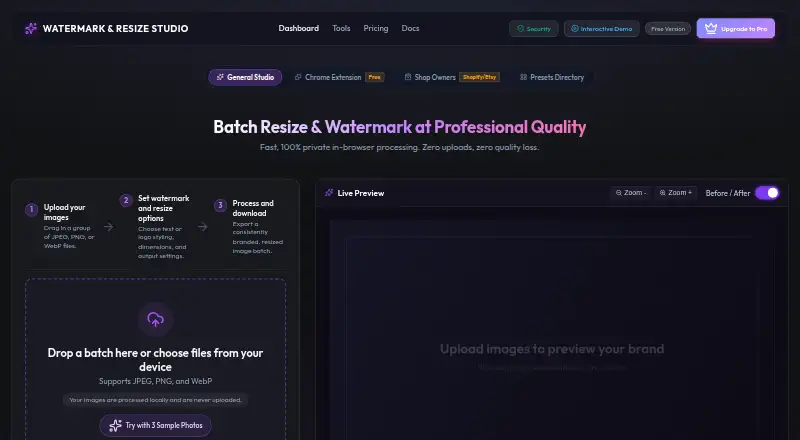
Watermark & Resize Studio is a browser-based image processing tool for creators, photographers, ecommerce sellers, social media managers, designers, and small businesses. It combines batch text watermarking, logo watermarking, image resizing, file renaming, live before-and-after comparison, and JPEG, PNG, and WebP input and export. Processing occurs locally in the browser without uploading images to company servers, making it suited to users who want a browser workflow for preparing groups of images.
The free tier covers text watermark customization, batches of up to 10 images, JPEG, PNG, and WebP export, and output up to 1080p. According to the vendor's pricing page, the Pro Lifetime License costs $28.99 as a one-time payment. It adds unlimited batch processing, PNG logo watermarking with dual-layer text, 4K, 8K, and native-resolution exports, EXIF and GPS metadata stripping, custom preset creation, and ZIP batch export. That structure makes the product accessible for occasional jobs while giving frequent batch users a clear upgrade path. The published pricing information has inconsistent tier wording around transparent PNG logo watermarking, so buyers should review the current plan comparison before relying on that capability in the free tier.
Its strongest fit is a browser-first workflow that benefits from reusable watermark presets, local processing, and compact batch delivery through ZIP files. The Chrome companion extension expands its browser coverage, but the listed platforms remain limited to web and Chrome. Choose it if you need watermarking and resizing without a recurring subscription, especially when higher-resolution export, metadata stripping, or unlimited batches matter. Users seeking broader platform coverage should consider an alternative with support beyond these browser-based options.
Watermark & Resize Studio pricing
All 2 Watermark & Resize Studio plans and prices →
Watermark & Resize Studio fact sheet
| Free plan | Yes |
|---|---|
| Paid from | $28.99 one-time |
| Batch watermarking | Yes |
| Maximum batch size | Not verified |
| Logo marks | Yes |
| Signature marks | Not verified |
| Watermark presets | Yes |
| Supported platforms | Web browser; Chrome companion extension |
| API access | Not verified |
| Money-back guarantee | 30 days |
| Deployment | Browser extension |
| Platforms | Web, Chrome extension |
| Support | |
| Built for | Solo, Small business, Mid-market (editorial estimate) |
| Pricing | Free plan · paid from $28.99 (source) |
| Website | watermarkresizestudio.com |
| Facts checked | 20 Sep 2026 |
Alternatives to Watermark & Resize Studio
- WatermarklyA capable choice for very large cross-platform batches, with a useful free plan.9.4
- eZy WatermarkA feature-rich freemium watermarking tool for mobile creators and businesses.9.2
- iWatermarkA broad watermarking toolkit for users who need batch processing and advanced mark types.9.0



See all Watermark & Resize Studio alternatives →
Used Watermark & Resize Studio? Be the first to review it
The editor score above is our own research. What this page doesn't have yet is a reader's view — what you used Watermark & Resize Studio for, what worked and what didn't. No stars are seeded and no review is paid for; an editor reads every one before it appears.
Write a reviewTwo minutes · verified accounts only · read by an editor before it appears
Featured on iTechGuides

Watermark & Resize Studio is listed in our Photo Watermarking Software directory. Add the badge to your site — it links back to this page.
<a href="https://www.itechguides.com/products/watermark-resize-studio/"><img src="https://www.itechguides.com/best/badge/watermark-resize-studio.svg" alt="Featured on iTechGuides" width="230" height="46"></a>
Reviewed by iTechGuides Editors · Editorial team · Updated Oct 2026
Advertiser disclosure: iTechGuides is reader-supported. Vendors can pay for top positions in our rankings and for a place on other products' pages, and we may earn a commission when you click some links. How we rank.
Last updated · How we research and update