
VSeeFace
VSeeFace: A focused free option for webcam-driven 3D VTubing on Windows. Ranked #9 of 25 in VTuber Software by our editors (8.1/10); pricing: Free plan; best for free, straightforward 3D VTubing.
At a glance
- Editor score8.1 / 10
- PricingFree plan
- Best forFree, straightforward 3D VTubing
- Free planYes
- Paid fromFree
- Avatar workflow3d
- Facts checked20 Sep 2026
Where it wins
- Free desktop software with webcam face tracking
- Supports VRM 0 and VSFAvatar models
- Works with OBS, Spout2, VMC, and external trackers
Where it doesn't
- Windows-only availability
- Live2D models are not supported
- Full-body tracking relies on external applications and VMC
Our verdict on VSeeFace
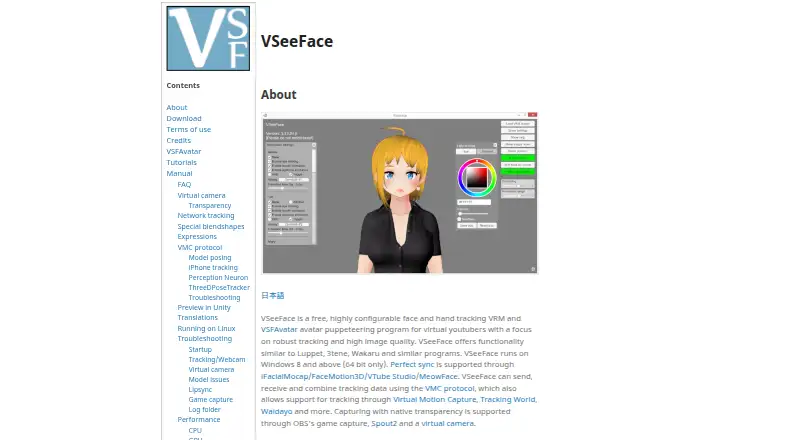
VSeeFace is free Windows software for animating 3D VTuber avatars. It is designed for creators who want to puppeteer VRM or VSFAvatar models with a regular webcam, while keeping the workflow focused on desktop broadcasting and video calls. Face tracking covers eye gaze, blinking, eyebrows, and mouth movement. Optional Leap Motion support adds hand tracking, and the software can be used for commercial or non-commercial activities.
The tracking and avatar workflow are its clearest strengths. VSeeFace supports VRM 0 models and VSFAvatar models with custom animations and shaders. It can receive VMC data, send VMC data, and accept perfect-sync input from supported tracking applications. Integrations include iFacialMocap, FaceMotion3D, VTube Studio, MeowFace, and Leap Motion. This gives creators room to extend tracking beyond a standard webcam, although full-body tracking is handled through external applications and VMC rather than a clearly native mode.
For production, VSeeFace provides virtual camera output and transparent capture through OBS game capture and Spout2. OBS support suits creators who want to combine the avatar with a streaming or recording layout, while the virtual camera supports video-call workflows. The main tradeoff is scope: the application supports 3D VRM-based avatar work, not Live2D models, and it is limited to Windows systems. Choose VSeeFace if you want a free, straightforward 3D VTubing tool with external tracking options. Choose another application if you need Live2D support, a non-Windows platform, or native full-body tracking.
Your product? Our editors can test VSeeFace in depth and publish a review, labelled as paid · from $149/mo →
VSeeFace pricing
VSeeFace fact sheet
| Free plan | Yes |
|---|---|
| Paid from | Free |
| Avatar workflow | 3d |
| Avatar import | Vrm |
| Body tracking | Not verified |
| Hand tracking | Yes |
| Lip-sync | Yes |
| Virtual camera | Yes |
| Recording | Not verified |
| Deployment | Desktop |
| Platforms | Windows |
| Support | Community, Docs |
| Built for | Solo, Small business (editorial estimate) |
| Integrations | 8 integrations: OBS, Spout2, VMC protocol, iFacialMocap, FaceMotion3D, VTube Studio … |
| Pricing | Free plan |
| Website | vseeface.icu |
| Facts checked | 20 Sep 2026 |
VSeeFace integrations
VSeeFace lists 8 integrations on its own site.
- OBS
- Spout2
- VMC protocol
- iFacialMocap
- FaceMotion3D
- VTube Studio
- MeowFace
- Leap Motion
Alternatives to VSeeFace
- AnimazeFlexible VTubing software with free access, 2D/3D imports, tracking, and recording.9.3
- WarudoA broad Windows toolkit for 3D avatars, motion capture, scene control, and recording.9.1
- VTube StudioA flexible free toolkit for animating Live2D avatars across desktop and mobile.9.0



See all VSeeFace alternatives →
Also Ranked In
VSeeFace is ranked in 4 of our directories.
Used VSeeFace? Be the first to review it
The editor score above is our own research. What this page doesn't have yet is a reader's view — what you used VSeeFace for, what worked and what didn't. No stars are seeded and no review is paid for; an editor reads every one before it appears.
Write a reviewTwo minutes · verified accounts only · read by an editor before it appears
Featured on iTechGuides

VSeeFace is listed in our VTuber Software directory. Add the badge to your site — it links back to this page.
<a href="https://www.itechguides.com/products/vseeface/"><img src="https://www.itechguides.com/best/badge/vseeface.svg" alt="Featured on iTechGuides" width="230" height="46"></a>
Reviewed by iTechGuides Editors · Editorial team · Updated Oct 2026
Advertiser disclosure: iTechGuides is reader-supported. Vendors can pay for top positions in our rankings and for a place on other products' pages, and we may earn a commission when you click some links. Bought places stand at the number bought; this page and our disclosure say so. Paying vendors may get a fuller, more detailed review from our editors, and that review can change their score. How we rank.
Last updated · How we research and update