
VideoCreek
VideoCreek: A web-based intro maker with templates, media uploads, and watermark-free exports on Premium. Ranked #7 of 31 in Video Intro Maker Software by our editors (8.6/10); pricing: Free plan; best for simple customizable intro templates.
At a glance
- Editor score8.6 / 10
- PricingFree plan
- Best forSimple customizable intro templates
- Free planYes
- Paid from$10/mo
- Facts checked20 Sep 2026
Where it wins
- Customizable templates with logos, media, text, and graphics
- Animations, transitions, audio, and royalty-free music included
- Exports MP4 or MOV videos at up to 1080p
Where it doesn't
- Free exports include a watermark
- Available only through the web
- Focused on intros and short videos rather than broader production
Our verdict on VideoCreek
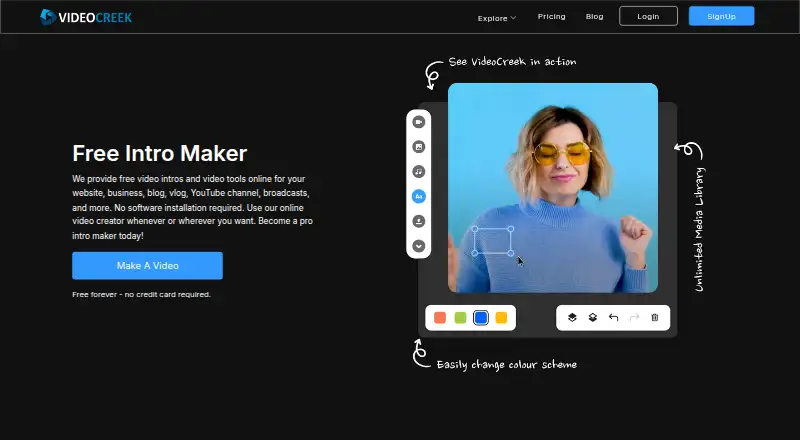
VideoCreek is a web-based video creation tool for YouTubers, bloggers, businesses, vloggers, and social-media creators. It focuses on customizable intros and other short videos, combining templates with personal media and logo uploads. Editors can add text, fonts, colors, graphics, emojis, stickers, images, videos, and text boxes, then preview the result before downloading. The workflow runs online, so it does not require installed software.
The pricing structure is straightforward. The Free plan provides use of the video maker, but exported videos include a watermark. Premium costs $10 per month with monthly billing and removes the watermark from created videos. Both plans support the core creation workflow, while Premium is the practical choice for published work where branded or platform-ready exports should not carry VideoCreek’s watermark.
VideoCreek’s main strength is breadth within a narrow use case: it brings templates, logo and media uploads, animations, transitions, audio, and a music library into one browser-based editor. MP4 and MOV exports are available in 720p and 1080p rendering options. That makes it suited to creators who want a customizable intro without installing desktop software. It is less suitable for users seeking a broader production environment or capabilities beyond short videos and intro-focused content. Choose VideoCreek for template-led intro creation and simple online editing; choose another tool if your priority is a wider video-production scope.
Your product? Our editors can test VideoCreek in depth and publish a review, labelled as paid · from $149/mo →
VideoCreek pricing
All 2 VideoCreek plans and prices →
VideoCreek fact sheet
| Free plan | Yes |
|---|---|
| Paid from | $10/mo |
| Max export resolution | 1080p |
| Transparent export | Not verified |
| Custom logo upload | Yes |
| Brand kit | Not verified |
| Intro duration limit | Not verified |
| Free-plan watermark | Yes |
| Deployment | Cloud |
| Platforms | Web |
| Support | Live chat, Tickets, Docs · 24/7 |
| Built for | Solo, Small business (editorial estimate) |
| Pricing | Free plan (source) |
| Website | videocreek.com |
| Facts checked | 20 Sep 2026 |
Alternatives to VideoCreek
- VideoboltA broad template library with flexible exports for branded intros and motion graphics.9.4
- Intro MakerA focused web tool for one-off logo and text intros with 720p to 4K60 downloads.9.2
- MakeWebVideoA focused option for logo animations and branded videos with pay-per-video pricing.9.0



See all VideoCreek alternatives →
VideoCreek vs the competition
- VideoCreek vs Videobolt
- VideoCreek vs Intro Maker
- VideoCreek vs MakeWebVideo
- VideoCreek vs Typito
- VideoCreek vs Renderforest Slideshow Maker
- VideoCreek vs Introbrand


Compare VideoCreek with any tool side by side →
Used VideoCreek? Be the first to review it
The editor score above is our own research. What this page doesn't have yet is a reader's view — what you used VideoCreek for, what worked and what didn't. No stars are seeded and no review is paid for; an editor reads every one before it appears.
Write a reviewTwo minutes · verified accounts only · read by an editor before it appears
Featured on iTechGuides

VideoCreek is listed in our Video Intro Maker Software directory. Add the badge to your site — it links back to this page.
<a href="https://www.itechguides.com/products/videocreek/"><img src="https://www.itechguides.com/best/badge/videocreek.svg" alt="Featured on iTechGuides" width="230" height="46"></a>
Reviewed by iTechGuides Editors · Editorial team · Updated Nov 2026
Advertiser disclosure: iTechGuides is reader-supported. Vendors can pay for top positions in our rankings and for a place on other products' pages, and we may earn a commission when you click some links. Bought places stand at the number bought; this page and our disclosure say so. Paying vendors may get a fuller, more detailed review from our editors, and that review can change their score. How we rank.
Last updated · How we research and update