VGG Image Annotator
VGG Image Annotator: A free, offline-ready manual annotator for straightforward image, video, and audio projects. Ranked #23 of 28 in Image Annotation Software by our editors (6.8/10); pricing: Free plan; best for simple free offline manual annotation.
At a glance
- Editor score6.8 / 10
- PricingFree plan
- Best forSimple free offline manual annotation
- Free planYes
- Paid fromFree
- Model-assisted labelingNo
- Facts checked20 Sep 2026
Where it wins
- Free, open-source tool that operates offline in a web browser
- Supports images, video, audio, and six region annotation shapes
- Exports and imports CSV, JSON, and COCO annotations
Where it doesn't
- No AI-assisted or model-assisted labeling workflows
- No API for programmatic integration
- Focused on manual annotation rather than advanced automation
Our verdict on VGG Image Annotator
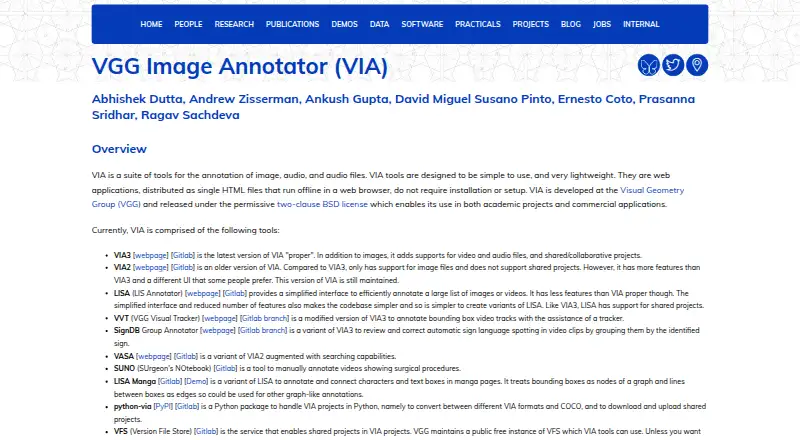
VGG Image Annotator is a free, open-source annotation tool from the Visual Geometry Group at the University of Oxford. It runs as a self-contained HTML application in a modern web browser, without installation or setup. The tool is designed for manual annotation of images, video, and audio, making it a practical fit for individuals and teams that need a straightforward way to create labeled datasets offline. Users can work with local files or image URLs, define spatial regions, and add attributes to regions and files.
Its strongest area is the range of manual annotation controls within a lightweight workflow. VIA supports rectangles, circles, ellipses, points, polygons, and polylines, along with temporal segments for video and audio. VIA3 adds collaborative shared projects, while CSV and JSON import/export support common annotation workflows. COCO annotation import and export also help connect projects to dataset formats used in computer vision. The browser-based design keeps the software portable, and offline operation is useful when annotation needs to stay on a local machine.
VGG Image Annotator is a good choice when free, open-source software and manual control matter more than automation or service integrations. The published product details show no AI assistance, model-assisted labeling, or API, so teams seeking automated suggestions, programmatic access, or a broader production platform should consider another tool. It is also distributed as a standalone browser application rather than a conventional hosted SaaS product. The listed releases include VIA 3.0.13 and VIA 2.0.12, with the latest listed release dates from 2024.
Your product? Our editors can test VGG Image Annotator in depth and publish a review, labelled as paid · from $149/mo →
VGG Image Annotator pricing
VGG Image Annotator fact sheet
| Free plan | Yes |
|---|---|
| Paid from | Free |
| Annotation types | rectangle, circle, ellipse, point, polygon, polyline |
| Image formats | Not verified |
| Model-assisted labeling | No |
| Dataset export | CSV, JSON, COCO format |
| Team collaboration | Yes |
| API access | Not verified |
| Deployment | Self-hosted |
| Platforms | Web |
| Support | Email, Community, Docs |
| Built for | Solo, Small business, Mid-market, Enterprise (editorial estimate) |
| Pricing | Free plan |
| Website | robots.ox.ac.uk |
| Facts checked | 20 Sep 2026 |
Alternatives to VGG Image Annotator
- PixanoA flexible open-source choice for teams annotating 2D and 3D vision datasets.9.0
- CVATA broad CV workflow spanning manual, AI-assisted, collaborative, and programmatic annotation.8.9
- Label StudioFlexible image annotation with open-source deployment, AI assistance, and broad exports.8.8


See all VGG Image Annotator alternatives →
Also Ranked In
VGG Image Annotator is ranked in 5 of our directories.
Used VGG Image Annotator? Be the first to review it
The editor score above is our own research. What this page doesn't have yet is a reader's view — what you used VGG Image Annotator for, what worked and what didn't. No stars are seeded and no review is paid for; an editor reads every one before it appears.
Write a reviewTwo minutes · verified accounts only · read by an editor before it appears
Featured on iTechGuides

VGG Image Annotator is listed in our Image Annotation Software directory. Add the badge to your site — it links back to this page.
<a href="https://www.itechguides.com/products/vgg-image-annotator/"><img src="https://www.itechguides.com/best/badge/vgg-image-annotator.svg" alt="Featured on iTechGuides" width="230" height="46"></a>
Reviewed by iTechGuides Editors · Editorial team · Updated Oct 2026
Advertiser disclosure: iTechGuides is reader-supported. Vendors can pay for top positions in our rankings and for a place on other products' pages, and we may earn a commission when you click some links. Bought places stand at the number bought; this page and our disclosure say so. Paying vendors may get a fuller, more detailed review from our editors, and that review can change their score. How we rank.
Last updated · How we research and update