
Vector Paint
Vector Paint: A free web vector editor for basic artwork, with optional advanced text features. Ranked #32 of 51 in Vector Graphics Software by our editors (5.5/10); pricing: Free plan; best for basic free browser vector drawing.
At a glance
- Editor score5.5 / 10
- PricingFree plan
- Best forBasic free browser vector drawing
- Free planYes
- Paid from$4.65 one-time
- SVG exportYes
- Facts checked20 Sep 2026
Where it wins
- Free browser editor with paths, layers, fills, masks, and snapping
- Supports shapes, images, gradients, strokes, effects, and clip paths
- Optional $4.65 one-time text upgrade adds 1000+ high-quality fonts
Where it doesn't
- PNG and JPEG export are the stated export options
- Advanced text features require a separate one-time purchase
- Focused on lightweight browser editing rather than a full desktop suite
Our verdict on Vector Paint
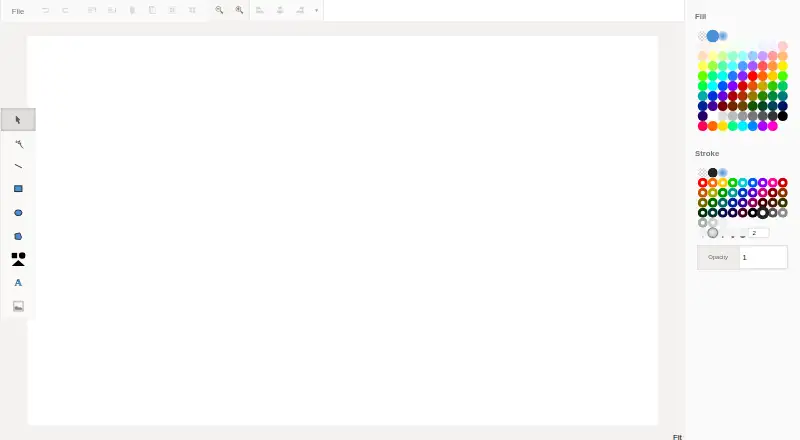
Vector Paint is a browser-based vector drawing and editing tool for individuals and small teams creating basic artwork in a web browser. It supports lines, rectangles, ellipses, polygons, text, shapes, images, and node editing, with the option to convert shapes to paths. Layer management, grouping, cloning, merging, moving, and reordering help organize artwork without requiring a desktop installation. The free editor is aimed at straightforward vector work rather than users seeking a broad graphics production environment.
Its feature set covers the core construction and styling tasks expected from a lightweight vector editor. Users can apply solid, gradient, and pattern fills; configure solid and gradient strokes with widths and dash patterns; and use opacity, effects, masks, and clip paths. Grid and snapping tools support alignment, while distribution controls help arrange objects. Artwork can be exported as PNG or JPEG, making Vector Paint a practical fit for web graphics and other raster-oriented output. It is less suitable for workflows that depend on a wider export format range or advanced desktop-style production features.
Pricing is straightforward: the browser editor is free, while Advanced text features are available as a US$4.65 one-time purchase. That add-on includes 1000+ extra high-quality fonts plus controls for letter spacing, word spacing, and line height. Choose Vector Paint if you want an accessible web-based tool for basic vector drawing, layered compositions, and raster export without a subscription. Consider an alternative if your work depends on extensive text controls from the start, a full desktop graphics suite, or collaboration features.
Your product? Our editors can test Vector Paint in depth and publish a review, labelled as paid · from $149/mo →
Vector Paint pricing
All 1 Vector Paint plans and prices →
Vector Paint fact sheet
| Free plan | Yes |
|---|---|
| Paid from | $4.65 one-time |
| SVG export | Yes |
| Browser app | Yes |
| Desktop app | Not verified |
| Real-time collaboration | Not verified |
| PDF export | Not verified |
| Animation tools | Not verified |
| Maximum artboards | Not verified |
| Deployment | Cloud |
| Platforms | Web |
| Built for | Solo, Small business (editorial estimate) |
| Pricing | Free plan (source) |
| Website | vectorpaint.yaks.co.nz |
| Facts checked | 20 Sep 2026 |
Alternatives to Vector Paint
- Adobe IllustratorA deep vector design suite for teams that need advanced artwork and typography tools.9.4
- AffinityA broad free desktop suite for designers who need vector, pixel and layout tools together.9.2
- InkscapeA capable no-cost SVG editor for designers who want desktop flexibility.9.0



See all Vector Paint alternatives →
Used Vector Paint? Be the first to review it
The editor score above is our own research. What this page doesn't have yet is a reader's view — what you used Vector Paint for, what worked and what didn't. No stars are seeded and no review is paid for; an editor reads every one before it appears.
Write a reviewTwo minutes · verified accounts only · read by an editor before it appears
Featured on iTechGuides

Vector Paint is listed in our Vector Graphics Software directory. Add the badge to your site — it links back to this page.
<a href="https://www.itechguides.com/products/vector-paint/"><img src="https://www.itechguides.com/best/badge/vector-paint.svg" alt="Featured on iTechGuides" width="230" height="46"></a>
Reviewed by iTechGuides Editors · Editorial team · Updated Oct 2026
Advertiser disclosure: iTechGuides is reader-supported. Vendors can pay for top positions in our rankings and for a place on other products' pages, and we may earn a commission when you click some links. Bought places stand at the number bought; this page and our disclosure say so. Paying vendors may get a fuller, more detailed review from our editors, and that review can change their score. How we rank.
Last updated · How we research and update