
Umamo
Umamo: A free Live2D-compatible modelling tool for desktop puppet workflows. Ranked #80 of 106 in Animation Software by our editors (3.0/10); pricing: Free plan; best for open-source Live2D-compatible puppet creation.
At a glance
- Editor score3.0 / 10
- PricingFree plan
- Best forOpen-source Live2D-compatible puppet creation
- Free planYes
- Paid fromFree
- Facts checked22 Sep 2026
Where it wins
- Free, open-source desktop editor for 2D puppet modelling
- Imports layered artwork from Krita, Photoshop, and Clip Studio Paint
- Supports CMO3 and MOC3 project interchange across three desktop platforms
Where it doesn't
- Animation functionality is not yet available
- Alpha-level software with community support
- Android tablet support is still in progress
Our verdict on Umamo
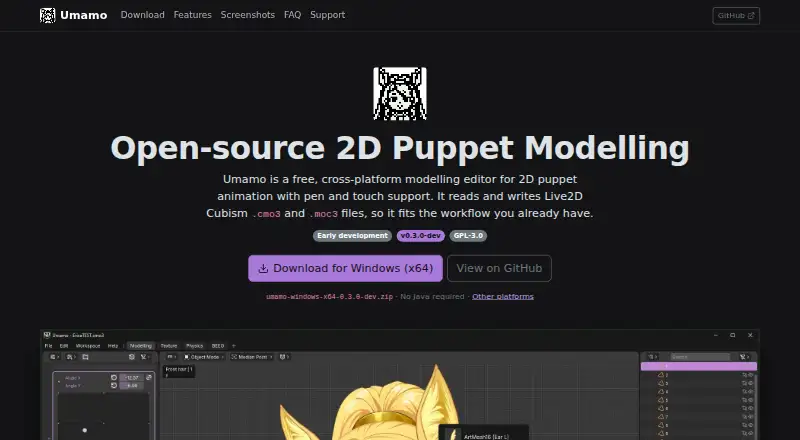
Umamo is a free, open-source desktop editor for building 2D puppet models for Live2D Cubism-compatible workflows. It is aimed at solo creators and small teams working on Windows, macOS, or Linux. The tool supports pen and touch input, character rigging workflows, texture and UV editing, physics-related work, and customisable key bindings. Its focus is model preparation rather than a complete animation pipeline.
Umamo’s main value is its file and artwork interoperability. It can import layered artwork from Krita, Photoshop, and Clip Studio Paint, while supporting Umamo, CMO3, and MOC3 files. The published feature set also includes MOC3 import and export and Cubism CMO3 project interoperability. That makes it a practical fit for creators who already organise artwork in those applications or need Live2D-compatible project exchange. As an open-source product with a free plan, it avoids paid-tier decisions, though support is provided through the community.
The important limitation is scope: Umamo is alpha-level software, and animation functionality is not yet available. Its current emphasis is on 2D puppet modelling, deformation-related workflows, texture editing, and physics. Choose it if you want a free, open-source desktop modeller and value compatibility with Live2D-related files and layered artwork. Choose another animation product if you need animation tools today, broader integrations beyond the listed file formats, or a more mature production environment. Android tablet support is still in progress, so the current fit is desktop-based.
Your product? Our editors can test Umamo in depth and publish a review, labelled as paid · from $149/mo →
Umamo pricing
Umamo fact sheet
| Free plan | Yes |
|---|---|
| Paid from | Free |
| 2D animation tools | Yes |
| 3D modeling | Not verified |
| Character rigging | Yes |
| Motion graphics | Not verified |
| Cloud collaboration | Not verified |
| Supported platforms | Windows, macOS, Linux |
| Export formats | .uma, .cmo3, .moc3 |
| Deployment | Desktop |
| Platforms | Windows, macOS, Linux |
| Support | Community |
| Built for | Solo, Small business (editorial estimate) |
| Integrations | 5 integrations: Live2D Cubism CMO3, Live2D Cubism MOC3, Krita, Photoshop, Clip Studio Paint |
| Pricing | Free plan |
| Website | umamo.org |
| Facts checked | 22 Sep 2026 |
Umamo integrations
Umamo lists 5 integrations on its own site.
- Live2D Cubism CMO3
- Live2D Cubism MOC3
- Krita
- Photoshop
- Clip Studio Paint
Alternatives to Umamo
- Toon Boom HarmonyA focused 2D suite for hand-drawn, rigged, composited, and effects-driven animation.9.3
- BlenderA broad 3D suite for professional animation without software licensing costs.9.2
- Cinema 4DA broad desktop toolkit for motion design, 3D production, simulation, and rendering.9.1



Also Ranked In
Umamo is ranked in 2 of our directories.
Used Umamo? Be the first to review it
The editor score above is our own research. What this page doesn't have yet is a reader's view — what you used Umamo for, what worked and what didn't. No stars are seeded and no review is paid for; an editor reads every one before it appears.
Write a reviewTwo minutes · verified accounts only · read by an editor before it appears
Featured on iTechGuides

Umamo is listed in our Animation Software directory. Add the badge to your site — it links back to this page.
<a href="https://www.itechguides.com/products/umamo/"><img src="https://www.itechguides.com/best/badge/umamo.svg" alt="Featured on iTechGuides" width="230" height="46"></a>
Reviewed by iTechGuides Editors · Editorial team · Updated Oct 2026
Advertiser disclosure: iTechGuides is reader-supported. Vendors can pay for top positions in our rankings and for a place on other products' pages, and we may earn a commission when you click some links. Bought places stand at the number bought; this page and our disclosure say so. Paying vendors may get a fuller, more detailed review from our editors, and that review can change their score. How we rank.
Last updated · How we research and update