TuFuse
TuFuse: A free Windows utility for controlled image fusion, with alignment handled elsewhere. Ranked #21 of 24 in Focus Stacking Software by our editors (6.8/10); pricing: Free plan; best for windows users needing simple focus blending.
At a glance
- Editor score6.8 / 10
- PricingFree plan
- Best forWindows users needing simple focus blending
- Free planYes
- Paid fromFree
- RAW file supportYes
- Facts checked20 Sep 2026
Where it wins
- Combines focus and exposure blending in a two-stage workflow
- Supports RAW input through DCRaw plus 8-bit and 16-bit output
- Provides TIFF, BigTIFF, and multiple compression options at no cost
Where it doesn't
- Requires aligned inputs before blending
- Command-line workflow does not provide its own graphical interface
- RAW support requires a separate DCRaw installation
Our verdict on TuFuse
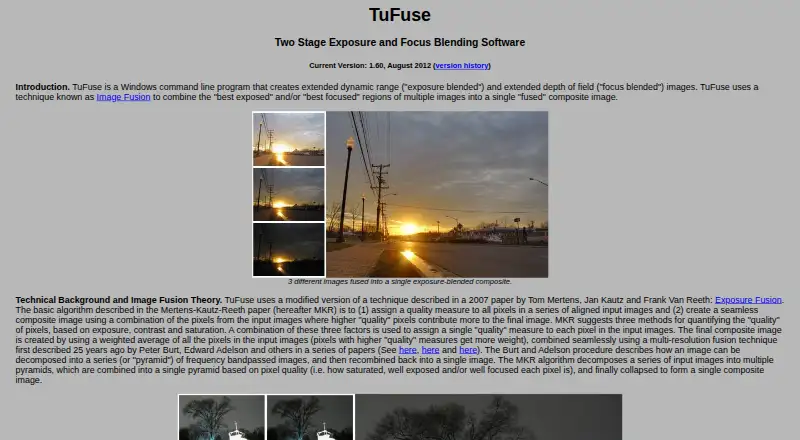
TuFuse is a free Windows command-line image-fusion utility for photographers combining multiple exposures or focus settings into one composite. It accepts JPEG and TIFF inputs, with RAW input available when DCRaw is installed separately. The software is suited to users who want direct control over focus stacking and exposure blending rather than an all-in-one graphical workflow.
Its standout capability is a two-stage process: similarly exposed images can be focus-blended first, then the resulting images can be exposure-blended. TuFuse also offers single-stage image fusion, automatic focus blending for similarly exposed images, and auto-bracketing from a single input image. Output can be selected as 8-bit or 16-bit, with LZW, DEFLATE, or uncompressed options. TIFF and BigTIFF support gives the workflow room for larger output files, while RAW input expands the types of source images it can process.
The main tradeoff is workflow responsibility. TuFuse expects aligned inputs and does not provide automatic alignment. PTAssembler and Panorama Tools integrations address its wider ecosystem fit, while PTAssembler can provide alignment and a graphical interface. This makes TuFuse a practical choice for Windows photographers who already have an alignment workflow or prefer command-line controls. Photographers seeking built-in alignment, a native graphical interface, or an integrated RAW setup should choose a different tool. The official page shows version 1.60 from August 2012, so buyers should also consider whether its dated release fits their requirements.
Your product? Our editors can test TuFuse in depth and publish a review, labelled as paid · from $149/mo →
TuFuse pricing
TuFuse fact sheet
| Free plan | Yes |
|---|---|
| Paid from | Free |
| RAW file support | Yes |
| Automatic alignment | No |
| Batch processing | Not verified |
| Manual retouching | Not verified |
| Supported platforms | Windows |
| Output formats | TIFF, BigTIFF |
| Deployment | Desktop |
| Platforms | Windows |
| Support | Email, Docs |
| Built for | Solo, Small business (editorial estimate) |
| Integrations | 2 integrations: PTAssembler, Panorama Tools |
| Pricing | Free plan |
| Website | tawbaware.com |
| Facts checked | 20 Sep 2026 |
TuFuse integrations
TuFuse lists 2 integrations on its own site.
- PTAssembler
- Panorama Tools
Alternatives to TuFuse
- PlaneFuseA flexible local stacker for advanced photographers working across RAW and developed images.9.4
- ForgePixA free, open-source workstation for focus stacking, astrophotography, and related image workflows.9.3
- Shine StackerA capable free stacker with desktop controls, RAW support, and automation options.9.1

Used TuFuse? Be the first to review it
The editor score above is our own research. What this page doesn't have yet is a reader's view — what you used TuFuse for, what worked and what didn't. No stars are seeded and no review is paid for; an editor reads every one before it appears.
Write a reviewTwo minutes · verified accounts only · read by an editor before it appears
Featured on iTechGuides

TuFuse is listed in our Focus Stacking Software directory. Add the badge to your site — it links back to this page.
<a href="https://www.itechguides.com/products/tufuse/"><img src="https://www.itechguides.com/best/badge/tufuse.svg" alt="Featured on iTechGuides" width="230" height="46"></a>
Reviewed by iTechGuides Editors · Editorial team · Updated Oct 2026
Advertiser disclosure: iTechGuides is reader-supported. Vendors can pay for top positions in our rankings and for a place on other products' pages, and we may earn a commission when you click some links. Bought places stand at the number bought; this page and our disclosure say so. Paying vendors may get a fuller, more detailed review from our editors, and that review can change their score. How we rank.
Last updated · How we research and update