
Trumble
Trumble: A low-cost general-purpose texturing suite with direct PBR painting and engine-ready exports. Ranked #8 of 29 in 3D Texturing Software by our editors (8.2/10); pricing: Free plan; best for low-cost general-purpose PBR texturing.
At a glance
- Editor score8.2 / 10
- PricingFree plan
- Best forLow-cost general-purpose PBR texturing
- Free planYes
- Paid from$5/mo
- 3D texture paintingYes
- Facts checked20 Sep 2026
Where it wins
- Direct PBR painting, layers, blend modes, and masks
- Bakes normal, ambient occlusion, curvature, position, and thickness maps
- Exports texture packs for Unity, Unreal, Godot, and Roblox
Where it doesn't
- The Free plan includes workspace ads
- Pro adds no additional tools beyond Free
- Browser access is required for the no-install workflow
Our verdict on Trumble
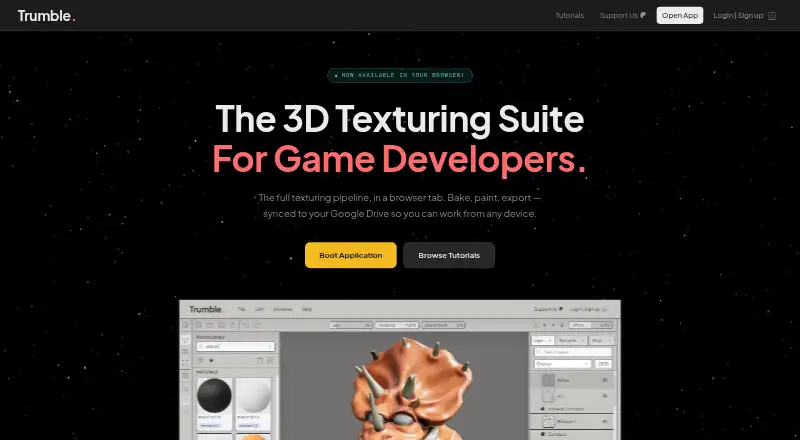
Trumble is a browser-based 3D texturing suite for game developers and artists who need a broad set of core painting, baking, and texture-editing tools without a large software commitment. It supports direct painting of PBR channels on 3D meshes, 2D editing for textures and alphas, material layers, blend modes, masks, and a built-in material and texture library. Mesh imports include OBJ, STL, FBX, GLTF, and GLB, while the product runs through a modern browser on Windows, macOS, and Linux.
Pricing is straightforward. The Free plan costs $0 forever and includes all current tools, all future tools, browser-based access with no installation, and workspace ads. The Pro plan costs $5 per month and includes everything in Free, with no ads and the full workspace layout. Because Pro changes the workspace experience rather than adding a separate set of texturing or baking tools, the Free plan covers the main feature set for users comfortable with ads. Pro is primarily a low-cost option for a cleaner workspace.
Trumble’s strongest fit is a PBR workflow that connects asset preparation with common game engines. It can bake normal, ambient occlusion, curvature, position, and thickness maps, then export engine-specific texture packs for Unity, Unreal Engine, Godot, and Roblox. Google Drive integration supports project saving, adding a cloud-storage connection to the browser workflow. Choose Trumble for accessible, general-purpose mesh texturing, map baking, and engine exports. Users seeking procedural materials or a workflow that does not depend on browser access should choose an alternative.
Your product? Our editors can test Trumble in depth and publish a review, labelled as paid · from $149/mo →
Trumble pricing
All 2 Trumble plans and prices →
Trumble fact sheet
| Free plan | Yes |
|---|---|
| Paid from | $5/mo |
| 3D texture painting | Yes |
| Procedural materials | No |
| Texture baking | Yes |
| PBR workflow | Yes |
| Node-based authoring | Not verified |
| Maximum texture resolution | Not verified |
| Supported platforms | web, Windows, macOS, Linux |
| Deployment | Cloud |
| Platforms | Web, Windows, macOS, Linux |
| Support | Email, Docs |
| Built for | Solo, Small business, Mid-market (editorial estimate) |
| Integrations | 5 integrations: Google Drive, Unity, Unreal Engine, Godot, Roblox |
| Pricing | Free plan (source) |
| Website | trumble.app |
| Facts checked | 20 Sep 2026 |
Trumble integrations
Trumble lists 5 integrations on its own site.
- Google Drive
- Unity
- Unreal Engine
- Godot
- Roblox
Alternatives to Trumble
- InstaMATA cross-platform toolkit for procedural materials, texture painting, baking, and pipeline automation.9.4
- Mixos PaintA broad, cross-platform PBR texturing workspace with a capable free tier and paid 4K export.9.2
- MariA deep texturing tool for VFX teams that need UDIM scale and procedural control.9.1



See all Trumble alternatives →
Trumble vs the competition
- Trumble vs InstaMAT
- Trumble vs Mixos Paint
- Trumble vs Mari
- Trumble vs ArmorPaint
- Trumble vs Texel
- Trumble vs Wafer



Compare Trumble with any tool side by side →
Used Trumble? Be the first to review it
The editor score above is our own research. What this page doesn't have yet is a reader's view — what you used Trumble for, what worked and what didn't. No stars are seeded and no review is paid for; an editor reads every one before it appears.
Write a reviewTwo minutes · verified accounts only · read by an editor before it appears
Featured on iTechGuides

Trumble is listed in our 3D Texturing Software directory. Add the badge to your site — it links back to this page.
<a href="https://www.itechguides.com/products/trumble/"><img src="https://www.itechguides.com/best/badge/trumble.svg" alt="Featured on iTechGuides" width="230" height="46"></a>
Reviewed by iTechGuides Editors · Editorial team · Updated Oct 2026
Advertiser disclosure: iTechGuides is reader-supported. Vendors can pay for top positions in our rankings and for a place on other products' pages, and we may earn a commission when you click some links. Bought places stand at the number bought; this page and our disclosure say so. Paying vendors may get a fuller, more detailed review from our editors, and that review can change their score. How we rank.
Last updated · How we research and update