
Todrawn Scribe
Todrawn Scribe: A focused, low-cost choice for manual whiteboard animations, not full video production. Ranked #15 of 26 in Whiteboard Animation Software by our editors (7.6/10); pricing: Free plan; best for low-cost manual whiteboard animation.
At a glance
- Editor score7.6 / 10
- PricingFree plan
- Best forLow-cost manual whiteboard animation
- Free planYes
- Paid from$75/yr
- Drawing animationYes
- Facts checked20 Sep 2026
Where it wins
- Free plan includes drawing tools, shapes, and real-time collaboration
- Supports 720p or 1080p exports in MP4 or WebM
- Accepts text, code, sketches, and files up to 100 KB
Where it doesn't
- No AI features, character library, or voiceover tools
- No integrations beyond its browser-based workflow
- Free exports are limited and watermarked
Our verdict on Todrawn Scribe
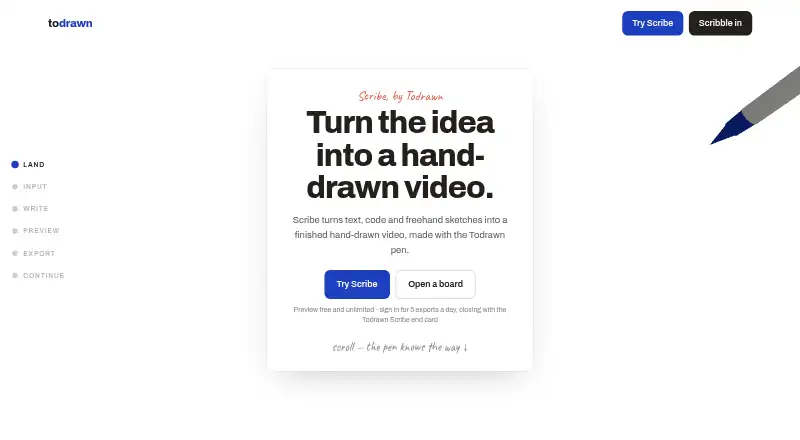
Todrawn Scribe is a browser-based whiteboard animation tool for developers, educators, documentation writers, and creators. It turns pasted text or code, uploaded plain-text or code files, and hand-drawn sketches into stroke-by-stroke animations. Users can draw with a mouse, finger, or pen, preview without an account, and choose vertical 9:16 or wide 16:9 canvases. It suits people who want direct control over a simple drawing-based animation rather than a character-driven video editor.
Pricing is straightforward across four plans. The Free plan includes three boards, five images per board, full drawing tools and shapes, real-time collaboration, and five watermarked Scribe exports per UTC day. Premium Monthly costs $10 per month and adds unlimited boards, unlimited images, unlimited exports without a watermark, collaboration for up to 10 people per board, and priority support. Premium Annual costs $75 per year with the same Premium features, while Lifetime costs $120 one time and includes Premium, no subscription, and all future updates. The listed starting price is $6.25 per month on annual billing.
Its main strength is focused manual animation: stroke playback, browser-based MP4/WebM rendering, 720p or 1080p output, and 24 or 30 fps options cover clear instructional and explanatory videos without requiring a larger production suite. Text and code input also make it relevant for technical content. The trade-off is a narrow ecosystem and feature scope. There are no AI features, stock character libraries, or voiceover tools, and the workflow is web-only. Choose Todrawn Scribe for affordable sketch-led animation and collaborative boards; choose another tool if you need narrated videos, reusable characters, integrations, or broader automated production features.
Your product? Our editors can test Todrawn Scribe in depth and publish a review, labelled as paid · from $149/mo →
Todrawn Scribe pricing
All 4 Todrawn Scribe plans and prices →
Todrawn Scribe fact sheet
| Free plan | Yes |
|---|---|
| Paid from | $75/yr |
| Drawing animation | Yes |
| Character library | No |
| Voiceover tools | None |
| Scene templates | Not verified |
| Export resolution | 1080p |
| Commercial use | Not verified |
| Deployment | Cloud |
| Platforms | Web |
| Compliance & security | GDPR |
| Support | |
| Built for | Solo, Small business (editorial estimate) |
| Pricing | Free plan (source) |
| Website | todrawn.com |
| Facts checked | 20 Sep 2026 |
Alternatives to Todrawn Scribe
- AnimakerA broad whiteboard and animation suite with AI tools, collaboration, and 4K export.9.4
- VideoScribeA focused whiteboard animation tool with broad assets, AI tools, and 1080p exports.9.2
- simpleshow video makerA browser-based explainer-video maker with AI scripting, storyboards, voices, and integrations.9.0


See all Todrawn Scribe alternatives →
Also Ranked In
Todrawn Scribe is ranked in 2 of our directories.
Used Todrawn Scribe? Be the first to review it
The editor score above is our own research. What this page doesn't have yet is a reader's view — what you used Todrawn Scribe for, what worked and what didn't. No stars are seeded and no review is paid for; an editor reads every one before it appears.
Write a reviewTwo minutes · verified accounts only · read by an editor before it appears
Featured on iTechGuides

Todrawn Scribe is listed in our Whiteboard Animation Software directory. Add the badge to your site — it links back to this page.
<a href="https://www.itechguides.com/products/todrawn-scribe/"><img src="https://www.itechguides.com/best/badge/todrawn-scribe.svg" alt="Featured on iTechGuides" width="230" height="46"></a>
Reviewed by iTechGuides Editors · Editorial team · Updated Oct 2026
Advertiser disclosure: iTechGuides is reader-supported. Vendors can pay for top positions in our rankings and for a place on other products' pages, and we may earn a commission when you click some links. Bought places stand at the number bought; this page and our disclosure say so. Paying vendors may get a fuller, more detailed review from our editors, and that review can change their score. How we rank.
Last updated · How we research and update