
TinyJPG
TinyJPG: A practical JPEG-focused compressor with flexible web, API, and WordPress options. Ranked #15 of 85 in Image Compression Software by our editors (7.9/10); pricing: Free plan; best for JPEG-focused web and API compression.
At a glance
- Editor score7.9 / 10
- PricingFree plan
- Best forJPEG-focused web and API compression
- Free planYes
- Compression modesLossy
- Facts checked22 Sep 2026
Where it wins
- Lossy JPEG compression with batch uploads and metadata removal
- REST API supports resizing, intelligent cropping, and metadata controls
- Free web and API options with WordPress, S3, and Cloud Storage integrations
Where it doesn't
- Core positioning is narrower than broader multi-format compression tools
- Web Free allows 20 compressions and 3 conversions per session
- Web Pro and Web Ultra are paid tiers with usage limits that vary by plan
Our verdict on TinyJPG
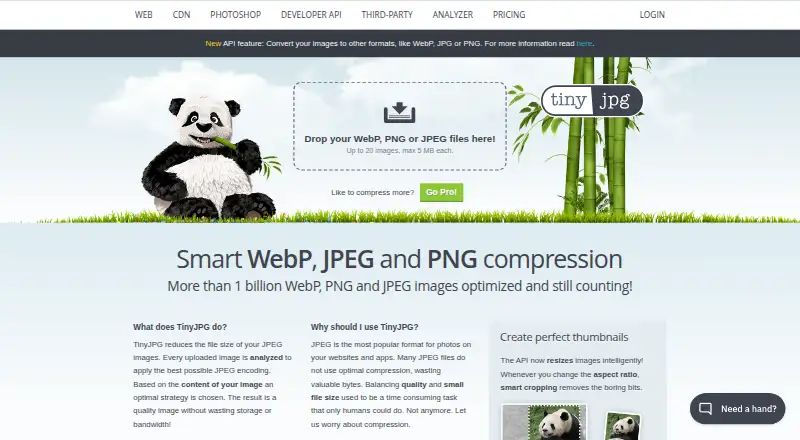
TinyJPG is a browser-based image compression service from Tinify B.V. It focuses on reducing JPEG file sizes through lossy compression, while the broader service supports AVIF, JPEG XL, WebP, PNG, and APNG workflows. Its web compressor suits individuals and teams handling image files directly, while the REST Developer API extends the product to automated workflows. WordPress integration also gives site owners a direct publishing-oriented option.
Pricing is structured across web subscriptions and API usage. Web Free supports AVIF, WebP, PNG, and JPEG, with 20 compressions per session, a 5 MB per-image limit, and 3 conversions per session. Web Pro adds unlimited compressions, 75 MB uploads, faster speed, and ad-free use, while retaining 3 conversions per session. Web Ultra raises the per-image limit to 150 MB, adds unlimited conversions, the fastest speed, and folder uploads. The Developer API Free plan includes 500 compressions each month without payment details. Paid API options include pay-per-successful-compression with no subscription fees or minimum charges, plus a volume-discount tier.
Platform fit is a notable strength for teams that need more than manual compression. The API supports format conversion, resizing, intelligent cropping, selective metadata preservation, and connections with Amazon S3 and Google Cloud Storage. The web compressor removes unnecessary metadata, while the service supports GDPR compliance and provides email and documentation support. TinyJPG is a good choice for JPEG-centered web work, lightweight automation, and WordPress workflows. Teams seeking a broader compression focus should consider whether its JPEG-led positioning matches their needs before choosing it for varied image pipelines.
Questions about TinyJPG
Does TinyJPG have a free plan? Yes: the Web Free plan is free.
What does TinyJPG run on? Web. It runs in the cloud.
What does TinyJPG integrate with? 3 integrations: WordPress, Amazon S3 and Google Cloud Storage.
Who is TinyJPG built for? Solo users, small businesses, mid-market companies and enterprises (our editorial estimate).
Your product? Our editors can test TinyJPG in depth and publish a review, labelled as paid · from $149/mo →
TinyJPG pricing
All 6 TinyJPG plans and prices →
TinyJPG fact sheet
| Free plan | Yes |
|---|---|
| Paid from | Not verified |
| Compression modes | Lossy |
| Batch processing | Yes |
| API access | Yes |
| Max upload size | 75 MB |
| Image resizing | Yes |
| Supported formats | AVIF, JXL, WebP, JPEG, PNG, APNG |
| Metadata controls | Yes |
| Deployment | Cloud |
| Platforms | Web |
| Compliance & security | GDPR |
| Support | Email, Docs |
| Built for | Solo, Small business, Mid-market, Enterprise (editorial estimate) |
| Integrations | 3 integrations: WordPress, Amazon S3, Google Cloud Storage |
| Pricing | Free plan (source) |
| Website | tinyjpg.com |
| Facts checked | 22 Sep 2026 |
TinyJPG integrations
TinyJPG lists 3 integrations on its own site.
- WordPress
- Amazon S3
- Google Cloud Storage
Alternatives to TinyJPG
- TinyPNGA flexible compressor for web workflows, batch processing, and automated image pipelines.9.3
- OptimoleA strong WordPress-focused optimizer for responsive images, modern formats, and CDN delivery.9.2
- ThumborA self-hosted image service with URL transformations, smart cropping, and format selection.9.1


See all TinyJPG alternatives →
Used TinyJPG? Be the first to review it
The editor score above is our own research. What this page doesn't have yet is a reader's view — what you used TinyJPG for, what worked and what didn't. No stars are seeded and no review is paid for; an editor reads every one before it appears.
Write a reviewTwo minutes · verified accounts only · read by an editor before it appears
Featured on iTechGuides

TinyJPG is listed in our Image Compression Software directory. Add the badge to your site — it links back to this page.
<a href="https://www.itechguides.com/products/tinyjpg/"><img src="https://www.itechguides.com/best/badge/tinyjpg.svg" alt="Featured on iTechGuides" width="230" height="46"></a>
Reviewed by iTechGuides Editors · Editorial team · Updated Nov 2026
Advertiser disclosure: iTechGuides is reader-supported. Vendors can pay for top positions in our rankings and for a place on other products' pages, and we may earn a commission when you click some links. Bought places stand at the number bought; this page and our disclosure say so. Paying vendors may get a fuller, more detailed review from our editors, and that review can change their score. How we rank.
Last updated · How we research and update