
ThumbReady
ThumbReady: A capable free editor for custom thumbnails without accounts, watermarks, or AI generation. Ranked #13 of 45 in Video Thumbnail Makers by our editors (8.2/10); pricing: Free plan; best for anyone wanting a free non-AI thumbnail editor.
At a glance
- Editor score8.2 / 10
- PricingFree plan
- Best forAnyone wanting a free non-AI thumbnail editor
- Free planYes
- Paid fromFree
- Facts checked20 Sep 2026
Where it wins
- No account, watermark, or download limit on the Free plan
- On-device cutouts, uploads, text, shapes, stickers, and emoji
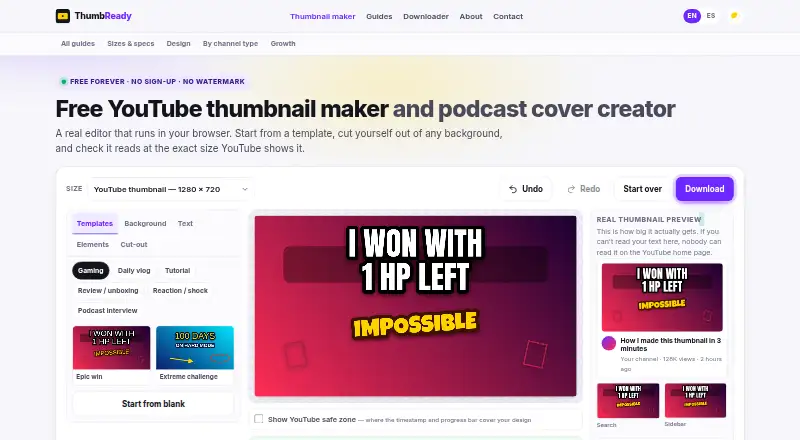
- Platform presets, live preview, readability scoring, and PNG/JPG export
Where it doesn't
- Only 12 templates are included
- Available on the web rather than as a native app
- Does not provide AI thumbnail generation
Our verdict on ThumbReady
ThumbReady is a browser-based editor for creating YouTube thumbnails and podcast covers. It suits creators who want to combine their own photos or screenshots with templates, outlined text, shapes, arrows, stickers, emoji, and background cut-outs. Platform-specific canvas sizes cover YouTube, podcast, Instagram, and TikTok artwork, while PNG and JPG export supports common publishing workflows. The Free plan provides the full listed editor experience without an account, watermark, or download limit.
Getting started is straightforward: open the web editor, choose a platform canvas or template, upload an image or screenshot, and refine the composition with the available tools. Background cut-outs use erase and restore brushes, giving users direct control over the result. A live thumbnail preview helps check the design in context, and the readability score offers a focused check on whether text remains clear. On-device image processing also keeps editing within the browser and on the user's device.
ThumbReady's strongest fit is focused, independent thumbnail creation rather than broad design production. Its 12 templates provide a starting point, but the editor's value comes from manual customization and platform presets instead of a large template library or automated generation. The permanently free model, unlimited downloads, and 4K maximum export resolution make it practical for creators who want a simple recurring workflow without account setup. Choose ThumbReady for free, non-AI editing with useful readability and cutout tools; choose another product if AI generation or a native application is central to the workflow.
Your product? Our editors can test ThumbReady in depth and publish a review, labelled as paid · from $149/mo →
ThumbReady pricing
All 1 ThumbReady plans and prices →
ThumbReady fact sheet
| Free plan | Yes |
|---|---|
| Paid from | Free |
| AI tools | Not verified |
| Platform presets | Multi_platform |
| Brand kit | Not verified |
| Background removal | Yes |
| Maximum export resolution | 4k |
| Template count | 12 |
| Deployment | Cloud |
| Platforms | Web |
| Support | Email, Docs |
| Built for | Solo, Small business (editorial estimate) |
| Pricing | Free plan (source) |
| Website | thumbready.com |
| Facts checked | 20 Sep 2026 |
Alternatives to ThumbReady
- ThumioA YouTube-focused editor combining AI creation, scoring, CTR reports, and A/B testing.9.4
- ThumbloreA flexible AI thumbnail maker for creators working across YouTube and social video.9.3
- ThumbmagicA video-first thumbnail maker with AI analysis, variants, and a free starting tier.9.2



See all ThumbReady alternatives →
Also Ranked In
ThumbReady is ranked in 2 of our directories.
Used ThumbReady? Be the first to review it
The editor score above is our own research. What this page doesn't have yet is a reader's view — what you used ThumbReady for, what worked and what didn't. No stars are seeded and no review is paid for; an editor reads every one before it appears.
Write a reviewTwo minutes · verified accounts only · read by an editor before it appears
Featured on iTechGuides

ThumbReady is listed in our Video Thumbnail Makers directory. Add the badge to your site — it links back to this page.
<a href="https://www.itechguides.com/products/thumbready/"><img src="https://www.itechguides.com/best/badge/thumbready.svg" alt="Featured on iTechGuides" width="230" height="46"></a>
Reviewed by iTechGuides Editors · Editorial team · Updated Oct 2026
Advertiser disclosure: iTechGuides is reader-supported. Vendors can pay for top positions in our rankings and for a place on other products' pages, and we may earn a commission when you click some links. Bought places stand at the number bought; this page and our disclosure say so. Paying vendors may get a fuller, more detailed review from our editors, and that review can change their score. How we rank.
Last updated · How we research and update