
The Master Slides
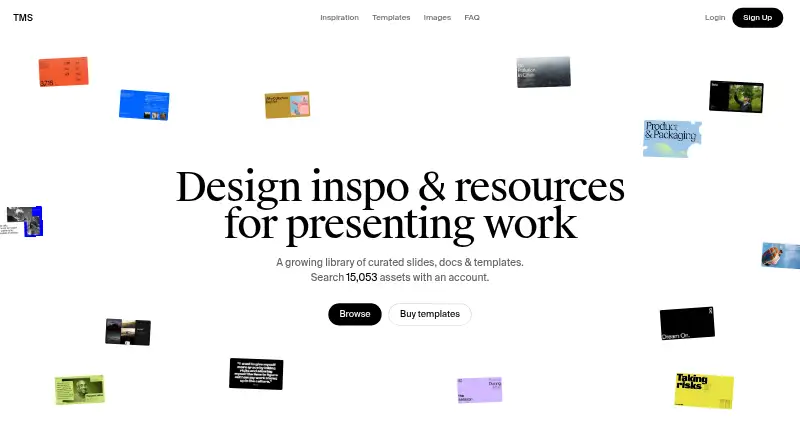
The Master Slides: A focused resource library for presentation inspiration and editable slide assets. Ranked #32 of 34 in Presentation Template Libraries by our editors (6.2/10); pricing: Free plan; best for curated slide inspiration and presentation resources.
At a glance
- Editor score6.2 / 10
- PricingFree plan
- Best forCurated slide inspiration and presentation resources
- Free planYes
- Commercial useYes
- Facts checked20 Sep 2026
Where it wins
- Searchable library spanning slides, decks, documents, templates, and images
- Downloads support Figma, Keynote, and PowerPoint formats
- Pro adds advanced search, PDF downloads, and unlimited collections
Where it doesn't
- Free users can save up to 10 items
- Unlimited decks and slides require the Pro plan
- Access is web-based rather than offered across multiple platforms
Our verdict on The Master Slides
The Master Slides is an online library for people who need presentation inspiration and reusable design resources. Its collection covers curated slides, decks, documents, templates, images, and presentation references, with editable resources available in Figma, Keynote, and PowerPoint formats. It is suited to individuals, agencies, brands, and creative teams that want to browse presentation material, save useful items to collections, and download resources for commercial use.
The freemium structure gives the service an accessible starting point. The Free plan provides access to the latest library content and allows users to save up to 10 items. The published plans show Pro starting at 10, with unlimited decks and slides, unlimited collections, full deck PDF downloads, advanced search, early access, and priority support. That makes Pro the more practical choice for ongoing research or teams that need to organize a larger reference library. The plan also adds broader access to downloadable resources rather than limiting the experience to browsing and a small saved set.
Its strongest fit is curated discovery rather than presentation creation or collaboration. Users can search across several resource types, download templates for established editing tools, and follow step-by-step guidance for updating slide masters and global settings. The web-based format keeps access straightforward, but the product is best chosen by people looking for design direction and editable assets, not by buyers seeking a full presentation production platform. Choose The Master Slides for inspiration, templates, and organized resource collecting; consider another option if your priority is a broader platform ecosystem or built-in presentation editing.
Your product? Our editors can test The Master Slides in depth and publish a review, labelled as paid · from $149/mo →
The Master Slides pricing
All 2 The Master Slides plans and prices →
The Master Slides fact sheet
| Free plan | Yes |
|---|---|
| Paid from | Not verified |
| Template count | Not verified |
| Download formats | Figma, Keynote, PowerPoint |
| Editing platforms | Figma, Keynote, PowerPoint |
| Commercial use | Yes |
| Team sharing | Not verified |
| License scope | Commercial |
| Deployment | Cloud |
| Platforms | Web |
| Built for | Solo, Small business, Mid-market (editorial estimate) |
| Pricing | Free plan (source) |
| Website | themasterslides.com |
| Facts checked | 20 Sep 2026 |
Alternatives to The Master Slides
- SmileTemplatesA broad, low-cost template library with free downloads and flexible file support.9.4
- SlideBazaarA large template library with AI tools and paid plans starting at $4.99 monthly.9.2
- PoweredTemplateA broad template library with AI tools, commercial licensing, and team features.9.1

See all The Master Slides alternatives →
Used The Master Slides? Be the first to review it
The editor score above is our own research. What this page doesn't have yet is a reader's view — what you used The Master Slides for, what worked and what didn't. No stars are seeded and no review is paid for; an editor reads every one before it appears.
Write a reviewTwo minutes · verified accounts only · read by an editor before it appears
Featured on iTechGuides

The Master Slides is listed in our Presentation Template Libraries directory. Add the badge to your site — it links back to this page.
<a href="https://www.itechguides.com/products/the-master-slides/"><img src="https://www.itechguides.com/best/badge/the-master-slides.svg" alt="Featured on iTechGuides" width="230" height="46"></a>
Reviewed by iTechGuides Editors · Editorial team · Updated Oct 2026
Advertiser disclosure: iTechGuides is reader-supported. Vendors can pay for top positions in our rankings and for a place on other products' pages, and we may earn a commission when you click some links. Bought places stand at the number bought; this page and our disclosure say so. Paying vendors may get a fuller, more detailed review from our editors, and that review can change their score. How we rank.
Last updated · How we research and update