
TBS Cover Editor
TBS Cover Editor: An affordable Windows tool for basic cover design and real-time 3D box previews. Ranked #28 of 28 in Packaging Design Software by our editors (5.9/10); pricing: Paid; best for basic 3D cover mockups.
At a glance
- Editor score5.9 / 10
- PricingPaid
- Best forBasic 3D cover mockups
- Free planNo
- Paid from$80 one-time
- Dieline editorNo
- Facts checked22 Sep 2026
Where it wins
- One-time license priced at $80
- Real-time 3D previews with rotation, shadows, and reflections
- Templates, layers, animation, export, and printing included
Where it doesn't
- Windows only
- No dieline editing, import, or preflight checks
- No label design, collaboration, or packaging-production integrations
Our verdict on TBS Cover Editor
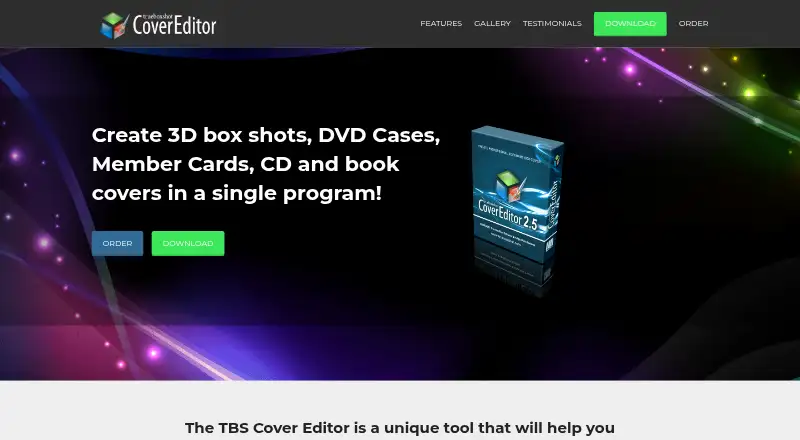
TBS Cover Editor is Windows desktop software for creating virtual product covers and 3D box shots. It is aimed at presentations for software boxes, DVD and CD cases, books, member cards, and other digital-product packaging concepts. Its core workflow combines a 2D cover designer with a real-time 3D preview, allowing users to edit all cover sides on a single sheet and view the result as a rendered box shot. It is a focused option for individuals or teams that need basic visual packaging mockups rather than production-ready physical packaging files.
The published plan is TBS Cover Editor 2.x, priced at $80 as a one-time license. It includes licensed desktop software, a personal registration code, and volume discounts. The feature set covers a template wizard with preset cover templates, layer-based editing, text, bitmap, shape, and vector objects, plus 3D rendering with rotation, shadows, reflections, and transparent backgrounds. Export and printing support covers bitmap output, cover sides, and 3D box shots. GIF and SWF animation add presentation options for digital-product visuals.
Its main boundary is scope. TBS Cover Editor targets virtual covers and box shots, not packaging production workflows. It does not provide dieline editing or import, label design, preflight checks, barcode tools, cloud collaboration, or packaging-production integrations. The category specifications list one maximum editor, and the software is available for Windows. Choose it when a low-cost, single-user desktop tool for cover artwork and 3D presentation is the priority. Choose another product when the project requires structural packaging design, production validation, labels, collaborative editing, or broader platform support.
Your product? Our editors can test TBS Cover Editor in depth and publish a review, labelled as paid · from $149/mo →
TBS Cover Editor pricing
All 1 TBS Cover Editor plans and prices →
TBS Cover Editor fact sheet
| Free plan | No |
|---|---|
| Paid from | $80 one-time |
| Dieline editor | No |
| Dieline import | No |
| Label design tools | No |
| Preflight checks | No |
| Barcode tools | No |
| Cloud collaboration | No |
| Editor limit | 1 users |
| Deployment | Desktop |
| Platforms | Windows |
| Support | Email, Tickets, Community, Docs |
| Built for | Solo, Small business (editorial estimate) |
| Pricing | Paid (source) |
| Website | tbscover.trueboxshot.com |
| Facts checked | 22 Sep 2026 |
Alternatives to TBS Cover Editor
- EngView Packaging SuiteA broad packaging design suite for teams connecting structural work to production.9.3
- KASEMAKEA production-focused Windows CAD tool spanning dielines, visualization, costing, and equipment control.9.1
- ArtiosCADA deep Windows desktop tool for structural packaging design and production preparation.8.9


See all TBS Cover Editor alternatives →
Used TBS Cover Editor? Be the first to review it
The editor score above is our own research. What this page doesn't have yet is a reader's view — what you used TBS Cover Editor for, what worked and what didn't. No stars are seeded and no review is paid for; an editor reads every one before it appears.
Write a reviewTwo minutes · verified accounts only · read by an editor before it appears
Featured on iTechGuides

TBS Cover Editor is listed in our Packaging Design Software directory. Add the badge to your site — it links back to this page.
<a href="https://www.itechguides.com/products/tbs-cover-editor/"><img src="https://www.itechguides.com/best/badge/tbs-cover-editor.svg" alt="Featured on iTechGuides" width="230" height="46"></a>
Reviewed by iTechGuides Editors · Editorial team · Updated Oct 2026
Advertiser disclosure: iTechGuides is reader-supported. Vendors can pay for top positions in our rankings and for a place on other products' pages, and we may earn a commission when you click some links. Bought places stand at the number bought; this page and our disclosure say so. Paying vendors may get a fuller, more detailed review from our editors, and that review can change their score. How we rank.
Last updated · How we research and update