SysMocap
SysMocap: A flexible open-source choice for full-body VTubing across Windows, macOS, and Linux. Ranked #13 of 25 in VTuber Software by our editors (7.5/10); pricing: Open source; best for open-source full-body VTubing.
At a glance
- Editor score7.5 / 10
- PricingOpen source
- Best forOpen-source full-body VTubing
- Paid fromFree
- Avatar workflow3d
- Facts checked20 Sep 2026
Where it wins
- Tracks face, hands, and full-body movement in real time
- Imports VRM 0.x, VRM 1.0, FBX, and glTF avatars
- Supports OBS streaming, WebXR motion forwarding, and WebM recording
Where it doesn't
- Linux support requires building from source code
- Workflow is focused on 3D avatar formats and motion capture
- Its listed ecosystem integrations are OBS and WebXR
Our verdict on SysMocap
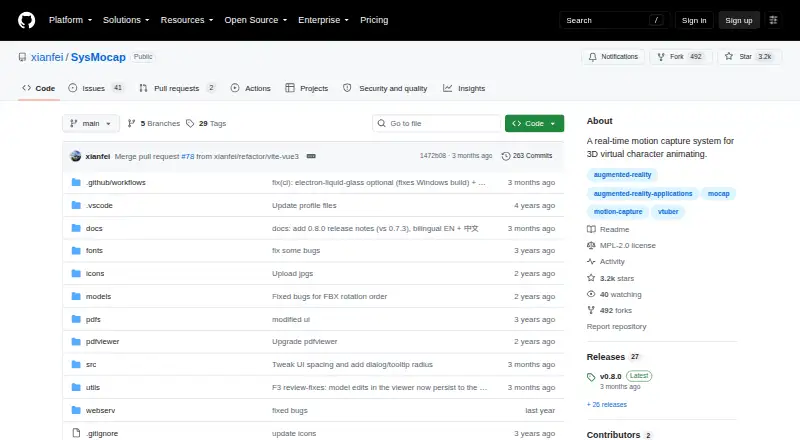
SysMocap is an open-source desktop application for real-time, video-driven motion capture and 3D virtual-character rendering. It is designed for VTubing, live streaming, augmented-reality, and virtual-reality workflows. The application tracks facial landmarks, body pose, and hands, then applies that motion to imported 3D avatars. Its strongest fit is for creators who want full-body tracking, facial and hand rigging, VRM avatar support, and an open-source desktop workflow across Windows, macOS, or Linux.
The avatar workflow is broad within 3D formats. SysMocap supports VRM 0.x and 1.0 imports, along with Mixamo-format FBX and glTF models. Its tracking feature set covers full-body movement, facial landmark solving, and hand landmarks, while real-time rendering applies the captured motion to the selected character. Recording is supported through WebM video output, giving creators a path to produce recorded content as well as live performances. This combination makes SysMocap more suitable for users who need more than face tracking, particularly when hands and body movement are central to the presentation.
Platform fit is another important consideration. OBS support connects the application to live-streaming workflows, while WebXR API motion forwarding supports browser-based extended-reality use cases. Windows and macOS have prebuilt packages; Linux is supported from source code, which adds a more technical setup requirement on that platform. SysMocap should appeal to open-source users who value full-body capture, multiple avatar import formats, and OBS or WebXR output. Users seeking a primarily 2D avatar workflow, a simpler plug-and-play Linux installation, or a wider set of listed integrations may prefer a different tool.
Your product? Our editors can test SysMocap in depth and publish a review, labelled as paid · from $149/mo →
SysMocap pricing
SysMocap fact sheet
| Free plan | Not verified |
|---|---|
| Paid from | Free |
| Avatar workflow | 3d |
| Avatar import | Vrm |
| Body tracking | Full-body |
| Hand tracking | Yes |
| Lip-sync | Yes |
| Virtual camera | Not verified |
| Recording | Yes |
| Deployment | Desktop |
| Platforms | Windows, macOS, Linux |
| Built for | Solo, Small business (editorial estimate) |
| Integrations | 2 integrations: OBS, WebXR |
| Pricing | Open source |
| Website | github.com |
| Facts checked | 20 Sep 2026 |
SysMocap integrations
SysMocap lists 2 integrations on its own site.
- OBS
- WebXR
Alternatives to SysMocap
- AnimazeFlexible VTubing software with free access, 2D/3D imports, tracking, and recording.9.3
- WarudoA broad Windows toolkit for 3D avatars, motion capture, scene control, and recording.9.1
- VTube StudioA flexible free toolkit for animating Live2D avatars across desktop and mobile.9.0



See all SysMocap alternatives →
Used SysMocap? Be the first to review it
The editor score above is our own research. What this page doesn't have yet is a reader's view — what you used SysMocap for, what worked and what didn't. No stars are seeded and no review is paid for; an editor reads every one before it appears.
Write a reviewTwo minutes · verified accounts only · read by an editor before it appears
Featured on iTechGuides

SysMocap is listed in our VTuber Software directory. Add the badge to your site — it links back to this page.
<a href="https://www.itechguides.com/products/sysmocap/"><img src="https://www.itechguides.com/best/badge/sysmocap.svg" alt="Featured on iTechGuides" width="230" height="46"></a>
Reviewed by iTechGuides Editors · Editorial team · Updated Oct 2026
Advertiser disclosure: iTechGuides is reader-supported. Vendors can pay for top positions in our rankings and for a place on other products' pages, and we may earn a commission when you click some links. Bought places stand at the number bought; this page and our disclosure say so. Paying vendors may get a fuller, more detailed review from our editors, and that review can change their score. How we rank.
Last updated · How we research and update