
SVGator
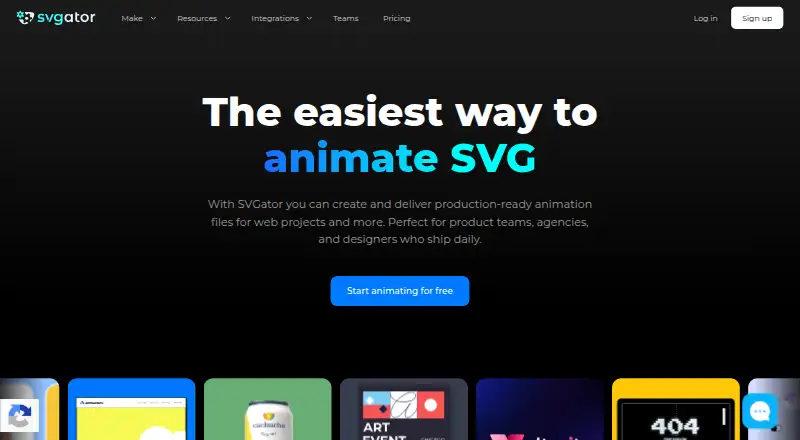
SVGator: A focused web editor for SVG, Lottie, interactive, and app-ready animation exports. Ranked #57 of 106 in Animation Software by our editors (3.5/10); pricing: Free plan; best for web-based SVG and Lottie animation.
At a glance
- Editor score3.5 / 10
- PricingFree plan
- Best forWeb-based SVG and Lottie animation
- Free planYes
- Paid from$20/mo
- Facts checked22 Sep 2026
Where it wins
- Timeline editor with keyframes, easing, morphing, and motion paths
- Exports SVG, Lottie JSON, React Native, Flutter, GIF, and video
- Cloud collaboration with sharing, comments, and team workspaces
Where it doesn't
- Its focus is narrower than general-purpose animation software
- The Free plan limits animation exports to static SVG
- The published starting price uses annual billing
Our verdict on SVGator
SVGator is a browser-based animation tool for designers, motion designers, marketers, agencies, and content teams creating vector animations from SVG artwork. Its timeline editor combines keyframes, easing controls, morphing, motion paths, and interactive click, hover, and scroll triggers. Because it runs on the web and focuses on SVG-based work, it fits teams producing animated web graphics, Lottie assets, and interface motion rather than users seeking a broad desktop animation environment.
The plan structure makes the product easy to evaluate before paying. The Free plan includes the full editor, unlimited static SVG exports, an assets library, and free animation templates. According to the vendor's pricing page, Starter costs $20 per month with annual billing and adds animated SVG, Lottie JSON, React Native, and Flutter exports, plus the SVG Player API and interactive animations. Pro costs $24 per month with annual billing and adds unlimited animation exports, video and GIF export, unlimited viewers, commenting, and public share links. Team costs $27 per seat per month with annual billing and adds editing invitations, a team workspace, unlimited team projects, priority customer support, and centralized billing.
SVGator's strongest case is its export and collaboration range within a web-vector workflow. Projects can move into SVG, Lottie JSON, React Native, Flutter, GIF, animated image, and video formats, with cloud rendering available for video exports. Figma and WordPress integrations support common design and publishing workflows, while public sharing, commenting, and team workspaces help coordinate review. Choose SVGator when browser-based SVG animation and delivery to web or app formats are central requirements. Consider an alternative if your work depends on a broader animation scope, since the product is specifically focused on vector animation and web use.
Your product? Our editors can test SVGator in depth and publish a review, labelled as paid · from $149/mo →
SVGator pricing
All 4 SVGator plans and prices →
SVGator fact sheet
| Free plan | Yes |
|---|---|
| Paid from | $20/mo |
| 2D animation tools | Yes |
| 3D modeling | Not verified |
| Character rigging | Not verified |
| Motion graphics | Yes |
| Cloud collaboration | Yes |
| Supported platforms | web |
| Export formats | SVG, Lottie JSON, React Native JS, Flutter DART, GIF, PNG, WebP, PNG sequence, MP4, AVI, MKV, MOV, WebM |
| Deployment | Cloud, Browser extension |
| Platforms | Web |
| Compliance & security | GDPR, ISO 27001 |
| Support | Email, Docs |
| Built for | Solo, Small business, Mid-market, Enterprise (editorial estimate) |
| Integrations | 2 integrations: Figma, WordPress |
| Pricing | Free plan (source) |
| Website | svgator.com |
| Facts checked | 22 Sep 2026 |
SVGator integrations
SVGator lists 2 integrations on its own site.
- Figma
- WordPress
Alternatives to SVGator
- Toon Boom HarmonyA focused 2D suite for hand-drawn, rigged, composited, and effects-driven animation.9.3
- BlenderA broad 3D suite for professional animation without software licensing costs.9.2
- Cinema 4DA broad desktop toolkit for motion design, 3D production, simulation, and rendering.9.1



See all SVGator alternatives →
Used SVGator? Be the first to review it
The editor score above is our own research. What this page doesn't have yet is a reader's view — what you used SVGator for, what worked and what didn't. No stars are seeded and no review is paid for; an editor reads every one before it appears.
Write a reviewTwo minutes · verified accounts only · read by an editor before it appears
Featured on iTechGuides

SVGator is listed in our Animation Software directory. Add the badge to your site — it links back to this page.
<a href="https://www.itechguides.com/products/svgator/"><img src="https://www.itechguides.com/best/badge/svgator.svg" alt="Featured on iTechGuides" width="230" height="46"></a>
Reviewed by iTechGuides Editors · Editorial team · Updated Oct 2026
Advertiser disclosure: iTechGuides is reader-supported. Vendors can pay for top positions in our rankings and for a place on other products' pages, and we may earn a commission when you click some links. Bought places stand at the number bought; this page and our disclosure say so. Paying vendors may get a fuller, more detailed review from our editors, and that review can change their score. How we rank.
Last updated · How we research and update