
SuperImage
SuperImage: A privacy-focused upscaler with offline processing and custom model support. Ranked #25 of 99 in Image Upscaling Software by our editors (6.9/10); pricing: Free plan; best for offline users wanting custom model loading.
At a glance
- Editor score6.9 / 10
- PricingFree plan
- Best forOffline users wanting custom model loading
- Free planYes
- Upscaling methodAi
- Facts checked22 Sep 2026
Where it wins
- Processes images locally without an internet connection
- Loads custom PyTorch, ONNX, and MNN upscaling models
- Combines upscaling with batch queues and portrait enhancement
Where it doesn't
- The Free plan queues up to 25 images at once
- Custom model loading is limited to the Pro edition
- NPU acceleration is available only on supported Android devices
Our verdict on SuperImage
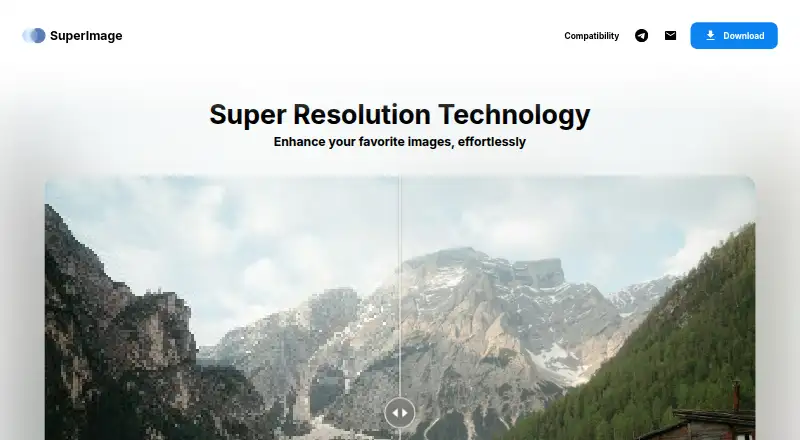
SuperImage is an image-enhancement application for individual users who want to upscale photos, wallpapers, anime images, and portraits locally. Its core appeal is on-device AI processing without internet access, with versions for Android, Windows, and macOS. Alongside image upscaling, it includes batch queue processing, portrait enhancement, background removal with transparent cutouts, and photo colourisation. That combination makes it suitable for privacy-conscious users and for people handling multiple image types rather than only standard photographs.
The plan structure is straightforward. SuperImage Free is free forever and queues up to 25 images at once. SuperImage Pro uses a lifetime license and adds unlimited image queues, an ad-free experience, the ability to save images anywhere, custom upscaling model loading, and early access to new features. Custom models can be loaded in PyTorch, ONNX, and MNN formats, giving technically inclined users more control over the enhancement workflow than a fixed-model application. Users who only need occasional upscaling may find the Free edition sufficient, while larger queues and model customization point toward Pro.
Platform coverage is practical for a personal image workflow: desktop users can work on Windows or macOS, while Android users also get NPU acceleration on supported devices. Local processing keeps the workflow independent of an online service, which is useful for images that should remain on the device. The product is less suited to users who need a broad cloud collaboration environment, published enterprise controls, or acceleration on unsupported Android hardware. It is a focused choice for offline enhancement, batch processing, and custom model loading, rather than a full image-management or team-production platform.
Your product? Our editors can test SuperImage in depth and publish a review, labelled as paid · from $149/mo →
SuperImage pricing
All 2 SuperImage plans and prices →
SuperImage fact sheet
| Free plan | Yes |
|---|---|
| Paid from | Not verified |
| Upscaling method | Ai |
| Maximum scale | Not verified |
| Batch processing | Yes |
| API access | Not verified |
| Desktop app | Yes |
| Input formats | Not verified |
| Deployment | Desktop, Mobile |
| Platforms | Windows, macOS, Android |
| Support | |
| Built for | Solo, Small business (editorial estimate) |
| Pricing | Free plan (source) |
| Website | superimage.io |
| Facts checked | 22 Sep 2026 |
Alternatives to SuperImage
- Real-ESRGANA flexible open-source upscaler for local image, anime, and video workflows.9.4
- NextGenUpA capable local upscaler with broad enhancement tools and no subscription.9.3
- UpscaylA flexible upscaler with free local processing and credit-based cloud plans.9.1


See all SuperImage alternatives →
Used SuperImage? Be the first to review it
The editor score above is our own research. What this page doesn't have yet is a reader's view — what you used SuperImage for, what worked and what didn't. No stars are seeded and no review is paid for; an editor reads every one before it appears.
Write a reviewTwo minutes · verified accounts only · read by an editor before it appears
Featured on iTechGuides

SuperImage is listed in our Image Upscaling Software directory. Add the badge to your site — it links back to this page.
<a href="https://www.itechguides.com/products/superimage/"><img src="https://www.itechguides.com/best/badge/superimage.svg" alt="Featured on iTechGuides" width="230" height="46"></a>
Reviewed by iTechGuides Editors · Editorial team · Updated Oct 2026
Advertiser disclosure: iTechGuides is reader-supported. Vendors can pay for top positions in our rankings and for a place on other products' pages, and we may earn a commission when you click some links. Bought places stand at the number bought; this page and our disclosure say so. Paying vendors may get a fuller, more detailed review from our editors, and that review can change their score. How we rank.
Last updated · How we research and update