
Super Resolution
Super Resolution: A web upscaler with broad AI modes, 10x enlargement, batch processing, and API access. Ranked #39 of 99 in Image Upscaling Software by our editors (6.0/10); pricing: Free plan; best for web users wanting high-scale AI modes.
At a glance
- Editor score6.0 / 10
- PricingFree plan
- Best forWeb users wanting high-scale AI modes
- Free planYes
- Paid from$84/yr
- Upscaling methodAi
- Facts checked22 Sep 2026
Where it wins
- AI modes cover photos, anime, text, and old photos
- Paid plans support enlargement up to 10x
- Max adds 100-image batches and API access
Where it doesn't
- Free downloads include a watermark
- Free use is limited to photo mode and 2x upscale
- Web-only access excludes desktop app workflows
Our verdict on Super Resolution
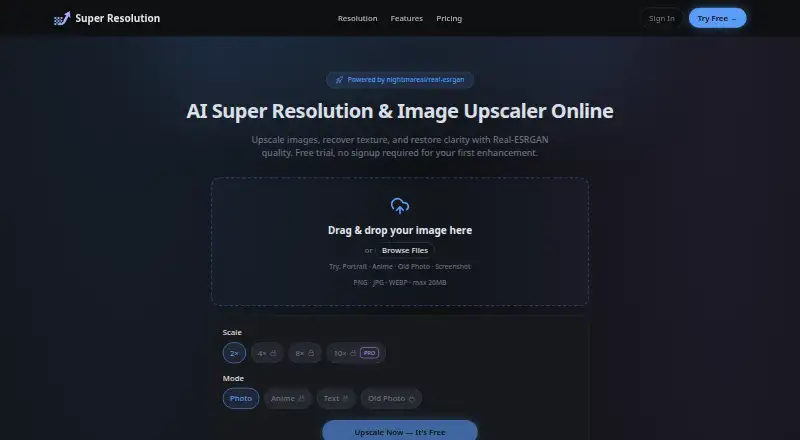
Super Resolution is a browser-based AI image upscaling service for creators, ecommerce users, and small teams. It accepts JPG, PNG, and WEBP files up to 20MB and uses Real-ESRGAN-based restoration to enlarge images. Users can choose Photo, Anime, Text, or Old Photo modes, with enlargement options of 2x, 4x, 8x, and 10x on paid plans. The free tier supports three images per day, Photo mode, and up to 2x upscale, but downloads include a watermark.
Its pricing covers occasional use, recurring workloads, and API-oriented projects. Pro costs $9 per month or $84 per year and includes 1,000 credits monthly, all AI modes, up to 10x upscale, watermark-free output, and batches of up to 20 images. Max costs $24 per month or $228 per year, raising the allowance to 3,000 credits monthly and batch size to 100 images while adding API access, a commercial license, and priority support. One-time credit packs are also available: Basic provides 350 credits for $4.9, Standard provides 1,200 credits for $14.9, and Premium provides 3,800 credits for $39.9.
The main advantage is breadth within a focused web workflow: one service handles photographic restoration, anime artwork, text, and older images, rather than limiting users to a single image type. Batch processing and API access make Max more suitable for repeat or larger-scale work, while email and documentation provide the listed support channels. The trade-off is platform scope: Super Resolution is cloud-based and web-only, with no desktop app. Choose it if browser access, multiple AI modes, and higher-scale processing matter; consider another option if a desktop application is central to your workflow.
Your product? Our editors can test Super Resolution in depth and publish a review, labelled as paid · from $149/mo →
Super Resolution pricing
All 7 Super Resolution plans and prices →
Super Resolution fact sheet
| Free plan | Yes |
|---|---|
| Paid from | $84/yr |
| Upscaling method | Ai |
| Maximum scale | Custom |
| Batch processing | Yes |
| API access | Yes |
| Desktop app | No |
| Input formats | JPG, PNG, WEBP |
| Deployment | Cloud |
| Platforms | Web |
| Support | Email, Docs |
| Built for | Solo, Small business (editorial estimate) |
| Pricing | Free plan (source) |
| Website | superresolution.app |
| Facts checked | 22 Sep 2026 |
Alternatives to Super Resolution
- Real-ESRGANA flexible open-source upscaler for local image, anime, and video workflows.9.4
- NextGenUpA capable local upscaler with broad enhancement tools and no subscription.9.3
- UpscaylA flexible upscaler with free local processing and credit-based cloud plans.9.1


See all Super Resolution alternatives →
Used Super Resolution? Be the first to review it
The editor score above is our own research. What this page doesn't have yet is a reader's view — what you used Super Resolution for, what worked and what didn't. No stars are seeded and no review is paid for; an editor reads every one before it appears.
Write a reviewTwo minutes · verified accounts only · read by an editor before it appears
Featured on iTechGuides

Super Resolution is listed in our Image Upscaling Software directory. Add the badge to your site — it links back to this page.
<a href="https://www.itechguides.com/products/super-resolution/"><img src="https://www.itechguides.com/best/badge/super-resolution.svg" alt="Featured on iTechGuides" width="230" height="46"></a>
Reviewed by iTechGuides Editors · Editorial team · Updated Oct 2026
Advertiser disclosure: iTechGuides is reader-supported. Vendors can pay for top positions in our rankings and for a place on other products' pages, and we may earn a commission when you click some links. Bought places stand at the number bought; this page and our disclosure say so. Paying vendors may get a fuller, more detailed review from our editors, and that review can change their score. How we rank.
Last updated · How we research and update