
squig
squig: A focused open-source wireframing canvas for local browser-based design work. Ranked #26 of 29 in Wireframing Software by our editors (6.2/10); pricing: Open source; best for local, open-source wireframe creation.
At a glance
- Editor score6.2 / 10
- PricingOpen source
- Best forLocal, open-source wireframe creation
- Paid fromFree
- Facts checked20 Sep 2026
Where it wins
- Infinite canvas with snapping, selection tools, undo and redo
- Reusable components, variants, blocks and whole-screen templates
- Local autosave with SVG, PNG and .squig.json export options
Where it doesn't
- Files are stored locally in the browser rather than cloud storage
- Collaboration and interactive prototyping are not part of its focus
- Web access is the listed platform, with local tooling as an option
Our verdict on squig
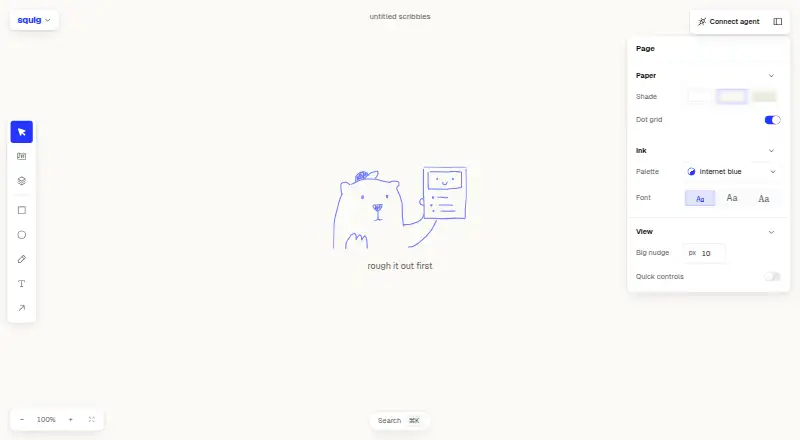
squig is a browser-based wireframing tool for people who think by drawing. Its hand-drawn rendering, infinite canvas and reusable UI components support local creation of interface layouts, from individual screens to broader wireframe flows. The component library includes buttons, inputs, selects, switches, tables, dialogs, tabs, navigation and sidebars. Blocks and whole-screen templates provide starting points, while grouping, snapping, keyboard controls and command search help organize the canvas. It is best suited to individuals or teams that want an open-source tool centered on wireframing rather than a broader collaboration or prototyping suite.
The main strength is the depth of the local canvas workflow. Users can pan, zoom, multi-select and use marquee selection, then adjust component options such as size, icons and styling through variants and an inspector. Components can also be broken apart into editable primitives, which gives more control when a reusable element needs customization. Clipboard support extends to screenshots, text and layers from another squig tab. Documents autosave locally in the browser, recent files are stored there, and copies can be exported in .squig.json, SVG or PNG formats.
Its open-source MIT-licensed model and local storage approach make squig a clear fit for privacy-conscious or locally focused wireframing. An optional local companion supports disk files, agent connections and rendering files, adding flexibility for technical workflows. The trade-off is that browser-local storage is not the same as cloud workspace storage, and the product is oriented toward local wireframe creation rather than shared collaboration or interactive prototyping. Choose squig for component-driven, hand-drawn wireframes and local control; choose another tool when real-time teamwork or interactive prototype delivery is central.
Your product? Our editors can test squig in depth and publish a review, labelled as paid · from $149/mo →
squig pricing
squig fact sheet
| Free plan | Not verified |
|---|---|
| Paid from | Free |
| Platform | Web |
| Real-time collaboration | Not verified |
| Interactive prototypes | Not verified |
| Export formats | .squig.json, SVG, PNG |
| Wireframe templates | Yes |
| Project limit | Not verified |
| Deployment | Cloud, Self-hosted |
| Platforms | Web |
| Support | Community, Docs |
| Built for | Solo, Small business (editorial estimate) |
| Pricing | Open source |
| Website | squig.sh |
| Facts checked | 20 Sep 2026 |
Alternatives to squig
- JustinmindA broad wireframing and prototyping suite with a useful free plan and scalable paid tiers.9.4
- Axure RPA deep prototyping tool for teams that need functional interactions and developer handoff.9.2
- MockplusBroad collaborative wireframing and prototyping features at a low published price.9.0


Used squig? Be the first to review it
The editor score above is our own research. What this page doesn't have yet is a reader's view — what you used squig for, what worked and what didn't. No stars are seeded and no review is paid for; an editor reads every one before it appears.
Write a reviewTwo minutes · verified accounts only · read by an editor before it appears
Featured on iTechGuides

squig is listed in our Wireframing Software directory. Add the badge to your site — it links back to this page.
<a href="https://www.itechguides.com/products/squig/"><img src="https://www.itechguides.com/best/badge/squig.svg" alt="Featured on iTechGuides" width="230" height="46"></a>
Reviewed by iTechGuides Editors · Editorial team · Updated Oct 2026
Advertiser disclosure: iTechGuides is reader-supported. Vendors can pay for top positions in our rankings and for a place on other products' pages, and we may earn a commission when you click some links. Bought places stand at the number bought; this page and our disclosure say so. Paying vendors may get a fuller, more detailed review from our editors, and that review can change their score. How we rank.
Last updated · How we research and update