
SpellingJoy
SpellingJoy: A free classroom spelling toolkit with paid school administration and reporting. Ranked #11 of 25 in Spelling Apps by our editors (8.1/10); pricing: Free plan; best for schools wanting free classroom basics.
At a glance
- Editor score8.1 / 10
- PricingFree plan
- Best forSchools wanting free classroom basics
- Free planYes
- Paid from$1,995/site/yr
- Facts checked20 Sep 2026
Where it wins
- Free plan includes unlimited games, tests, lists, and progress tracking
- Supports custom lists, automatic scoring, worksheets, and audio pronunciation
- Works on web, iOS, and Android with Clever, Google Classroom, and Canvas
Where it doesn't
- Whole-school administration requires a $1,995 annual license
- Advanced school reporting and shared libraries are paid-tier features
- Its focus is spelling practice rather than a broader literacy curriculum
Our verdict on SpellingJoy
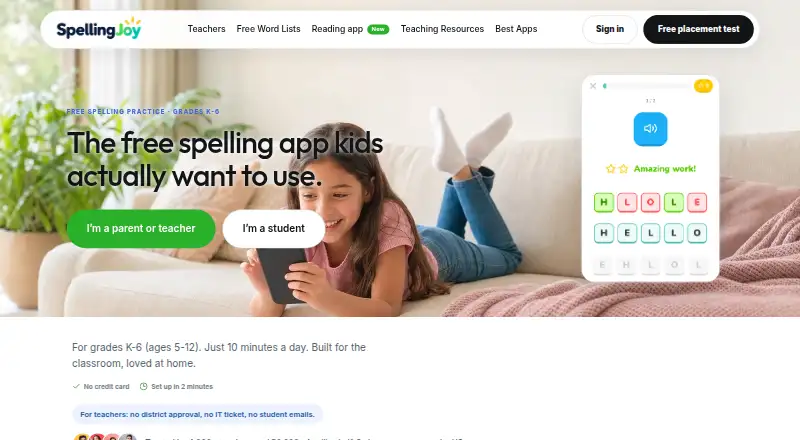
SpellingJoy is a spelling-practice platform for kindergarten through sixth grade, designed for teachers, families, and homeschoolers. Teachers can create classes, assign custom or ready-made lists, track student progress, and generate online tests with automatic scoring. Students can sign in with class codes instead of individual email accounts, and practice is available on the web, iOS, and Android. The free plan provides unlimited spelling games and tests, 134+ ready-made lists, custom word-list creation, progress tracking, printable worksheets and tests, and audio pronunciation.
The free offering is particularly suited to classroom basics. Teachers can manage classes and students, monitor analytics, and use integrations with Clever, Google Classroom, and Canvas. The school license costs $1,995 per school per year and adds access for every teacher and student in the school, a shared school library, a school admin view, monthly reports by grade, a printable resource library, guided onboarding, and priority support. That makes the paid tier more relevant to schools that need centralized administration and reporting than to individual educators.
SpellingJoy’s main strength is its combination of list creation, ready-made content, practice activities, tests, and printable materials in one spelling-focused product. Its scope is narrower than a full literacy platform, so schools seeking broader instruction may need another tool alongside it. Choose SpellingJoy for accessible spelling practice with a generous free classroom plan; choose an alternative when centralized school workflows are not worth the annual license or when spelling is only one part of a wider curriculum.
Questions about SpellingJoy
Does SpellingJoy have a free plan? Yes, there is a free plan; paid plans start at $1,995/site/yr (School license).
What does SpellingJoy run on? Web, iOS and Android. It runs in the cloud and as a mobile app.
What does SpellingJoy integrate with? 3 integrations: Clever, Google Classroom and Canvas.
Who is SpellingJoy built for? Solo users, small businesses, mid-market companies and enterprises (our editorial estimate).
Your product? Our editors can test SpellingJoy in depth and publish a review, labelled as paid · from $149/mo →
SpellingJoy pricing
All 2 SpellingJoy plans and prices →
SpellingJoy fact sheet
| Free plan | Yes |
|---|---|
| Paid from | $1,995/site/yr |
| Phonics instruction | Yes |
| Dictation practice | Yes |
| Corrective practice | Not verified |
| Teacher dashboard | Yes |
| Offline access | Not verified |
| Word-list import | Not verified |
| Deployment | Cloud, Mobile |
| Platforms | Web, iOS, Android |
| Support | |
| Built for | Solo, Small business, Mid-market, Enterprise (editorial estimate) |
| Integrations | 3 integrations: Clever, Google Classroom, Canvas |
| Pricing | Free plan (source) |
| Website | spellingjoy.com |
| Facts checked | 20 Sep 2026 |
SpellingJoy integrations
SpellingJoy lists 3 integrations on its own site.
- Clever
- Google Classroom
- Canvas
Alternatives to SpellingJoy
- Spelling.LiveA free, flexible spelling tool with adaptive practice, dictation and classroom reporting.9.4
- SpellMeA broad spelling platform combining phonics, adaptive practice, AI tools, and teacher dashboards.9.2
- Spelling ShedA curriculum-led spelling platform with strong diagnostics, reporting, and offline learning.9.1

See all SpellingJoy alternatives →
Used SpellingJoy? Be the first to review it
The editor score above is our own research. What this page doesn't have yet is a reader's view — what you used SpellingJoy for, what worked and what didn't. No stars are seeded and no review is paid for; an editor reads every one before it appears.
Write a reviewTwo minutes · verified accounts only · read by an editor before it appears
Featured on iTechGuides

SpellingJoy is listed in our Spelling Apps directory. Add the badge to your site — it links back to this page.
<a href="https://www.itechguides.com/products/spellingjoy/"><img src="https://www.itechguides.com/best/badge/spellingjoy.svg" alt="Featured on iTechGuides" width="230" height="46"></a>
Reviewed by iTechGuides Editors · Editorial team · Updated Nov 2026
Advertiser disclosure: iTechGuides is reader-supported. Vendors can pay for top positions in our rankings and for a place on other products' pages, and we may earn a commission when you click some links. Bought places stand at the number bought; this page and our disclosure say so. Paying vendors may get a fuller, more detailed review from our editors, and that review can change their score. How we rank.
Last updated · How we research and update