
Spelling Notebook
Spelling Notebook: A focused spelling app for Apple users who want simple, personalized practice. Ranked #16 of 25 in Spelling Apps by our editors (6.1/10); pricing: Free plan; best for apple users wanting simple list practice.
At a glance
- Editor score6.1 / 10
- PricingFree plan
- Best forApple users wanting simple list practice
- Free planYes
- Facts checked20 Sep 2026
Where it wins
- Create multiple personalized spelling lists
- Spoken testing with custom voice recordings
- Practice history and iCloud word-list transfer
Where it doesn't
- Available only on iOS and macOS
- No teacher dashboard in the listed capabilities
- No phonics feature in the listed capabilities
Our verdict on Spelling Notebook
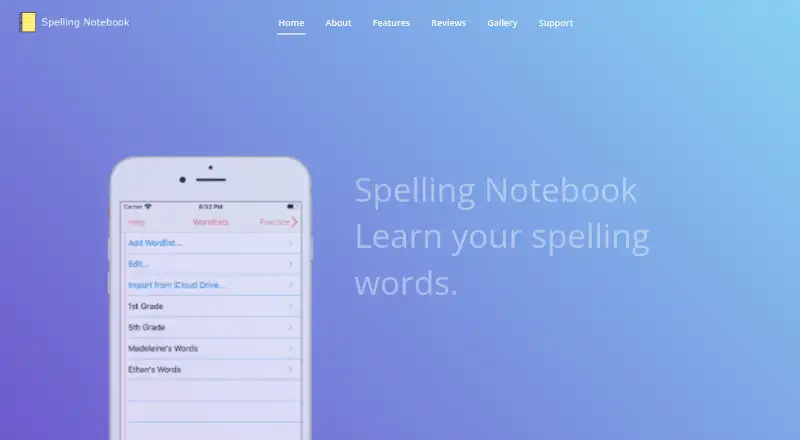
Spelling Notebook is a spelling-practice app for students and families using Apple devices. It lets users create and manage personalized word lists, hear words spoken during practice and tests, type spellings, and concentrate on words they have not yet mastered. A dictionary of more than 100,000 words, practice and test history, custom voice recordings, and result sharing round out the core feature set. It is best suited to individual learners or families who want list-based spelling practice rather than a broader literacy platform.
The free plan covers personalized spelling lists, spoken word testing, and practice and test history. Premium adds an ad-free experience, unlimited words per word list, and UK, US, and Australian voices. That structure keeps the basic workflow available without payment while reserving greater list capacity and regional voice options for the paid tier. The product's value therefore depends on whether those additions matter to a learner's routine.
Platform fit is clear for users already working across iPhone, iPad, and Mac environments. iCloud Drive supports importing and exporting word lists, while AirDrop and email support sharing; test results can also be emailed or shared. The app has a focused scope: it supports spelling lists, dictation-style testing, corrective practice, history, and dictionary lookup, but the listed capabilities do not include a teacher dashboard or phonics feature. Choose Spelling Notebook for straightforward, mastery-focused practice within Apple's ecosystem. Look elsewhere if classroom administration, phonics instruction, or wider platform coverage is central to the requirement.
Spelling Notebook pricing
All 2 Spelling Notebook plans and prices →
Spelling Notebook fact sheet
| Free plan | Yes |
|---|---|
| Paid from | Not verified |
| Phonics instruction | Not verified |
| Dictation practice | Yes |
| Corrective practice | Yes |
| Teacher dashboard | Not verified |
| Offline access | Not verified |
| Word-list import | Yes |
| Deployment | Mobile, Desktop |
| Platforms | iOS, macOS |
| Support | |
| Built for | Solo, Small business (editorial estimate) |
| Integrations | 3 integrations: iCloud Drive, AirDrop, Email |
| Pricing | Free plan (source) |
| Website | spellingnotebook.com |
| Facts checked | 20 Sep 2026 |
Spelling Notebook integrations
Spelling Notebook lists 3 integrations on its own site.
- iCloud Drive
- AirDrop
Alternatives to Spelling Notebook
- Spelling.LiveA free, flexible spelling tool with adaptive practice, dictation and classroom reporting.9.0
- SpellMeA broad spelling platform combining phonics, adaptive practice, AI tools, and teacher dashboards.9.0
- Spelling ShedA curriculum-led spelling platform with strong diagnostics, reporting, and offline learning.8.4

See all Spelling Notebook alternatives →
Used Spelling Notebook? Be the first to review it
The editor score above is our own research. What this page doesn't have yet is a reader's view — what you used Spelling Notebook for, what worked and what didn't. No stars are seeded and no review is paid for; an editor reads every one before it appears.
Write a reviewTwo minutes · verified accounts only · read by an editor before it appears
Featured on iTechGuides

Spelling Notebook is listed in our Spelling Apps directory. Add the badge to your site — it links back to this page.
<a href="https://www.itechguides.com/products/spelling-notebook/"><img src="https://www.itechguides.com/best/badge/spelling-notebook.svg" alt="Featured on iTechGuides" width="230" height="46"></a>
Reviewed by iTechGuides Editors · Editorial team · Updated Sep 2026
Advertiser disclosure: iTechGuides is reader-supported. We may earn a commission when you click some links. How we rank.
Last updated · How we research and update