
Speech Assistant AAC
Speech Assistant AAC: A mobile AAC app for composing messages by typing or choosing saved phrases. Ranked #20 of 26 in AAC Communication Software by our editors (7.2/10); pricing: Free plan; best for people who communicate through typed or saved phrases.
At a glance
- Editor score7.2 / 10
- PricingFree plan
- Best forPeople who communicate through typed or saved phrases
- Free planYes
- Symbol systemHybrid
- Facts checked23 Sep 2026
Where it wins
- Combines typed messages with saved phrases, categories, and autocomplete.
- Offers speech output, large-text display, and phrase history.
- Customizes buttons and layouts; available on iOS and Android.
Where it doesn't
- Switch access relies on a separate iOS app and Switch Control.
- Android separates basic functionality from a full-version upgrade.
- The iOS app is a one-time purchase rather than a free edition.
Our verdict on Speech Assistant AAC
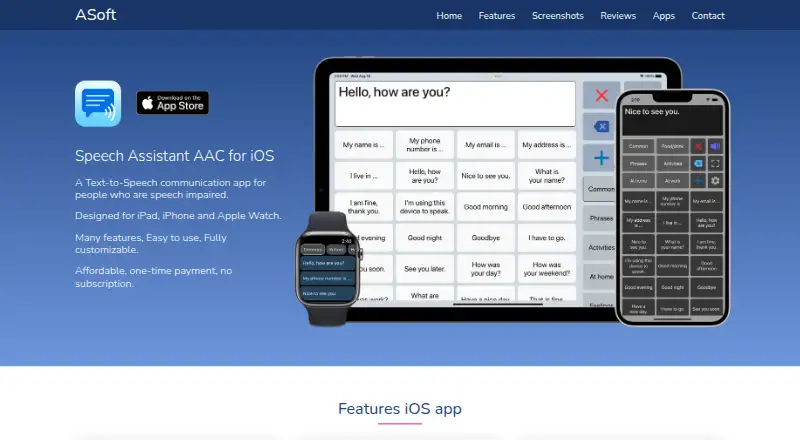
Speech Assistant AAC is a mobile augmentative and alternative communication app for people with speech impairments, including aphasia, MND/ALS, autism, stroke, and cerebral palsy. It supports communication by typing messages or selecting saved phrase buttons, then speaking them with device text-to-speech or voice recordings. Its combination of composition tools and customizable displays suits people who want to build messages from their own words and reusable phrases on a phone or tablet.
Phrase organization is a central strength: users can arrange buttons into categories and subcategories, add photos or symbols, and search or autocomplete saved phrases while typing. Phrase history and conversation tabs support returning to prior messages or keeping exchanges separate. Messages can be shown full screen in large text, with an option to rotate the text for someone facing the user. Button size, text, color scheme, and layout are customizable, so the interface can be shaped around communication preferences. The app also supports offline use, and phrases and settings can be backed up or transferred.
The Android app has a free basic edition, with full-version features unlocked through an in-app upgrade; the iOS app is a one-time purchase and supports iPhone, iPad, and Apple Watch. Integrations include iCloud, Mail, AirDrop, Google Drive, and ElevenLabs voices. For switch access, iOS Switch Control is used with the separate Speech Assist Switch app, so this is not a single-app switch setup. Speech Assistant AAC is a fit for people who value typed or saved phrases, speech output, and layout control on mobile. Those seeking switch access within the same app should consider that separate-app requirement before choosing it.
Your product? Our editors can test Speech Assistant AAC in depth and publish a review, labelled as paid · from $149/mo →
Speech Assistant AAC pricing
All 3 Speech Assistant AAC plans and prices →
Speech Assistant AAC fact sheet
| Free plan | Yes |
|---|---|
| Paid from | Not verified |
| Symbol system | Hybrid |
| Speech output | Yes |
| Access methods | Touch; external switch through iOS Switch Control in the separate Speech Assist Switch version; iOS head tracking is not verified for the ASoft product. |
| Offline use | Yes |
| Supported platforms | iOS (iPhone, iPad, Apple Watch); Android |
| Layout customization | Fully_customizable |
| Deployment | Mobile |
| Platforms | iOS, Android |
| Support | |
| Built for | Solo (editorial estimate) |
| Integrations | 5 integrations: iCloud, Mail, AirDrop, Google Drive, ElevenLabs voices |
| Pricing | Free plan (source) |
| Website | asoft.nl |
| Facts checked | 23 Sep 2026 |
Speech Assistant AAC integrations
Speech Assistant AAC lists 5 integrations on its own site.
- iCloud
- AirDrop
- Google Drive
- ElevenLabs voices
Alternatives to Speech Assistant AAC
- Asterics AACA flexible free AAC option for users needing personalized grids and varied input methods.9.4
- TD SnapA free AAC foundation with eye-gaze, switch and scanning access, plus paid page-set upgrades.9.2
- CboardA flexible free AAC core across web, Windows, and Android, with paid Pro additions.9.0



See all Speech Assistant AAC alternatives →
Used Speech Assistant AAC? Be the first to review it
The editor score above is our own research. What this page doesn't have yet is a reader's view — what you used Speech Assistant AAC for, what worked and what didn't. No stars are seeded and no review is paid for; an editor reads every one before it appears.
Write a reviewTwo minutes · verified accounts only · read by an editor before it appears
Featured on iTechGuides

Speech Assistant AAC is listed in our AAC Communication Software directory. Add the badge to your site — it links back to this page.
<a href="https://www.itechguides.com/products/speech-assistant-aac/"><img src="https://www.itechguides.com/best/badge/speech-assistant-aac.svg" alt="Featured on iTechGuides" width="230" height="46"></a>
Reviewed by iTechGuides Editors · Editorial team · Updated Oct 2026
Advertiser disclosure: iTechGuides is reader-supported. Vendors can pay for top positions in our rankings and for a place on other products' pages, and we may earn a commission when you click some links. Bought places stand at the number bought; this page and our disclosure say so. Paying vendors may get a fuller, more detailed review from our editors, and that review can change their score. How we rank.
Last updated · How we research and update