
SpacesEDU
SpacesEDU: A collaborative K–12 portfolio platform spanning evidence, assessment, feedback, and reporting. Ranked #4 of 23 in Eportfolio Software by our editors (8.9/10); pricing: Free plan; best for schools needing collaborative portfolio workflows.
At a glance
- Editor score8.9 / 10
- PricingFree plan
- Best forSchools needing collaborative portfolio workflows
- Free planYes
- Assessment toolsYes
- Founded2005
- Facts checked21 Sep 2026
Where it wins
- Supports photos, video, audio, files, text, URLs, Google Drive, and OneDrive
- Connects portfolios with assignments, reflections, feedback, rubrics, and standards
- Offers web, iOS, and Android access with family communication tools
Where it doesn't
- Advanced rostering, SSO, and engagement data require the Pro tier
- Custom standards, proficiency scales, and templates require Enterprise
- Plan pricing is not published as numeric amounts
Our verdict on SpacesEDU
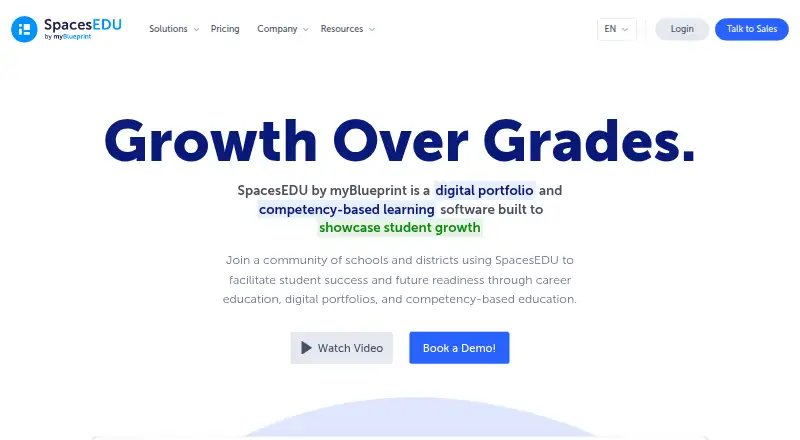
SpacesEDU is a web and mobile platform for K–12 teachers, students, families, and administrators. Its core use case is collaborative evidence of learning: students collect and curate work in digital portfolios, while educators organize activities, review submissions, give feedback, and track growth. The platform also supports curriculum, standards, and competency alignment, making it suitable for schools that want portfolios connected to classroom assessment rather than treated as separate showcases.
The three-tier structure maps to increasing administrative and reporting needs. SpacesEDU Core includes PK–12 learning environments, multimedia capture, formative feedback, and activities with submission status, attachments, tags, and reflections. Pro adds SIS/LMS synchronization, class rostering, single sign-on, QR-code login, school and district engagement data, and family accounts. Enterprise adds customized standards and proficiency scales, class-level proficiency reports, visual and interactive summative reports, and custom portfolio templates. Numeric prices are not published, and Pro and Enterprise are contact-sales tiers; the free Core access makes initial adoption more accessible.
Its strongest fit is for schools seeking one workflow across evidence collection, portfolios, assignments, reflection, feedback, communication, and reporting. Educators can use rubric-based feedback and proficiency-scale assessment, while students and families can participate through comments, messaging, peer review, and family communication. Google Drive, Google Workspace, Microsoft OneDrive, Microsoft, Clever, and SIS/LMS systems support an existing school technology environment. Schools needing sophisticated customization should consider Enterprise, while organizations focused only on simple portfolio publishing may find the assessment and administrative scope more than they need.
Your product? Our editors can test SpacesEDU in depth and publish a review, labelled as paid · from $149/mo →
SpacesEDU pricing
All 3 SpacesEDU plans and prices →
SpacesEDU fact sheet
| Free plan | Yes |
|---|---|
| Paid from | Not verified |
| Evidence collection | Yes |
| Assessment tools | Yes |
| Feedback workflows | Yes |
| Mobile access | Both |
| Storage limit | Not verified |
| User limit | Not verified |
| Single sign-on | Yes |
| Deployment | Cloud, Mobile |
| Platforms | Web, iOS, Android |
| Support | Email, Live chat, Docs |
| Built for | Small business, Mid-market, Enterprise (editorial estimate) |
| Integrations | 6 integrations: Google Drive, Google Workspace, Microsoft OneDrive, Microsoft, Clever, SIS/LMS systems |
| Pricing | Free plan (source) |
| Website | spacesedu.com |
| Facts checked | 21 Sep 2026 |
SpacesEDU integrations
SpacesEDU lists 6 integrations on its own site.
- Google Drive
- Google Workspace
- Microsoft OneDrive
- Microsoft
- Clever
- SIS/LMS systems
Alternatives to SpacesEDU
- MaharaA broad portfolio and assessment workspace for organizations that value open-source control.9.4
- Digication ePortfolioA mature ePortfolio suite for portfolio creation, assessment, analytics, and institutional integrations.9.3
- PebblePadA broad ePortfolio and assessment platform for institution-wide learning workflows.9.1



See all SpacesEDU alternatives →
SpacesEDU vs the competition
- SpacesEDU vs Mahara
- SpacesEDU vs Digication ePortfolio
- SpacesEDU vs PebblePad
- SpacesEDU vs Seesaw Digital Portfolios
- SpacesEDU vs Onefile Eportfolio
- SpacesEDU vs Portflow



Compare SpacesEDU with any tool side by side →
Used SpacesEDU? Be the first to review it
The editor score above is our own research. What this page doesn't have yet is a reader's view — what you used SpacesEDU for, what worked and what didn't. No stars are seeded and no review is paid for; an editor reads every one before it appears.
Write a reviewTwo minutes · verified accounts only · read by an editor before it appears
Featured on iTechGuides

SpacesEDU is listed in our Eportfolio Software directory. Add the badge to your site — it links back to this page.
<a href="https://www.itechguides.com/products/spacesedu/"><img src="https://www.itechguides.com/best/badge/spacesedu.svg" alt="Featured on iTechGuides" width="230" height="46"></a>
Reviewed by iTechGuides Editors · Editorial team · Updated Oct 2026
Advertiser disclosure: iTechGuides is reader-supported. Vendors can pay for top positions in our rankings and for a place on other products' pages, and we may earn a commission when you click some links. Bought places stand at the number bought; this page and our disclosure say so. Paying vendors may get a fuller, more detailed review from our editors, and that review can change their score. How we rank.
Last updated · How we research and update