Snipora
Snipora: A focused, free desktop snippet manager for fast offline insertion. Ranked #16 of 21 in Code Snippet Managers by our editors (6.8/10); pricing: Free plan; best for solo users wanting fast offline snippet insertion.
At a glance
- Editor score6.8 / 10
- PricingFree plan
- Best forSolo users wanting fast offline snippet insertion
- Free planYes
- Paid fromFree
- Cross-device syncNo
- Facts checked20 Sep 2026
Where it wins
- Global shortcut opens a searchable snippet popup
- Inserts saved text directly into the active application
- Local, offline storage with tags and keyboard navigation
Where it doesn't
- No cross-device snippet syncing
- Desktop-only rather than a browser or mobile tool
- Import and export are planned rather than available
Our verdict on Snipora
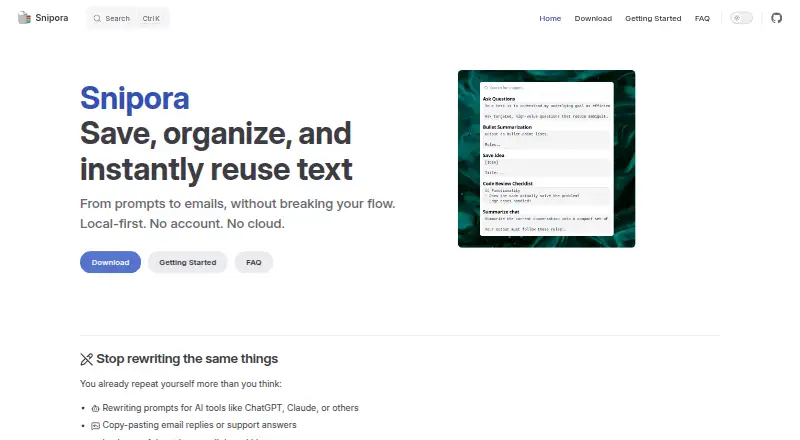
Snipora is an open-source desktop snippet manager for saving and reusing prompts, email replies, signatures, code blocks, commands, and other text. It is designed for solo users who want quick access to frequently reused content without an account or an internet connection. The application runs on Windows, macOS, and Linux, using a global keyboard shortcut to open its popup and insert a selected snippet into the active application.
Its main strength is a focused offline workflow. Search-as-you-type helps narrow the collection quickly, while tags support multiple labels per snippet for broader organization. The popup is keyboard-navigable, the global shortcut is customizable, and clipboard reuse is supported for saved text. Local storage keeps the workflow centered on one desktop, which suits users who prioritize speed, privacy, and independence from online services over a connected workspace.
The trade-off is a narrow ecosystem. Snipora is desktop-only, and snippets do not sync between devices, so maintaining the same library across multiple computers is outside its current scope. Team features and integrations are also not part of the product positioning, while import and export are planned functionality. Choose Snipora if you need a lightweight personal library with fast insertion across supported desktop operating systems. Choose an alternative if cross-device access, collaboration, integrations, or a broader cloud-based workflow is essential.
Your product? Our editors can test Snipora in depth and publish a review, labelled as paid · from $149/mo →
Snipora pricing
Snipora fact sheet
| Free plan | Yes |
|---|---|
| Paid from | Free |
| Cross-device sync | No |
| Browser extension | Not verified |
| Team workspaces | Not verified |
| Version history | Not verified |
| Snippet limit | Not verified |
| Markdown notes | Not verified |
| Deployment | Desktop |
| Platforms | Windows, macOS, Linux |
| Support | Community, Docs |
| Built for | Solo, Small business (editorial estimate) |
| Pricing | Free plan |
| Website | snipora.github.io |
| Facts checked | 20 Sep 2026 |
Alternatives to Snipora
- CacherA mature snippet hub with strong integrations, history, and team libraries.9.3
- massCodeA broad free toolkit for developers who want local-first snippet and Markdown workflows.9.0
- SnippetsLabA free, deeply organized snippet library for developers on Mac.8.8


See all Snipora alternatives →
Used Snipora? Be the first to review it
The editor score above is our own research. What this page doesn't have yet is a reader's view — what you used Snipora for, what worked and what didn't. No stars are seeded and no review is paid for; an editor reads every one before it appears.
Write a reviewTwo minutes · verified accounts only · read by an editor before it appears
Featured on iTechGuides

Snipora is listed in our Code Snippet Managers directory. Add the badge to your site — it links back to this page.
<a href="https://www.itechguides.com/products/snipora/"><img src="https://www.itechguides.com/best/badge/snipora.svg" alt="Featured on iTechGuides" width="230" height="46"></a>
Reviewed by iTechGuides Editors · Editorial team · Updated Oct 2026
Advertiser disclosure: iTechGuides is reader-supported. Vendors can pay for top positions in our rankings and for a place on other products' pages, and we may earn a commission when you click some links. Bought places stand at the number bought; this page and our disclosure say so. Paying vendors may get a fuller, more detailed review from our editors, and that review can change their score. How we rank.
Last updated · How we research and update