
SlidesGo
SlidesGo: A web-based tool for turning documents and existing decks into editable PowerPoint slides. Ranked #22 of 26 in AI Presentation Software by our editors (7.3/10); pricing: Paid; best for document-heavy PowerPoint conversion.
At a glance
- Editor score7.3 / 10
- PricingPaid
- Best forDocument-heavy PowerPoint conversion
- Free planNo
- Paid from$9.50/mo
- Generation inputstext prompts, PDF, PowerPoint, YouTube video, web page, Word, Excel, Markdown, plain text
- Founded2019 · Málaga, Spain
- Facts checked19 Sep 2026
Where it wins
- Converts PDFs, existing PowerPoints, and varied content into presentations
- Adds speaker notes, scripts, web search, charts, and automatic layouts
- Exports editable PPTX files for PowerPoint, Google Slides, and Keynote
Where it doesn't
- No free plan; monthly pricing starts at $9.50
- A 20-slide limit constrains longer presentations
- Web-only, with no listed integrations
Our verdict on SlidesGo
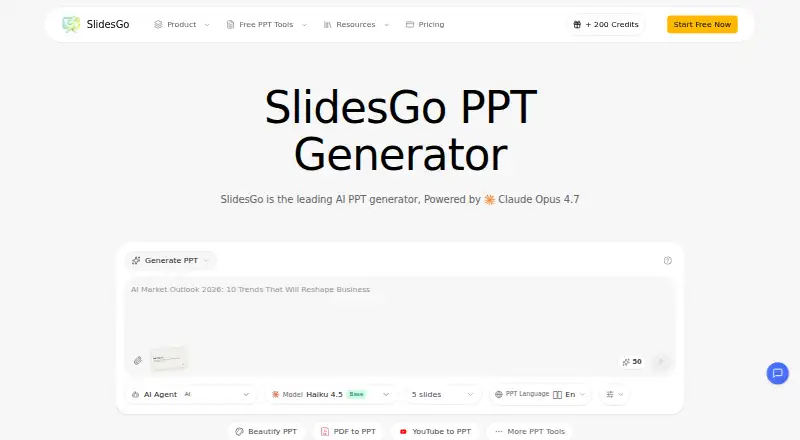
SlidesGo is a web-based AI presentation tool for business users, educators, students, and content creators who need to turn source material into slides or refresh existing PowerPoint presentations. It accepts text prompts, PDFs, PowerPoint files, YouTube videos, web pages, Word and Excel files, Markdown, and plain text. That breadth makes it especially relevant to people working from documents and online material rather than starting with a blank deck. The tool also supports browser preview and editing, then exports editable PPTX files compatible with PowerPoint, Google Slides, and Keynote.
Its conversion workflow extends beyond importing content: SlidesGo can redesign existing presentations, select layouts based on slide content, and generate charts and graphs. Speaker notes and presentation scripts can support delivery, while web search can add current information. These features suit users who want a draft deck assembled from varied inputs and refined in the browser. The listed presentation formats include PowerPoint, Google Slides, and Keynote, but PPTX is the documented export format; buyers seeking native-format exports or a stated integration ecosystem should weigh that distinction.
According to the vendor's pricing page, there is no free plan. Starter costs $9.50 per month and includes Claude Sonnet 4.6 access, 12,000 credits per year, 10 PPTs per month, and 10–20 pages per PPT. Standard is $23.90 monthly, with 36,000 credits per year, 60 PPTs per month, and 10–40 pages per PPT, also with Claude Sonnet 4.6. Premium costs $47.90 monthly and adds Claude Opus 4.7 access, 90,000 credits per year, up to 150 PPTs per month, 10–40 pages per PPT, and 100+ professional templates. Choose SlidesGo for document-driven PPTX creation and redesign; look elsewhere if you need a free tier, desktop access, or presentations beyond its 20-slide limit.
Your product? Our editors can test SlidesGo in depth and publish a review, labelled as paid · from $149/mo →
SlidesGo pricing
All 3 SlidesGo plans and prices →
SlidesGo fact sheet
| Free plan | No |
|---|---|
| Paid from | $9.50/mo |
| Generation inputs | text prompts, PDF, PowerPoint, YouTube video, web page, Word, Excel, Markdown, plain text |
| Slide limit | 20 slides/deck |
| Export formats | PPTX |
| Brand controls | Not verified |
| Collaboration | Not verified |
| Presentation formats | PowerPoint, Google Slides, Keynote |
| Deployment | Cloud |
| Platforms | Web |
| Pricing | Paid (source) |
| Website | slidesgo.io |
| Facts checked | 19 Sep 2026 |
Alternatives to SlidesGo
- Canva PresentationsDraft with AI, refine with a full editor, and collaborate across web and mobile.9.4
- GammaA collaborative AI content tool for building and sharing decks alongside other visual content.9.3
- Microsoft PowerPointA mature, cross-platform slide editor with Copilot, brand controls, and collaboration.9.2



See all SlidesGo alternatives →
Used SlidesGo? Be the first to review it
The editor score above is our own research. What this page doesn't have yet is a reader's view — what you used SlidesGo for, what worked and what didn't. No stars are seeded and no review is paid for; an editor reads every one before it appears.
Write a reviewTwo minutes · verified accounts only · read by an editor before it appears
Featured on iTechGuides

SlidesGo is listed in our AI Presentation Software directory. Add the badge to your site — it links back to this page.
<a href="https://www.itechguides.com/products/slidesgo/"><img src="https://www.itechguides.com/best/badge/slidesgo.svg" alt="Featured on iTechGuides" width="230" height="46"></a>
Reviewed by iTechGuides Editors · Editorial team · Updated Oct 2026
Advertiser disclosure: iTechGuides is reader-supported. Vendors can pay for top positions in our rankings and for a place on other products' pages, and we may earn a commission when you click some links. Bought places stand at the number bought; this page and our disclosure say so. Paying vendors may get a fuller, more detailed review from our editors, and that review can change their score. How we rank.
Last updated · How we research and update