
Slidesgo AI Presentation Maker
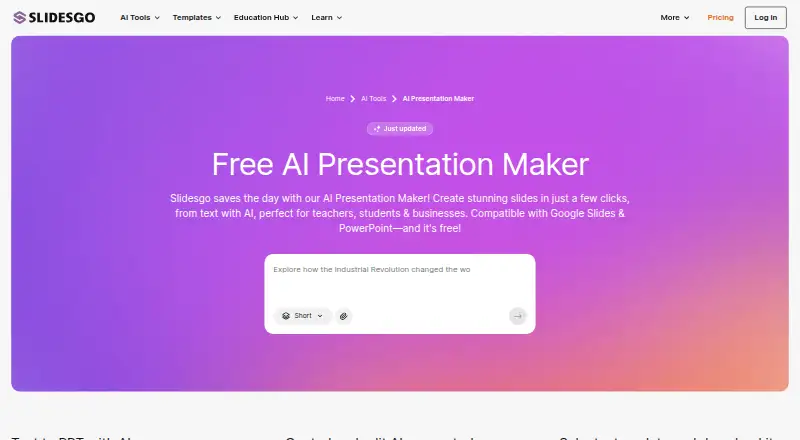
Slidesgo AI Presentation Maker: A focused web tool for generating and refining presentations quickly. Ranked #63 of 148 in Graphic Design Software by our editors (3.1/10); pricing: Free plan; best for users needing fast AI-generated presentations.
At a glance
- Editor score3.1 / 10
- PricingFree plan
- Best forUsers needing fast AI-generated presentations
- Free planYes
- Facts checked19 Sep 2026
Where it wins
- Generates presentations from text prompts with editable outputs
- Exports editable PPTX files for PowerPoint and Google Slides
- Free plan includes monthly AI generations and template downloads
Where it doesn't
- Web-only access limits platform flexibility
- Free plan limits AI generations and template downloads each month
- Presentation focus is narrower than broader graphic-design software
Our verdict on Slidesgo AI Presentation Maker
Slidesgo AI Presentation Maker creates presentation drafts from text prompts, then lets users edit generated text, colors, layouts, and visuals. It is designed for educators, students, freelancers, business owners, and other people who need presentation content and structure without starting from a blank slide. Users can select from presentation templates, export editable PPTX files, and continue editing in PowerPoint or Google Slides. Figma is also identified as a further editing tool. The product is a focused presentation maker rather than a general-purpose graphic-design workspace.
Its freemium pricing makes it accessible for occasional presentation work. The Free plan includes 3 AI-generated presentations per month and 3 template downloads per month. Premium monthly raises both limits to up to 150 AI generations and 150 template downloads per month, while adding Premium templates and assets plus team-member management. Premium annual includes the same monthly usage limits and Premium template and asset access, with pricing shown as RM41.99 billed annually, or RM3.50 per month on the annual billing presentation. The paid tiers suit users who regularly create presentations or need expanded template access.
Compatibility is a practical strength: editable PPTX export supports continued work in PowerPoint and Google Slides, while the product also lists Figma among its editing connections. Premium team-member invitation and management adds a basic collaboration path, although the product remains centered on presentation creation rather than broad collaborative design. Choose Slidesgo AI Presentation Maker when fast text-to-PPT generation, templates, and familiar presentation-file compatibility are the priority. Choose a broader graphic-design tool instead when you need work beyond presentations or a wider web-based design environment.
Your product? Our editors can test Slidesgo AI Presentation Maker in depth and publish a review, labelled as paid · from $149/mo →
Slidesgo AI Presentation Maker pricing
All 3 Slidesgo AI Presentation Maker plans and prices →
Slidesgo AI Presentation Maker fact sheet
| Free plan | Yes |
|---|---|
| Paid from | Not verified |
| Template library | Yes |
| Presentation design | Yes |
| Illustration tools | Not verified |
| Brand kit | Not verified |
| Real-time collaboration | Not verified |
| Desktop app | Not verified |
| Mobile app | Not verified |
| Deployment | Cloud |
| Platforms | Web |
| Integrations | 3 integrations: Google Slides, Microsoft PowerPoint, Figma |
| Pricing | Free plan (source) |
| Website | slidesgo.com |
| Facts checked | 19 Sep 2026 |
Slidesgo AI Presentation Maker integrations
Slidesgo AI Presentation Maker lists 3 integrations on its own site.
- Google Slides
- Microsoft PowerPoint
- Figma
Alternatives to Slidesgo AI Presentation Maker
- Adobe Creative CloudA broad creative suite for teams that need design, video, collaboration, and asset management.9.4
- CanvaA broad template-based editor for creating and sharing varied visual content.9.3
- FigmaA shared workspace for interface design, prototyping, developer handoff and more.9.2



See all Slidesgo AI Presentation Maker alternatives →
Also Ranked In
Slidesgo AI Presentation Maker is ranked in 6 of our directories.
Used Slidesgo AI Presentation Maker? Be the first to review it
The editor score above is our own research. What this page doesn't have yet is a reader's view — what you used Slidesgo AI Presentation Maker for, what worked and what didn't. No stars are seeded and no review is paid for; an editor reads every one before it appears.
Write a reviewTwo minutes · verified accounts only · read by an editor before it appears
Featured on iTechGuides

Slidesgo AI Presentation Maker is listed in our Graphic Design Software directory. Add the badge to your site — it links back to this page.
<a href="https://www.itechguides.com/products/slidesgo-ai-presentation-maker/"><img src="https://www.itechguides.com/best/badge/slidesgo-ai-presentation-maker.svg" alt="Featured on iTechGuides" width="230" height="46"></a>
Reviewed by iTechGuides Editors · Editorial team · Updated Oct 2026
Advertiser disclosure: iTechGuides is reader-supported. Vendors can pay for top positions in our rankings and for a place on other products' pages, and we may earn a commission when you click some links. Bought places stand at the number bought; this page and our disclosure say so. Paying vendors may get a fuller, more detailed review from our editors, and that review can change their score. How we rank.
Last updated · How we research and update