SlidesAcademy
SlidesAcademy: A broad free library for personal presentations, with limited commercial-use value. Ranked #28 of 34 in Presentation Template Libraries by our editors (6.6/10); pricing: Free plan; best for personal-use Google Slides and PowerPoint users.
At a glance
- Editor score6.6 / 10
- PricingFree plan
- Best forPersonal-use Google Slides and PowerPoint users
- Free planYes
- Paid fromFree
- Commercial useNo
- Facts checked20 Sep 2026
Where it wins
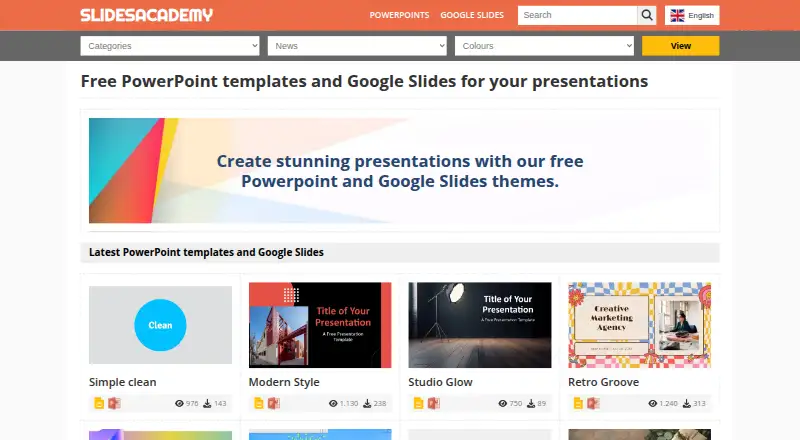
- 3,712 free templates organized by category and color
- Supports editable PowerPoint and Google Slides presentations
- Offers PPTX downloads, Google Drive copying, and 4:3 or 16:9 formats
Where it doesn't
- Personal-use licensing excludes commercial use
- Licensing may vary between templates from different authors
- Web access is the listed platform
Our verdict on SlidesAcademy
SlidesAcademy is a web-based library of free presentation templates for people creating personal presentations in Google Slides or Microsoft PowerPoint. Its catalog covers business, education, health, commerce and other presentation needs, with editable designs that include slide themes, diagrams, graphics, charts, timelines and other presentation elements. The library lists 3,712 templates and supports both standard 4:3 and widescreen 16:9 formats, giving users a broad starting point for different presentation layouts.
The main practical strength is format and workflow flexibility. Users can copy templates to Google Drive and open them in Google Slides, or download PowerPoint files in PPTX format for editing in PowerPoint. Templates are organized by categories and colors, which helps narrow the selection before choosing a design. This makes SlidesAcademy a useful fit for individuals who want free, editable materials without committing to a paid plan. It does not include AI features, and the listed platform is the web, so the product is primarily a template library rather than a broader presentation production suite.
Licensing is the key boundary for professional use. The verified license scope is personal, and commercial use is false, so SlidesAcademy is better suited to personal presentations than client work, business deliverables or other commercial projects. The library also states that templates are curated from different authors and specialized websites, meaning licensing may vary by individual template. Choose SlidesAcademy for a large free selection, Google Slides and PowerPoint compatibility, and straightforward editing options. Choose an alternative when commercial rights, a unified license across the catalog, or broader presentation software capabilities are required.
Your product? Our editors can test SlidesAcademy in depth and publish a review, labelled as paid · from $149/mo →
SlidesAcademy pricing
SlidesAcademy fact sheet
| Free plan | Yes |
|---|---|
| Paid from | Free |
| Template count | 3712 templates |
| Download formats | PowerPoint (.pptx), Google Slides |
| Editing platforms | PowerPoint, Google Slides |
| Commercial use | No |
| Team sharing | Not verified |
| License scope | Personal |
| Deployment | Cloud |
| Platforms | Web |
| Compliance & security | GDPR |
| Support | |
| Built for | Solo, Small business, Mid-market, Enterprise (editorial estimate) |
| Integrations | 3 integrations: Google Slides, Google Drive, Microsoft PowerPoint |
| Pricing | Free plan |
| Website | slidesacademy.com |
| Facts checked | 20 Sep 2026 |
SlidesAcademy integrations
SlidesAcademy lists 3 integrations on its own site.
- Google Slides
- Google Drive
- Microsoft PowerPoint
Alternatives to SlidesAcademy
- SmileTemplatesA broad, low-cost template library with free downloads and flexible file support.9.4
- SlideBazaarA large template library with AI tools and paid plans starting at $4.99 monthly.9.2
- PoweredTemplateA broad template library with AI tools, commercial licensing, and team features.9.1

See all SlidesAcademy alternatives →
Used SlidesAcademy? Be the first to review it
The editor score above is our own research. What this page doesn't have yet is a reader's view — what you used SlidesAcademy for, what worked and what didn't. No stars are seeded and no review is paid for; an editor reads every one before it appears.
Write a reviewTwo minutes · verified accounts only · read by an editor before it appears
Featured on iTechGuides

SlidesAcademy is listed in our Presentation Template Libraries directory. Add the badge to your site — it links back to this page.
<a href="https://www.itechguides.com/products/slidesacademy/"><img src="https://www.itechguides.com/best/badge/slidesacademy.svg" alt="Featured on iTechGuides" width="230" height="46"></a>
Reviewed by iTechGuides Editors · Editorial team · Updated Oct 2026
Advertiser disclosure: iTechGuides is reader-supported. Vendors can pay for top positions in our rankings and for a place on other products' pages, and we may earn a commission when you click some links. Bought places stand at the number bought; this page and our disclosure say so. Paying vendors may get a fuller, more detailed review from our editors, and that review can change their score. How we rank.
Last updated · How we research and update