SlateForm Pro
SlateForm Pro: A broad production office system with mobile access and production-level licensing. Ranked #22 of 29 in Video Production Management Software by our editors (7.1/10); pricing: Pricing on request; best for mobile-enabled crew and production administration.
At a glance
- Editor score7.1 / 10
- PricingPricing on request
- Best forMobile-enabled crew and production administration
- Free planNo
- Facts checked20 Sep 2026
Where it wins
- Covers scheduling, call sheets, budgets, crew, cast, and locations
- Daily time sheets calculate meal penalties and forced calls
- Web, desktop, iOS, and Android access with role-based permissions
Where it doesn't
- Pricing requires contacting sales
- Not available for self-serve sign-ups
- No AI features are included
Our verdict on SlateForm Pro
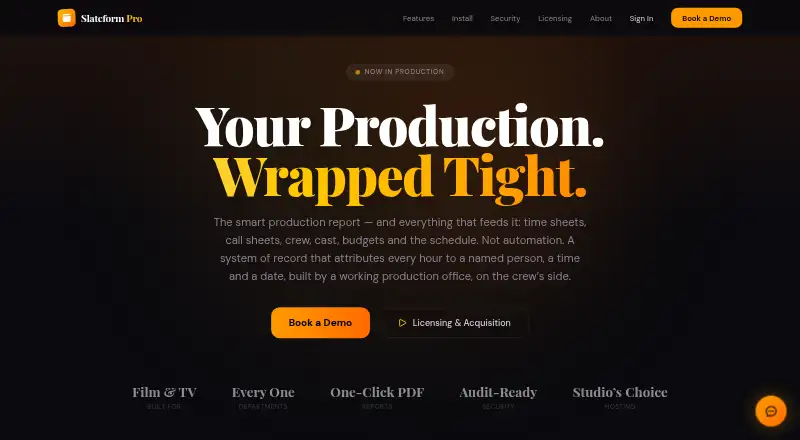
SlateForm Pro is production management software for film and television offices, studios, productions, and production-payroll platforms. It brings production reports, crew and cast records, daily time sheets, call sheets, schedules, budgets, approvals, location scouting, department tools, and PDF exports into one system. Its web, Windows, macOS, iOS, and Android access suits production teams that need information available across office and mobile workflows.
The feature set is broad, with several tools aimed at day-to-day production administration. Production reports include attributed entries and timestamps, while daily time sheets handle meal-penalty and forced-call calculations. Teams can manage new-hire pipelines, cast day-of-days, fitting schedules, production calendars, schedule imports and exports, manpower budgets, equipment, approvals, and location photos with costs. Call sheets can be created and distributed as PDFs, and production documents can also be exported as PDFs. Role-based access includes 22 role levels, alongside audit trails and production-specific data isolation.
SlateForm Pro is licensed by production rather than by seat, and pricing is handled through contact sales. That model is suited to production organizations coordinating a project-wide workflow, rather than individuals looking for an immediately accessible subscription. The product should appeal to teams that value mobile-enabled crew administration, detailed time-sheet calculations, and centralized production records. Organizations seeking a self-serve application, AI features, or a narrower tool focused on one production task should look elsewhere.
Your product? Our editors can test SlateForm Pro in depth and publish a review, labelled as paid · from $149/mo →
SlateForm Pro pricing
SlateForm Pro fact sheet
| Free plan | No |
|---|---|
| Paid from | Not verified |
| Script breakdowns | Not verified |
| Production scheduling | Yes |
| Call sheets | Yes |
| Budget tracking | Yes |
| Crew and cast management | Yes |
| Location management | Yes |
| Mobile app platforms | Both |
| Deployment | Cloud, Desktop, Mobile |
| Platforms | Web, Windows, macOS, iOS, Android |
| Compliance & security | SOC 2, 2FA |
| Support | |
| Built for | Mid-market, Enterprise (editorial estimate) |
| Pricing | Pricing on request |
| Website | slateformpro.com |
| Facts checked | 20 Sep 2026 |
Alternatives to SlateForm Pro
- YamduA broad production workspace covering planning, scheduling, budgeting, collaboration, and delivery.9.4
- InteSceneA broad, budget-friendly toolkit covering production from script to reports.9.3
- ScenePaperA free production workspace spanning scripts, schedules, budgets, crews, and department workflows.9.2



See all SlateForm Pro alternatives →
Used SlateForm Pro? Be the first to review it
The editor score above is our own research. What this page doesn't have yet is a reader's view — what you used SlateForm Pro for, what worked and what didn't. No stars are seeded and no review is paid for; an editor reads every one before it appears.
Write a reviewTwo minutes · verified accounts only · read by an editor before it appears
Featured on iTechGuides

SlateForm Pro is listed in our Video Production Management Software directory. Add the badge to your site — it links back to this page.
<a href="https://www.itechguides.com/products/slateform-pro/"><img src="https://www.itechguides.com/best/badge/slateform-pro.svg" alt="Featured on iTechGuides" width="230" height="46"></a>
Reviewed by iTechGuides Editors · Editorial team · Updated Oct 2026
Advertiser disclosure: iTechGuides is reader-supported. Vendors can pay for top positions in our rankings and for a place on other products' pages, and we may earn a commission when you click some links. Bought places stand at the number bought; this page and our disclosure say so. Paying vendors may get a fuller, more detailed review from our editors, and that review can change their score. How we rank.
Last updated · How we research and update