
Skylight Calendar
Skylight Calendar: A broad family scheduling hub, with useful extras balanced by notable hardware and subscription costs. Ranked #28 of 43 in Family Calendar Apps by our editors (5.3/10); pricing: Free plan; best for families wanting device-connected calendar management.
At a glance
- Editor score5.3 / 10
- PricingFree plan
- Best forFamilies wanting device-connected calendar management
- Free planYes
- Shared tasksYes
- Facts checked21 Sep 2026
Where it wins
- Syncs Google, Apple, Outlook, Yahoo, Cozi, and public calendar links
- Combines chores, reminders, meals, lists, profiles, and rewards
- Supports web, iOS, Android, and a 15-inch touchscreen calendar
Where it doesn't
- Calendar Plus costs $79 per year
- The Skylight Calendar 2 device costs $299.99 upfront
- Some standout features sit outside the Basic tier
Our verdict on Skylight Calendar
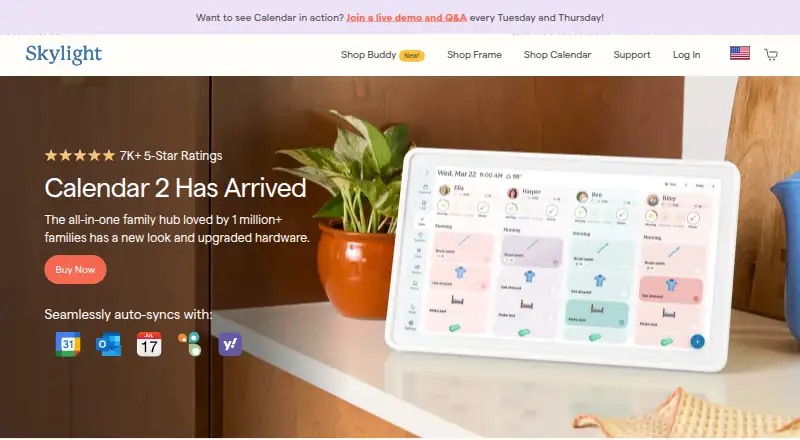
Skylight Calendar is a family organization system built around shared schedules, chores, routines, meals, lists, and profiles. Families can manage calendars through the web, iOS, and Android apps, or use the Skylight Calendar 2 15-inch touchscreen calendar. Its software synchronizes calendars from Google, Apple, Outlook, Yahoo, Cozi, and public calendar links, while color-coded profiles help households distinguish individual schedules. It is best suited to families that want one shared place for time-sensitive plans and everyday coordination.
The published plans show a Basic tier with calendar management, tasks and chores, custom lists, mobile access, and calendar synchronization. Calendar Plus costs $79 per year and adds meal planning, rewards, a photo and video screensaver, Magic Import, and Disney Mode. Sidekick can import events from emails, PDFs, photos, and flyers, while the system also supports recipes and family-visible meal schedules. The product connects with Google Calendar, Apple Calendar, Microsoft Outlook, Yahoo Calendar, Cozi, Readdle Calendars, and AnyList, giving it a practical fit for households already spread across several calendar and list services.
The main tradeoff is cost across the experience. The Calendar 2 device is listed at $299.99 as a one-time purchase, and Calendar Plus adds an annual charge for several of the more distinctive features. Families focused on basic shared scheduling, chores, reminders, and lists may find the Basic software sufficient. Those wanting a visible household display, meal planning, rewards, AI-assisted imports, and device management have a fuller feature set to consider, but should be comfortable with the added hardware and subscription expense. Households seeking only a simple calendar may prefer a narrower tool.
Questions about Skylight Calendar
Does Skylight Calendar have a free plan? No free plan is listed; paid plans start at $79/yr (Calendar Plus).
How much does Skylight Calendar cost? Skylight Calendar lists 2 paid plans; the lowest is Calendar Plus at $79/yr.
What does Skylight Calendar run on? Web, iOS and Android. It runs in the cloud and as a mobile app.
What does Skylight Calendar integrate with? 7 integrations, including Google Calendar, Apple Calendar, Microsoft Outlook, Yahoo Calendar and Cozi.
Who is Skylight Calendar built for? Small businesses (our editorial estimate).
Your product? Our editors can test Skylight Calendar in depth and publish a review, labelled as paid · from $149/mo →
Skylight Calendar pricing
All 3 Skylight Calendar plans and prices →
Skylight Calendar fact sheet
| Free plan | Yes |
|---|---|
| Paid from | Not verified |
| Member limit | Not verified |
| Shared tasks | Yes |
| Reminders | Yes |
| Meal planning | Yes |
| Shared shopping lists | Yes |
| Location sharing | Not verified |
| Deployment | Cloud, Mobile |
| Platforms | Web, iOS, Android |
| Support | Email, Phone, Tickets, Docs · 24/7 |
| Built for | Small business (editorial estimate) |
| Integrations | 7 integrations: Google Calendar, Apple Calendar, Microsoft Outlook, Yahoo Calendar, Cozi, Readdle Calendars … |
| Pricing | Free plan (source) |
| Website | myskylight.com |
| Facts checked | 21 Sep 2026 |
Skylight Calendar integrations
Skylight Calendar lists 7 integrations on its own site.
- Google Calendar
- Apple Calendar
- Microsoft Outlook
- Yahoo Calendar
- Cozi
- Readdle Calendars
- AnyList
Alternatives to Skylight Calendar
- CoziA mature family organizer that combines calendars, lists, meals, and chores.8.8
- TimeTreeA focused shared-calendar app for families that need clear schedule communication.8.6
- FamilyWallA broad family organizer with shared calendars, planning tools, and safety features.7.9



See all Skylight Calendar alternatives →
Also Ranked In
Skylight Calendar is ranked in 2 of our directories.
Used Skylight Calendar? Be the first to review it
The editor score above is our own research. What this page doesn't have yet is a reader's view — what you used Skylight Calendar for, what worked and what didn't. No stars are seeded and no review is paid for; an editor reads every one before it appears.
Write a reviewTwo minutes · verified accounts only · read by an editor before it appears
Featured on iTechGuides

Skylight Calendar is listed in our Family Calendar Apps directory. Add the badge to your site — it links back to this page.
<a href="https://www.itechguides.com/products/skylight-calendar/"><img src="https://www.itechguides.com/best/badge/skylight-calendar.svg" alt="Featured on iTechGuides" width="230" height="46"></a>
Reviewed by iTechGuides Editors · Editorial team · Updated Nov 2026
Advertiser disclosure: iTechGuides is reader-supported. Vendors can pay for top positions in our rankings and for a place on other products' pages, and we may earn a commission when you click some links. Bought places stand at the number bought; this page and our disclosure say so. Paying vendors may get a fuller, more detailed review from our editors, and that review can change their score. How we rank.
Last updated · How we research and update