
Simple Commenter
Simple Commenter: A controlled review hub for webpage, image, and PDF feedback. Ranked #28 of 31 in Web Annotation Tools by our editors (6.4/10); pricing: 14-day trial; best for teams needing controlled webpage and file comments.
At a glance
- Editor score6.4 / 10
- Pricing14-day trial
- Best forTeams needing controlled webpage and file comments
- Free planNo
- Collaborative reviewYes
- Facts checked20 Sep 2026
Where it wins
- Pins comments to webpage elements with browser and viewport context
- Supports threaded replies, status tracking, image, and PDF review
- Offers guest sharing, access controls, and broad workflow integrations
Where it doesn't
- No free plan
- The Pro plan is limited to 3 team members
- Agency and Enterprise tiers are needed for broader team capacity
Our verdict on Simple Commenter
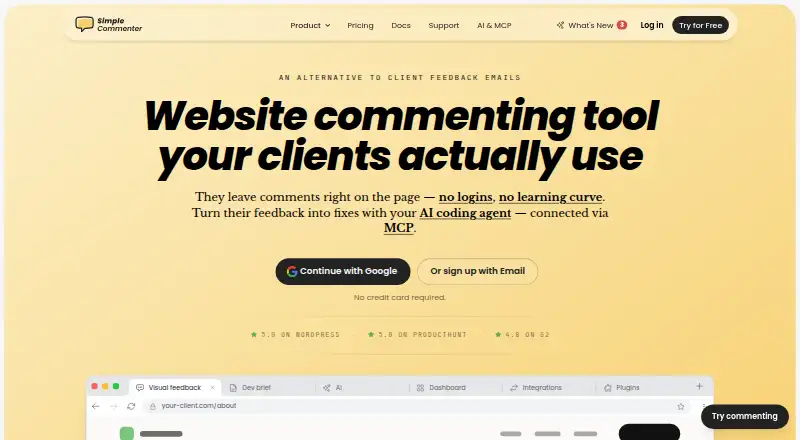
Simple Commenter is a web-based annotation and feedback tool for agencies, freelancers, product teams, and developers. It supports website review, client approvals, design review, QA, and staging-site feedback. Comments can be pinned directly to webpage elements, while automatic screenshots capture browser, viewport, operating-system, and URL context. Teams can also review images and PDFs with page-specific comments, then manage discussions through threaded replies and status tracking.
Its strongest fit is controlled collaborative review across web and document work. Client sharing does not require account creation, which supports external approvals, while role-based moderation and access controls help teams manage who can comment. The Chrome extension and WordPress plugin extend coverage beyond the main web application, and integrations with Asana, ClickUp, Email, GitHub, Jira, Linear, Monday.com, Slack, Trello, Webhooks, and AI Agent can connect feedback to existing project and communication workflows. Data export is also available.
The paid structure is organized into Pro, Agency, and Enterprise tiers. Pro includes 3 team members, unlimited domains and projects, 50 GB of storage, and a 500 MB file-size limit. Agency adds unlimited team members, 500 GB or more of storage, and unlimited file size, while Enterprise adds unlimited storage plus SSO/SAML and enterprise support options. A 14-day trial is available without a credit card, alongside a 14-day money-back guarantee. Choose Simple Commenter when pinned context, guest review, and workflow connections matter; teams needing a free plan or more than 3 members on the entry tier should look beyond Pro.
Your product? Our editors can test Simple Commenter in depth and publish a review, labelled as paid · from $149/mo →
Simple Commenter pricing
All 3 Simple Commenter plans and prices →
Simple Commenter fact sheet
| Free plan | No |
|---|---|
| Paid from | Not verified |
| Annotation modes | Both |
| Collaborative review | Yes |
| Guest access | Yes |
| Document support | Both |
| Browser capture | Yes |
| Team seats | 3 seats |
| Export options | Data export |
| Free trial | 14 days · no card needed |
| Money-back guarantee | 14 days |
| Deployment | Cloud, Browser extension |
| Platforms | Web, Chrome extension |
| Compliance & security | GDPR, SSO/SAML |
| Support | Email, Live chat, Docs |
| Built for | Solo, Small business, Mid-market, Enterprise (editorial estimate) |
| Integrations | 11 integrations: AI Agent, Asana, ClickUp, Email, GitHub, Jira … See all → |
| Pricing | 14-day trial (source) |
| Website | simplecommenter.com |
| Facts checked | 20 Sep 2026 |
Simple Commenter integrations
Simple Commenter lists 11 integrations on its own site.
- AI Agent
- Asana
- ClickUp
- GitHub
- Jira
- Linear
- Monday.com
- Slack
- Trello
- Webhooks
See all Simple Commenter integrations →
Alternatives to Simple Commenter
- HypothesisA free, open-source annotation platform with strong education and collaboration features.9.3
- PinPointA free web annotation workspace combining collaborative review, PDF proofing, and AI QA.9.1
- PerusallA course-focused annotation platform combining discussion, assessment, analytics, and LMS sync.9.0



See all Simple Commenter alternatives →
Used Simple Commenter? Be the first to review it
The editor score above is our own research. What this page doesn't have yet is a reader's view — what you used Simple Commenter for, what worked and what didn't. No stars are seeded and no review is paid for; an editor reads every one before it appears.
Write a reviewTwo minutes · verified accounts only · read by an editor before it appears
Featured on iTechGuides

Simple Commenter is listed in our Web Annotation Tools directory. Add the badge to your site — it links back to this page.
<a href="https://www.itechguides.com/products/simple-commenter/"><img src="https://www.itechguides.com/best/badge/simple-commenter.svg" alt="Featured on iTechGuides" width="230" height="46"></a>
Reviewed by iTechGuides Editors · Editorial team · Updated Oct 2026
Advertiser disclosure: iTechGuides is reader-supported. Vendors can pay for top positions in our rankings and for a place on other products' pages, and we may earn a commission when you click some links. Bought places stand at the number bought; this page and our disclosure say so. Paying vendors may get a fuller, more detailed review from our editors, and that review can change their score. How we rank.
Last updated · How we research and update