
Signaturky
Signaturky: A focused choice for teams managing branded signatures across Gmail and Outlook. Ranked #27 of 30 in Email Signature Management Software by our editors (6.6/10); pricing: 14-day trial; best for teams needing both Gmail and Outlook support.
At a glance
- Editor score6.6 / 10
- Pricing14-day trial
- Best forTeams needing both Gmail and Outlook support
- Free planNo
- Centralized managementYes
- Facts checked20 Sep 2026
Where it wins
- Central dashboard with rules, targeting, and continuous enforcement
- Supports Gmail and Outlook across web, desktop, and mobile
- Liquid templates, user attributes, and custom branding support
Where it doesn't
- No free plan; access is available through paid plans
- Installation is domain-wide rather than limited to one user
- No verified AI, campaign, or disclaimer features
Our verdict on Signaturky
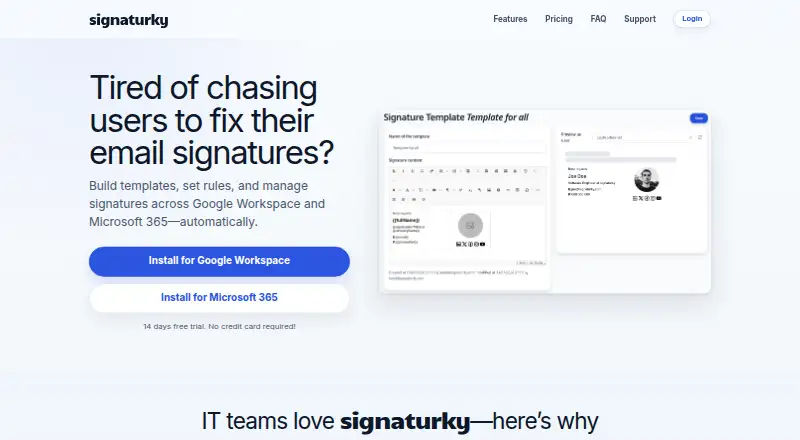
Signaturky is a centralized email signature management service for organizations using Google Workspace and Microsoft 365. Administrators can create or customize branded templates, manage user signatures from one dashboard, and apply rules to departments, groups, organizational units, or individual users. It supports Gmail signature updates, including aliases, along with Outlook on the web, desktop, and mobile. Domain-wide installation makes it suited to teams that want organization-level control rather than isolated single-user setup.
Its strongest area is targeting and enforcement. User attributes and Liquid template support allow signatures to be adapted for different employees, while continuous enforcement helps keep approved signatures in place. The platform also includes a built-in icon picker with more than 40 icons, plus integrations with Google Workspace, Microsoft 365, Gmail, and Outlook. This combination fits organizations that need one management approach across both major mail ecosystems instead of maintaining separate processes for Gmail and Outlook.
Signaturky is a paid service with a 14-day trial that does not require a credit card. Its published plan structure is organized into 1–150 users, 151–500 users, and 501+ users, with separate entries for each user range. The service is a strong fit for teams that prioritize centralized control, employee targeting, branded templates, and broad Outlook coverage. It is less suitable for organizations seeking a free option, single-user installation, or built-in AI, campaign management, or disclaimer features.
Questions about Signaturky
Is there a free trial of Signaturky? Yes: a 14-day free trial; no card is needed.
What does Signaturky run on? Web, iOS and Android. It runs in the cloud and as a mobile app.
What does Signaturky integrate with? 4 integrations: Google Workspace, Microsoft 365, Gmail and Outlook.
Who is Signaturky built for? Small businesses, mid-market companies and enterprises (our editorial estimate).
Your product? Our editors can test Signaturky in depth and publish a review, labelled as paid · from $149/mo →
Signaturky pricing
All 3 Signaturky plans and prices →
Signaturky fact sheet
| Free plan | No |
|---|---|
| Paid from | Not verified |
| Centralized management | Yes |
| Directory sync | Yes |
| Banner campaigns | Not verified |
| Disclaimer controls | Not verified |
| Supported mail platforms | Both |
| Employee targeting | Yes |
| Free trial | 14 days · no card needed |
| Deployment | Cloud, Mobile |
| Platforms | Web, iOS, Android |
| Compliance & security | GDPR |
| Support | Email, Docs |
| Built for | Small business, Mid-market, Enterprise (editorial estimate) |
| Integrations | 4 integrations: Google Workspace, Microsoft 365, Gmail, Outlook |
| Pricing | 14-day trial (source) |
| Website | signaturky.com |
| Facts checked | 20 Sep 2026 |
Signaturky integrations
Signaturky lists 4 integrations on its own site.
- Google Workspace
- Microsoft 365
- Gmail
- Outlook
Alternatives to Signaturky
- ExclaimerA mature, flexible choice for centralized signatures across major email platforms.9.4
- CodeTwo Email Signatures 365A Microsoft 365-focused suite for centrally managed signatures, campaigns, and analytics.9.2
- OpensenseA cross-platform signature platform with directory sync, campaigns, analytics, and API access.9.0



See all Signaturky alternatives →
Used Signaturky? Be the first to review it
The editor score above is our own research. What this page doesn't have yet is a reader's view — what you used Signaturky for, what worked and what didn't. No stars are seeded and no review is paid for; an editor reads every one before it appears.
Write a reviewTwo minutes · verified accounts only · read by an editor before it appears
Featured on iTechGuides

Signaturky is listed in our Email Signature Management Software directory. Add the badge to your site — it links back to this page.
<a href="https://www.itechguides.com/products/signaturky/"><img src="https://www.itechguides.com/best/badge/signaturky.svg" alt="Featured on iTechGuides" width="230" height="46"></a>
Reviewed by iTechGuides Editors · Editorial team · Updated Nov 2026
Advertiser disclosure: iTechGuides is reader-supported. Vendors can pay for top positions in our rankings and for a place on other products' pages, and we may earn a commission when you click some links. Bought places stand at the number bought; this page and our disclosure say so. Paying vendors may get a fuller, more detailed review from our editors, and that review can change their score. How we rank.
Last updated · How we research and update