
Signature 365
Signature 365: Centralized Microsoft 365 signature control with campaigns, rules, and multiple insertion modes. Ranked #25 of 30 in Email Signature Management Software by our editors (6.8/10); pricing: 14-day trial; best for microsoft 365 teams wanting standard controls.
At a glance
- Editor score6.8 / 10
- Pricing14-day trial
- Best forMicrosoft 365 teams wanting standard controls
- Free planNo
- Facts checked21 Sep 2026
Where it wins
- Centralized deployment with user, group, department, and rule assignments
- Client-side, server-side, and combined signature insertion
- Campaign banners, analytics, disclaimers, QR codes, and vCards
Where it doesn't
- Designed around Microsoft 365 and its surrounding ecosystem
- No free plan; access starts with a paid subscription
- Pricing requires a billing conversation rather than a published numeric rate
Our verdict on Signature 365
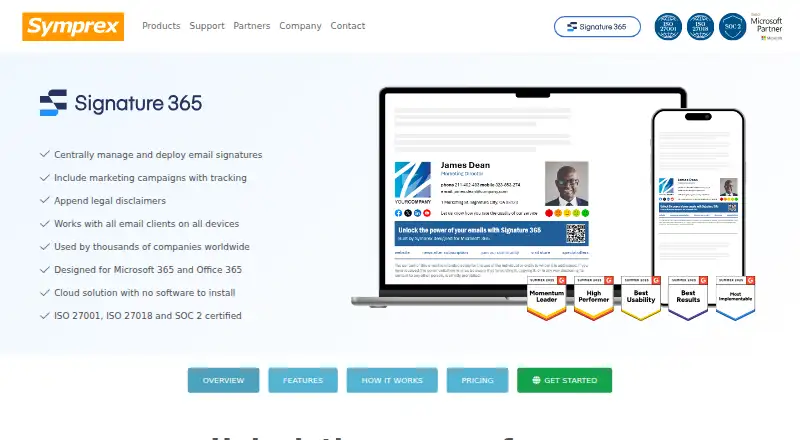
Signature 365 is a cloud-based email signature management service for organizations using Microsoft 365 and Office 365. It gives administrators a central place to create and deploy signatures, manage templates with visual and source editors, assign content by user, group, department, or rule, and add legal disclaimers or campaign banners. The service supports Outlook on Windows, macOS, the web, iOS, and Android, making it suitable for distributed teams that need consistent email branding and messaging across supported Outlook environments.
Its strongest area is administrative control. Entra ID user and group import can connect directory structure to signature assignments, while client-side, server-side, and combined insertion modes cover messages sent from Outlook and other clients. Campaign banners add tracking and analytics, extending the product beyond basic signature standardization. QR code and vCard generation are useful additions for contact details, while cloud deployment keeps management centralized. The published plan highlights Microsoft 365 integration, legal disclaimers, campaign tracking and analytics, and centralized management in one paid plan.
Signature 365 fits teams that want Microsoft-focused governance without managing signatures individually. It is especially suited to organizations that need department-specific rules, directory-driven assignments, and consistent coverage across desktop, web, and mobile Outlook. The product is less compelling for businesses seeking broad cross-platform email integrations beyond Microsoft’s ecosystem, a free option, or built-in AI features. Teams choosing it should be comfortable with a paid, cloud-deployed service centered on Microsoft 365, Office 365, Entra ID, Exchange Online, and Outlook.
Your product? Our editors can test Signature 365 in depth and publish a review, labelled as paid · from $149/mo →
Signature 365 pricing
All 1 Signature 365 plans and prices →
Signature 365 fact sheet
| Free plan | No |
|---|---|
| Paid from | Not verified |
| Centralized management | Not verified |
| Directory sync | Yes |
| Banner campaigns | Not verified |
| Disclaimer controls | Not verified |
| Supported mail platforms | Not verified |
| Employee targeting | Not verified |
| Free trial | 14 days · no card needed |
| Deployment | Cloud |
| Platforms | Web, Windows, macOS, iOS, Android |
| Compliance & security | SOC 2, ISO 27001, GDPR, HIPAA, PCI DSS, 2FA |
| Support | Email, Phone, Docs |
| Built for | Small business, Mid-market, Enterprise (editorial estimate) |
| Integrations | 3 integrations: Microsoft 365, Exchange Online, Outlook |
| Pricing | 14-day trial (source) |
| Website | symprex.com |
| Facts checked | 21 Sep 2026 |
Signature 365 integrations
Signature 365 lists 3 integrations on its own site.
- Microsoft 365
- Exchange Online
- Outlook
Alternatives to Signature 365
- ExclaimerA mature, flexible choice for centralized signatures across major email platforms.9.4
- CodeTwo Email Signatures 365A Microsoft 365-focused suite for centrally managed signatures, campaigns, and analytics.9.2
- OpensenseA cross-platform signature platform with directory sync, campaigns, analytics, and API access.9.0



See all Signature 365 alternatives →
Also Ranked In
Signature 365 is ranked in 2 of our directories.
Used Signature 365? Be the first to review it
The editor score above is our own research. What this page doesn't have yet is a reader's view — what you used Signature 365 for, what worked and what didn't. No stars are seeded and no review is paid for; an editor reads every one before it appears.
Write a reviewTwo minutes · verified accounts only · read by an editor before it appears
Featured on iTechGuides

Signature 365 is listed in our Email Signature Management Software directory. Add the badge to your site — it links back to this page.
<a href="https://www.itechguides.com/products/signature-365/"><img src="https://www.itechguides.com/best/badge/signature-365.svg" alt="Featured on iTechGuides" width="230" height="46"></a>
Reviewed by iTechGuides Editors · Editorial team · Updated Oct 2026
Advertiser disclosure: iTechGuides is reader-supported. Vendors can pay for top positions in our rankings and for a place on other products' pages, and we may earn a commission when you click some links. Bought places stand at the number bought; this page and our disclosure say so. Paying vendors may get a fuller, more detailed review from our editors, and that review can change their score. How we rank.
Last updated · How we research and update