
SIDETRACK
SIDETRACK: A focused Windows tool for Word redlines, PDF comparison, and local document review. Ranked #12 of 25 in Document Comparison Software by our editors (7.8/10); pricing: 14-day trial; best for word-focused desktop redline review.
At a glance
- Editor score7.8 / 10
- Pricing14-day trial
- Best forWord-focused desktop redline review
- Free planNo
- Paid from$199.95/yr
- PDF comparisonYes
- Facts checked20 Sep 2026
Where it wins
- Exports editable redline DOCX files and marked-up PDFs
- Supports one-to-many comparison for up to five reviewers
- Includes local OCR, Outlook sharing, and detailed comparison settings
Where it doesn't
- Requires Microsoft Word to run
- Available only on Windows 10/11
- No free plan; paid access starts at $19.95 per month
Our verdict on SIDETRACK
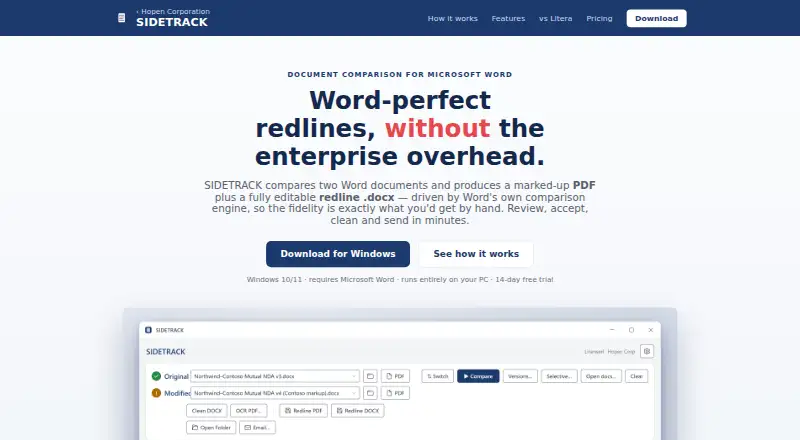
SIDETRACK is a Windows desktop application for comparing Microsoft Word documents, aimed at lawyers and legal teams that need a focused local redline workflow. It uses Word’s comparison engine and produces editable redline DOCX files alongside marked-up PDF output. Reviewers can navigate a change list, accept or reject changes, compare one document against up to five reviewers, and work with PDF input through local OCR for scanned files. The application also supports metadata and AI-signature scanning and cleaning, with settings for tables, headers, footers, footnotes, and moves.
Pricing is straightforward across two plans. Monthly costs $19.95 per month and includes unlimited comparisons, no watermark, and free updates. Yearly costs $199.95 per year and includes everything in Monthly, plus the stated value of annual billing and the ability to cancel anytime. A 14-day free trial is available, while the product does not offer a free plan. For regular use, the yearly option lowers the listed effective price compared with paying the monthly rate across a year, while Monthly suits users who prefer monthly billing.
SIDETRACK fits teams already centered on Microsoft Word and Outlook: Outlook draft and clipboard sharing extend the desktop workflow, and local installation with automatic updates keeps document processing on the PC. That local model may suit legal work that favors desktop handling, but the application requires Microsoft Word and is limited to Windows 10/11. Choose it for Word-focused comparison, editable redlines, PDF output, OCR, and detailed review controls. Choose an alternative if your team needs a browser-based or non-Windows workflow, or does not rely on Microsoft Word.
Your product? Our editors can test SIDETRACK in depth and publish a review, labelled as paid · from $149/mo →
SIDETRACK pricing
All 2 SIDETRACK plans and prices →
SIDETRACK fact sheet
| Free plan | No |
|---|---|
| Paid from | $199.95/yr |
| PDF comparison | Yes |
| Office file comparison | Yes |
| Formatting changes | Yes |
| Redline output | Yes |
| Deployment | Desktop |
| Maximum file size | Not verified |
| Free trial | 14 days · no card needed |
| Deployment | Desktop |
| Platforms | Windows |
| Support | |
| Built for | Solo, Small business (editorial estimate) |
| Integrations | 2 integrations: Microsoft Outlook, Microsoft Word |
| Pricing | 14-day trial (source) |
| Website | hopencorp.com |
| Facts checked | 20 Sep 2026 |
SIDETRACK integrations
SIDETRACK lists 2 integrations on its own site.
- Microsoft Outlook
- Microsoft Word
Alternatives to SIDETRACK
- DiffcheckerA broad comparison toolkit with free access and a $15 monthly desktop tier.9.3
- Litera CompareA broad comparison toolkit for redlines, scanned PDFs, and server-side workflows.9.2
- UltraCompareA broad desktop comparison suite for technical teams that need three-way merges.9.0


See all SIDETRACK alternatives →
Used SIDETRACK? Be the first to review it
The editor score above is our own research. What this page doesn't have yet is a reader's view — what you used SIDETRACK for, what worked and what didn't. No stars are seeded and no review is paid for; an editor reads every one before it appears.
Write a reviewTwo minutes · verified accounts only · read by an editor before it appears
Featured on iTechGuides

SIDETRACK is listed in our Document Comparison Software directory. Add the badge to your site — it links back to this page.
<a href="https://www.itechguides.com/products/sidetrack/"><img src="https://www.itechguides.com/best/badge/sidetrack.svg" alt="Featured on iTechGuides" width="230" height="46"></a>
Reviewed by iTechGuides Editors · Editorial team · Updated Oct 2026
Advertiser disclosure: iTechGuides is reader-supported. Vendors can pay for top positions in our rankings and for a place on other products' pages, and we may earn a commission when you click some links. Bought places stand at the number bought; this page and our disclosure say so. Paying vendors may get a fuller, more detailed review from our editors, and that review can change their score. How we rank.
Last updated · How we research and update