Shot Designer
Shot Designer: A mobile-friendly planning tool for animated camera diagrams, shot lists, and scene design. Ranked #19 of 30 in Storyboard Software by our editors (7.3/10); pricing: Free plan; best for mobile-friendly shot diagrams.
At a glance
- Editor score7.3 / 10
- PricingFree plan
- Best forMobile-friendly shot diagrams
- Free planYes
- Facts checked20 Sep 2026
Where it wins
- Animated camera, character, lighting, and scene movement planning
- Integrated shot lists with descriptions and production data
- Available on macOS, Windows, iOS, and Android
Where it doesn't
- Free use is limited to one scene at a time
- The Free plan does not support saving or exporting
- Dropbox is the listed integration; the focus is diagram-led
Our verdict on Shot Designer
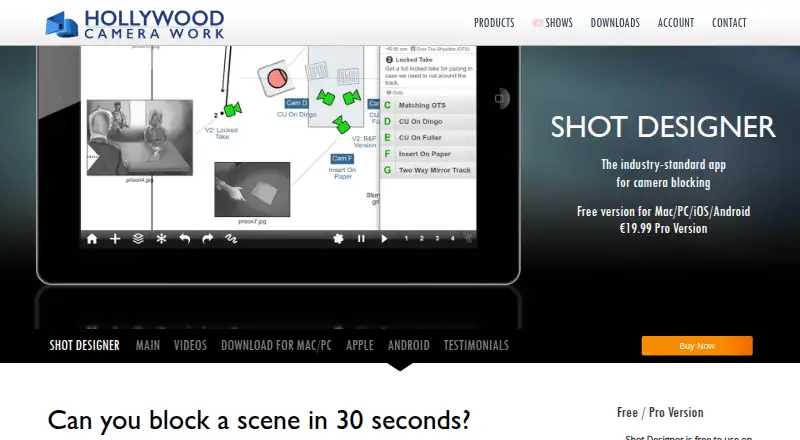
Shot Designer is a pre-production planning application for film and television directors, cinematographers, and production teams. It brings camera diagrams, shot lists, storyboards, a director’s viewfinder, set and lighting design, scene animation, and team sharing into one workspace. Its mobile availability makes it suited to filmmakers who need to plan camera blocking and scene layouts away from a desktop, while its desktop versions support broader production planning workflows.
The Free plan is full-featured apart from saving and exporting, and it limits work to one scene at a time. That makes it useful for exploring the product’s planning tools or handling a focused scene exercise. The Pro plan adds file management, macOS and Windows desktop software, PDF, JPG, and Excel export, Scene Freeze, synchronization, and team sharing. Buyers who need reusable project files, deliverables for production teams, or shared scene work should choose Pro rather than relying on the Free plan.
Shot Designer’s strongest distinction is the depth of its animated diagram workflow. Users can plan character and camera movement in real time, add shot descriptions and shot data, import production drawings as backgrounds, and combine scene planning with lighting and set design. It also supports storyboard import and a director’s viewfinder. The product is better suited to blocking, spatial planning, and production coordination than to a frame-focused storyboard process. Filmmakers seeking mobile scene diagrams and camera planning should consider it; those primarily looking for detailed visual frames or a broad connected software ecosystem may prefer a more frame-led tool.
Your product? Our editors can test Shot Designer in depth and publish a review, labelled as paid · from $149/mo →
Shot Designer pricing
All 2 Shot Designer plans and prices →
Shot Designer fact sheet
| Free plan | Yes |
|---|---|
| Paid from | Not verified |
| Frame limit | Not verified |
| Shot annotations | Yes |
| Scene layouts | Yes |
| Team collaboration | Yes |
| Export formats | PDF, JPG, Excel |
| Supported platforms | macOS, Windows, iOS, Android |
| Deployment | Cloud, Desktop, Mobile |
| Platforms | Windows, macOS, iOS, Android |
| Support | Email, Phone, Community |
| Built for | Solo, Small business, Mid-market (editorial estimate) |
| Integrations | 1 integrations: Dropbox |
| Pricing | Free plan (source) |
| Website | hollywoodcamerawork.com |
| Facts checked | 20 Sep 2026 |
Shot Designer integrations
Shot Designer lists 1 integrations on its own site.
- Dropbox
Alternatives to Shot Designer
- StoryboardCanvas AIA full production workspace connecting scripts, storyboards, animatics and producer tools.9.4
- BoordsBoords brings scripts, storyboards, animatics, approvals, and exports into one workspace.9.3
- Previs ProA focused 3D previs toolkit with strong production exports and Mac-only coverage.9.0



See all Shot Designer alternatives →
Used Shot Designer? Be the first to review it
The editor score above is our own research. What this page doesn't have yet is a reader's view — what you used Shot Designer for, what worked and what didn't. No stars are seeded and no review is paid for; an editor reads every one before it appears.
Write a reviewTwo minutes · verified accounts only · read by an editor before it appears
Featured on iTechGuides

Shot Designer is listed in our Storyboard Software directory. Add the badge to your site — it links back to this page.
<a href="https://www.itechguides.com/products/shot-designer/"><img src="https://www.itechguides.com/best/badge/shot-designer.svg" alt="Featured on iTechGuides" width="230" height="46"></a>
Reviewed by iTechGuides Editors · Editorial team · Updated Oct 2026
Advertiser disclosure: iTechGuides is reader-supported. Vendors can pay for top positions in our rankings and for a place on other products' pages, and we may earn a commission when you click some links. Bought places stand at the number bought; this page and our disclosure say so. Paying vendors may get a fuller, more detailed review from our editors, and that review can change their score. How we rank.
Last updated · How we research and update