
Scribe Animator
Scribe Animator: A capable free whiteboard editor for solo creators who can accept 720p watermarked exports. Ranked #26 of 40 in Explainer Video Software by our editors (6.4/10); pricing: Free plan; best for free single-user whiteboard editing.
At a glance
- Editor score6.4 / 10
- PricingFree plan
- Best forFree single-user whiteboard editing
- Free planYes
- Facts checked21 Sep 2026
Where it wins
- Editable scenes with timelines, keyframes, camera moves, and StoryBeats
- Local AI voiceovers, audio mixing, and WAV export
- SVG stroke reveals and screen recordings converted into editable scenes
Where it doesn't
- Free exports are limited to 720p and include a watermark
- Collaboration is limited to a single user
- No-watermark 1080p publishing requires the Pro upgrade
Our verdict on Scribe Animator
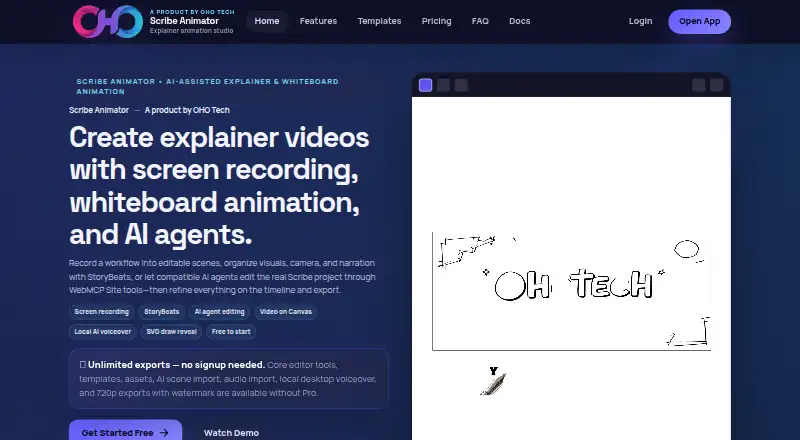
Scribe Animator is a browser-based whiteboard animation studio for teachers, marketers, founders, freelancers, agencies, and creators. Its workflow combines editable scenes with screen recording, local video annotation, SVG draw-reveal animation, smart arrows, timeline controls, camera moves, audio tools, and local AI narration. It runs on the web, iOS, and Android, supports local MP4/H.264 export, and allows read-only project links for sharing. The product is aimed at solo creators who want more control than a simple presentation editor while keeping whiteboard explainers as the central format.
The free creator workflow is priced at ₹0 monthly and includes AI scene import, built-in assets and templates, local desktop AI voiceover, and unlimited 720p exports with a watermark. Its editing depth is a notable strength: users can convert screen recordings into editable scenes, import and trim local video, add annotations with Freeze and Explain, animate SVGs stroke by stroke, and shape timing with keyframes and StoryBeats. Audio can be imported or recorded, then mixed and synchronized with the animation. AI scene and project import uses validated JSON, with ChatGPT and Gemini listed as integrations.
The Pro publishing upgrade adds 1080p exports, removes the watermark, includes 5 GB of cloud storage, and provides an SVG cloud library. That makes the upgrade relevant for polished client, classroom, or marketing delivery, while the free workflow remains suitable for drafting and personal publishing. Scribe Animator is a strong choice for one creator who values editable whiteboard scenes, local media tools, and built-in narration. Teams needing multi-user collaboration, or creators focused on formats beyond whiteboard explainers, should consider a different product.
Your product? Our editors can test Scribe Animator in depth and publish a review, labelled as paid · from $149/mo →
Scribe Animator pricing
All 2 Scribe Animator plans and prices →
Scribe Animator fact sheet
| Free plan | Yes |
|---|---|
| Paid from | Not verified |
| Character library | Not verified |
| Voiceover recording | Yes |
| AI voiceover | Yes |
| 最高 export quality | 1080p |
| Collaboration level | Single-user |
| Maximum video length | Not verified |
| Deployment | Cloud, Mobile |
| Platforms | Web, iOS, Android |
| Support | Docs |
| Built for | Solo, Small business, Mid-market (editorial estimate) |
| Integrations | 2 integrations: ChatGPT, Gemini |
| Pricing | Free plan (source) |
| Website | scribeanimator.com |
| Facts checked | 21 Sep 2026 |
Scribe Animator integrations
Scribe Animator lists 2 integrations on its own site.
- ChatGPT
- Gemini
Alternatives to Scribe Animator
- VyondA broad business video suite with strong animation depth and a high starting price.9.3
- PowtoonA broad browser-based toolkit for animated explainers, presentations, and branded video content.9.2
- VideoScribeA focused whiteboard animation tool with AI, voice tools, and flexible exports.9.0



See all Scribe Animator alternatives →
Used Scribe Animator? Be the first to review it
The editor score above is our own research. What this page doesn't have yet is a reader's view — what you used Scribe Animator for, what worked and what didn't. No stars are seeded and no review is paid for; an editor reads every one before it appears.
Write a reviewTwo minutes · verified accounts only · read by an editor before it appears
Featured on iTechGuides

Scribe Animator is listed in our Explainer Video Software directory. Add the badge to your site — it links back to this page.
<a href="https://www.itechguides.com/products/scribe-animator/"><img src="https://www.itechguides.com/best/badge/scribe-animator.svg" alt="Featured on iTechGuides" width="230" height="46"></a>
Reviewed by iTechGuides Editors · Editorial team · Updated Oct 2026
Advertiser disclosure: iTechGuides is reader-supported. Vendors can pay for top positions in our rankings and for a place on other products' pages, and we may earn a commission when you click some links. Bought places stand at the number bought; this page and our disclosure say so. Paying vendors may get a fuller, more detailed review from our editors, and that review can change their score. How we rank.
Last updated · How we research and update