ScreenToGif
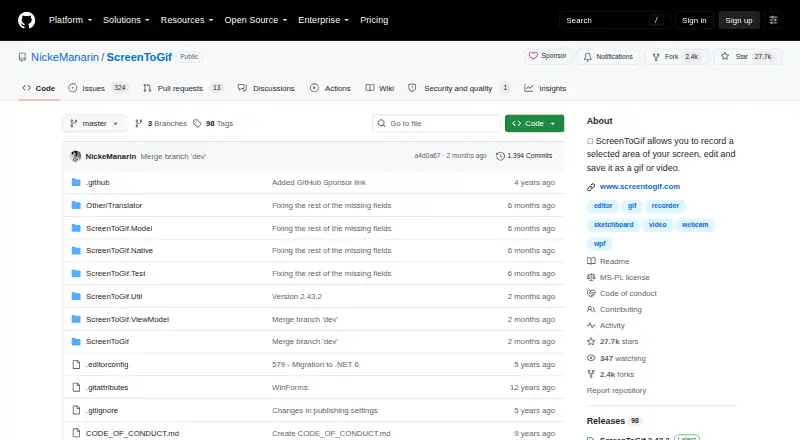
ScreenToGif: A free, open-source Windows tool for recording, editing, and exporting GIFs. Ranked #7 of 33 in GIF Maker Software by our editors (8.6/10); pricing: Free plan; best for free Windows screen-to-GIF recording.
At a glance
- Editor score8.6 / 10
- PricingFree plan
- Best forFree Windows screen-to-GIF recording
- Free planYes
- Paid fromFree
- Supported platformsWindows 10/11
- Facts checked16 Sep 2026
Where it wins
- Free and open source with screen, webcam, and sketchboard recording
- Integrated frame editor supports annotations, resizing, cropping, and imports
- Exports GIF, APNG, video, PSD, and PNG with FFmpeg and Gifski support
Where it doesn't
- Windows-only, with support focused on Windows 10 and 11
- Desktop workflow may be more than needed for simple GIF conversion
- Recording and editing are centered on frame sequences rather than broad media workflows
Our verdict on ScreenToGif
ScreenToGif is a free, open-source Windows desktop application for creating GIFs from selected screen areas, webcam video, or sketchboard drawings. It is aimed at people who need to capture demonstrations, interface activity, annotated explanations, or other short visual sequences and then refine them before export. The integrated editor works with frame sequences and can import GIFs and videos, giving the application a wider starting point than screen capture alone. Its Windows focus makes it a practical fit for users working on Windows 10 or 11 who want recording and editing in one application.
The standout feature is the combination of capture modes and frame-level editing. Users can record a selected screen area, webcam feed, or sketchboard, then add annotations and apply actions such as resizing and cropping. The editor also supports importing existing GIFs and videos, which helps bring outside material into the same frame-based workflow. Export options include GIF files using multiple encoders, along with APNG, video, PSD, and PNG images. FFmpeg and Gifski integrations add useful options within that export workflow.
ScreenToGif’s open-source model and free plan make it suitable for individuals and teams that want a Windows-native tool without a paid tier structure. The project remains available through its GitHub repository, with releases published in 2026. However, the product is limited to Windows and is specifically shaped around screen recording, webcam or sketchboard capture, and frame-sequence editing. Users who need broader platform coverage or a more general media-production workflow should choose an alternative. Pick ScreenToGif when Windows support, open-source availability, and detailed GIF editing matter most.
Your product? Our editors can test ScreenToGif in depth and publish a review, labelled as paid · from $149/mo →
ScreenToGif pricing
ScreenToGif fact sheet
| Free plan | Yes |
|---|---|
| Paid from | Free |
| Video import | Yes |
| Screen recording | Yes |
| Watermark-free export | Not verified |
| Transparent GIF export | Not verified |
| Maximum file size | Not verified |
| Maximum GIF duration | Not verified |
| Supported platforms | Windows 10/11 |
| Deployment | Desktop |
| Platforms | Windows |
| Integrations | 2 integrations: FFmpeg, Gifski |
| Pricing | Free plan |
| Website | github.com |
| Facts checked | 16 Sep 2026 |
ScreenToGif integrations
ScreenToGif lists 2 integrations on its own site.
- FFmpeg
- Gifski
Alternatives to ScreenToGif
- EzgifA free, watermark-free browser toolkit covering GIF creation, editing, conversion, and optimization.9.4
- GGIFFA deep free browser editor for animated visuals, with no screen-recording workflow.9.2
- ImgPlayA versatile mobile GIF editor with broad media imports, exports, and sharing options.9.1

See all ScreenToGif alternatives →
ScreenToGif vs the competition
- ScreenToGif vs Ezgif
- ScreenToGif vs GGIFF
- ScreenToGif vs ImgPlay
- ScreenToGif vs FlexClip
- ScreenToGif vs Honeycam
- ScreenToGif vs GIF Editor


Compare ScreenToGif with any tool side by side →
Used ScreenToGif? Be the first to review it
The editor score above is our own research. What this page doesn't have yet is a reader's view — what you used ScreenToGif for, what worked and what didn't. No stars are seeded and no review is paid for; an editor reads every one before it appears.
Write a reviewTwo minutes · verified accounts only · read by an editor before it appears
Featured on iTechGuides

ScreenToGif is listed in our GIF Maker Software directory. Add the badge to your site — it links back to this page.
<a href="https://www.itechguides.com/products/screentogif/"><img src="https://www.itechguides.com/best/badge/screentogif.svg" alt="Featured on iTechGuides" width="230" height="46"></a>
Reviewed by iTechGuides Editors · Editorial team · Updated Oct 2026
Advertiser disclosure: iTechGuides is reader-supported. Vendors can pay for top positions in our rankings and for a place on other products' pages, and we may earn a commission when you click some links. Bought places stand at the number bought; this page and our disclosure say so. Paying vendors may get a fuller, more detailed review from our editors, and that review can change their score. How we rank.
Last updated · How we research and update