SciPen Studio
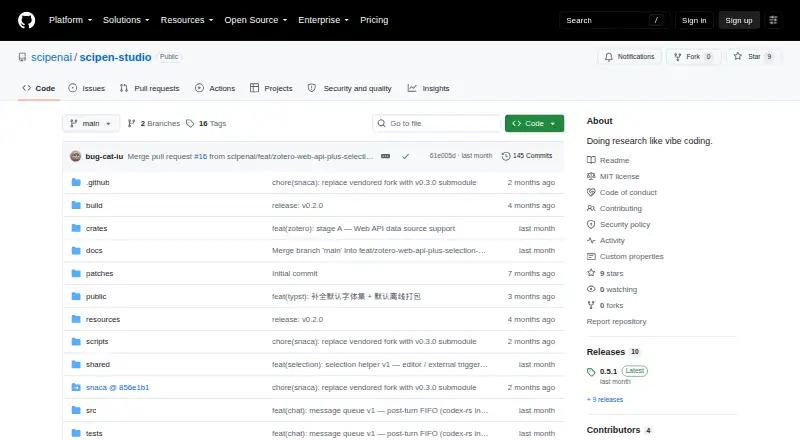
SciPen Studio: A free, open-source desktop editor for local LaTeX and Typst work with AI assistance. Ranked #16 of 31 in LaTeX Editors by our editors (7.1/10); pricing: Free plan; best for offline LaTeX users wanting AI assistance.
At a glance
- Editor score7.1 / 10
- PricingFree plan
- Best forOffline LaTeX users wanting AI assistance
- Free planYes
- Paid fromFree
- Editor typeDesktop
- Facts checked20 Sep 2026
Where it wins
- Bundled BusyTeX and Typst WebAssembly compilers
- Live PDF preview with SyncTeX navigation
- Zotero, Overleaf sync, history, diff, and restore
Where it doesn't
- Desktop application rather than a browser-based workspace
- AI web search adds an online component to local writing
- Overleaf synchronization may require reviewing three-way merges
Our verdict on SciPen Studio
SciPen Studio is a desktop IDE for research writing with LaTeX and Typst. It is designed for users who want local document editing across Windows, macOS, and Linux, with Markdown support included alongside LaTeX and Typst. Bundled BusyTeX and Typst WebAssembly compilers support local compilation, while language-server editing and live PDF preview with SyncTeX navigation connect source changes to the rendered document. Its MIT license permits free use, modification, and distribution, making it a fit for researchers, students, and technical writers who prefer an open-source desktop workflow.
The editor’s strongest advantage is the combination of local writing tools and research-oriented assistance. The built-in AI agent can edit files and perform web searches, while Ctrl+K provides inline code editing. Local project history adds diff and restore functions, giving users a way to review or recover project changes. Zotero integration through Better BibTeX supports reference workflows, and Overleaf synchronization with three-way merge connects local projects to an established online LaTeX environment. These features make SciPen Studio more than a basic source editor, particularly for projects that move between offline work and Overleaf.
SciPen Studio is a strong choice for users who want a free, open-source LaTeX environment that remains centered on the desktop while still offering AI and ecosystem connections. Its platform coverage spans Windows, macOS, and Linux, and the local compiler approach suits offline editing. The trade-off is that it is a desktop application rather than a browser-based workspace, and the AI agent’s web-search capability introduces an online element for users seeking assistance. Overleaf synchronization can also involve reviewing three-way merges when project versions diverge. Choose it for local control, compiler support, and research integrations; consider another editor if browser-first collaboration is the primary requirement.
Your product? Our editors can test SciPen Studio in depth and publish a review, labelled as paid · from $149/mo →
SciPen Studio pricing
SciPen Studio fact sheet
| Free plan | Yes |
|---|---|
| Paid from | Free |
| Editor type | Desktop |
| Real-time collaboration | Not verified |
| Offline editing | Yes |
| Visual editor | Not verified |
| Git integration | Not verified |
| Supported platforms | Windows, macOS, Linux |
| Deployment | Desktop |
| Platforms | Windows, macOS, Linux |
| Support | Community, Docs |
| Built for | Solo, Small business (editorial estimate) |
| Integrations | 2 integrations: Zotero, Overleaf |
| Pricing | Free plan |
| Website | github.com |
| Facts checked | 20 Sep 2026 |
SciPen Studio integrations
SciPen Studio lists 2 integrations on its own site.
- Zotero
- Overleaf
Alternatives to SciPen Studio
- OverleafA capable collaborative LaTeX workspace for teams that need editing, review, and citations together.9.3
- TeXstudioA capable free LaTeX desktop editor with strong document-production tools.9.1
- LyXA capable LaTeX-based editor for academic, mathematical, and technical documents.8.9

See all SciPen Studio alternatives →
Used SciPen Studio? Be the first to review it
The editor score above is our own research. What this page doesn't have yet is a reader's view — what you used SciPen Studio for, what worked and what didn't. No stars are seeded and no review is paid for; an editor reads every one before it appears.
Write a reviewTwo minutes · verified accounts only · read by an editor before it appears
Featured on iTechGuides

SciPen Studio is listed in our LaTeX Editors directory. Add the badge to your site — it links back to this page.
<a href="https://www.itechguides.com/products/scipen-studio/"><img src="https://www.itechguides.com/best/badge/scipen-studio.svg" alt="Featured on iTechGuides" width="230" height="46"></a>
Reviewed by iTechGuides Editors · Editorial team · Updated Oct 2026
Advertiser disclosure: iTechGuides is reader-supported. Vendors can pay for top positions in our rankings and for a place on other products' pages, and we may earn a commission when you click some links. Bought places stand at the number bought; this page and our disclosure say so. Paying vendors may get a fuller, more detailed review from our editors, and that review can change their score. How we rank.
Last updated · How we research and update