
Rubric Scorer
Rubric Scorer: A focused Android rubric grader with useful sharing, PDF, and classroom tools. Ranked #15 of 22 in Rubric Software by our editors (7.4/10); pricing: Free plan; best for teachers grading rubrics on Android.
At a glance
- Editor score7.4 / 10
- PricingFree plan
- Best forTeachers grading rubrics on Android
- Free planYes
- Facts checked21 Sep 2026
Where it wins
- Touch-based grading with custom and predefined comments
- Bulk email, combined PDFs, and class statistics on Premium
- Optional Google Classroom and Gmail integrations
Where it doesn't
- Available on Android only
- Free plan is limited to 3 rubrics and 1 class
- Rubrics are limited to 20 rows by 10 columns
Our verdict on Rubric Scorer
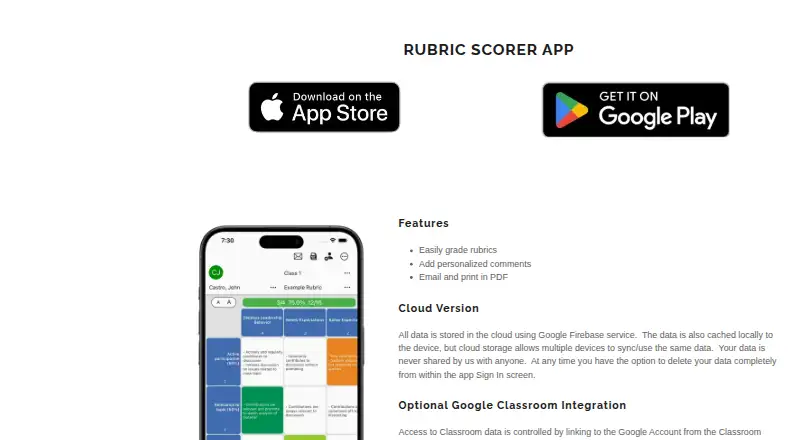
Rubric Scorer is an education app for teachers who create, share, and grade rubrics on Android. Its core workflow covers rubric creation, touch-based scoring, comments, PDF generation, printing, and email sharing. Teachers can also share rubrics with other teachers, making it suited to classroom grading workflows that rely on structured criteria rather than general assignment tracking.
The free plan provides up to 3 rubrics for 1 class, which is a practical starting point for a teacher evaluating a limited set of assignments. The Premium subscription expands the workspace to 20 classes and up to 100 rubrics per class. It also adds bulk email grades, combined PDFs, quick comments, and class statistics. The published plan structure makes the product easier to assess by separating basic rubric grading from higher-volume classroom administration, while subscription pricing is not displayed in the available plan details.
Rubric Scorer’s ecosystem fit centers on Android, with optional Google Classroom integration and optional Gmail integration for sending email. The app can generate individual PDF copies for students, as well as combined PDFs, and supports printing and email sharing. A cloud version synchronizes data across devices. The main trade-off is breadth: Android-only coverage and a maximum rubric size of 20 rows by 10 columns may not suit schools that require broader platform support, larger assessment grids, or a wider learning-management ecosystem. Choose it for touch-based rubric grading and teacher-friendly sharing tools; consider an alternative if cross-platform access or larger rubrics is essential.
Your product? Our editors can test Rubric Scorer in depth and publish a review, labelled as paid · from $149/mo →
Rubric Scorer pricing
All 2 Rubric Scorer plans and prices →
Rubric Scorer fact sheet
| Free plan | Yes |
|---|---|
| Paid from | Not verified |
| Analytic rubrics | Not verified |
| Holistic rubrics | Not verified |
| Single-point rubrics | Not verified |
| LMS integration | Yes |
| AI assistance | Not verified |
| Collaborative authoring | Not verified |
| Bulk scoring | Yes |
| Deployment | Cloud, Mobile |
| Platforms | Android |
| Support | |
| Built for | Solo, Small business (editorial estimate) |
| Integrations | 2 integrations: Google Classroom, Gmail |
| Pricing | Free plan (source) |
| Website | inpocketsolutions.com |
| Facts checked | 21 Sep 2026 |
Rubric Scorer integrations
Rubric Scorer lists 2 integrations on its own site.
- Google Classroom
- Gmail
Alternatives to Rubric Scorer
- iRubricA flexible rubric platform for moderated, multi-rater assessment and LMS-connected grading.9.3
- UniRubricAuditable AI grading with rubric evidence, review controls, and LMS grade return.9.2
- AssessIQA broad AI assessment engine with rubric scoring, feedback, analytics, and LMS grade passback.9.1


See all Rubric Scorer alternatives →
Used Rubric Scorer? Be the first to review it
The editor score above is our own research. What this page doesn't have yet is a reader's view — what you used Rubric Scorer for, what worked and what didn't. No stars are seeded and no review is paid for; an editor reads every one before it appears.
Write a reviewTwo minutes · verified accounts only · read by an editor before it appears
Featured on iTechGuides

Rubric Scorer is listed in our Rubric Software directory. Add the badge to your site — it links back to this page.
<a href="https://www.itechguides.com/products/rubric-scorer/"><img src="https://www.itechguides.com/best/badge/rubric-scorer.svg" alt="Featured on iTechGuides" width="230" height="46"></a>
Reviewed by iTechGuides Editors · Editorial team · Updated Oct 2026
Advertiser disclosure: iTechGuides is reader-supported. Vendors can pay for top positions in our rankings and for a place on other products' pages, and we may earn a commission when you click some links. Bought places stand at the number bought; this page and our disclosure say so. Paying vendors may get a fuller, more detailed review from our editors, and that review can change their score. How we rank.
Last updated · How we research and update