
Rokoko Studio
Rokoko Studio: A broad desktop mocap workflow with free entry, retargeting, streaming and automation tiers. Ranked #5 of 64 in Motion Capture Software by our editors (8.5/10); pricing: Free plan · 7-day trial; best for teams needing complete mocap workflows.
At a glance
- Editor score8.5 / 10
- PricingFree plan · 7-day trial
- Best forTeams needing complete mocap workflows
- Free planYes
- Paid from$10/user/mo
- Character retargetingYes
- Founded2014 · Copenhagen, Denmark
- Facts checked20 Sep 2026
Where it wins
- Captures body, finger and facial movement from hardware or Vision AI
- Includes cleanup, retargeting, streaming and FBX, BVH and CSV export
- Integrates with Blender, Unreal Engine, Unity, Maya and other 3D tools
Where it doesn't
- Advanced capabilities are split across multiple paid plans
- Annual prices are monthly equivalents billed annually
- Enterprise pricing starts at $100 and requires contacting sales
Our verdict on Rokoko Studio
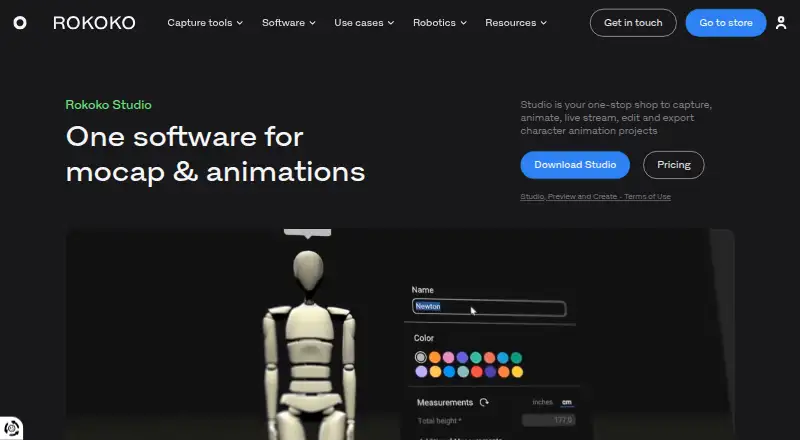
Rokoko Studio is desktop motion-capture software for animators, filmmakers, game developers, educators and other creators. It captures body motion from Rokoko hardware or Vision AI, with finger and facial capture input, then brings recording, cleanup, retargeting, real-time streaming and export into one workflow. Studio runs on Windows and macOS and supports formats including FBX, BVH and CSV. Its scope suits teams that need more than capture alone, particularly those moving performances into 3D production tools.
The free Starter plan includes motion-capture recording and export, cleanup filters, FBX export and 30 seconds per month of Vision AI video processing. Annual billing lists Basic at $10 per user per month, adding custom-character import and retargeting, advanced export options, smoothing and loop segments. Plus is $20 per user per month annually, with livestreaming to third-party tools, unlimited team members and user management, custom skeleton presets, and chat and email support. Pro is $50 per user per month annually and adds Face Capture, an advanced command API, UDP trigger messages and CSV export. Enterprise starts at $100 per user per month annually, with local storage, extra offline days, custom support hours, custom onboarding and an SLA. Monthly pricing lists Basic at $12 and Plus at $28 per user per month; a free seven-day Plus or Pro trial is also stated.
Integration breadth is a central strength. Studio connects with Blender, Unreal Engine, Unity, Maya, Cinema 4D, Houdini, MotionBuilder and iClone, while skeleton presets, mesh export and retargeting support downstream animation work. Cleanup includes root locking, foot locking and knee-pop smoothing, and command APIs plus UDP triggers provide options for automated or interactive pipelines. The trade-off is that livestreaming, team management, face capture and advanced automation require higher tiers, while the Starter plan has limited Vision AI processing. Choose Rokoko Studio for a complete Windows or macOS mocap workflow; consider another option if your pipeline needs a different desktop platform or concentrates on a single capture task.
Your product? Our editors can test Rokoko Studio in depth and publish a review, labelled as paid · from $149/mo →
Rokoko Studio pricing
All 5 Rokoko Studio plans and prices →
Rokoko Studio fact sheet
| Free plan | Yes |
|---|---|
| Paid from | $10/user/mo |
| Body tracking | Yes |
| Face and hand tracking | Yes |
| Character retargeting | Yes |
| Cleanup tools | Yes |
| Export formats | FBX, BVH, CSV |
| Real-time output | Yes |
| Supported platforms | Windows, macOS |
| Free trial | 7 days |
| Deployment | Desktop |
| Platforms | Windows, macOS |
| Support | Email, Live chat, Community, Docs |
| Built for | Solo, Small business, Mid-market, Enterprise (editorial estimate) |
| Integrations | 8 integrations: Blender, Unreal Engine, Unity, Maya, Cinema 4D, Houdini … See all → |
| Pricing | Free plan · 7-day trial (source) |
| Website | rokoko.com |
| Facts checked | 20 Sep 2026 |
Rokoko Studio integrations
Rokoko Studio lists 8 integrations on its own site.
- Blender
- Unreal Engine
- Unity
- Maya
- Cinema 4D
- Houdini
- MotionBuilder
- iClone
See all Rokoko Studio integrations →
Alternatives to Rokoko Studio
- Vicon ShogunA mature Windows suite for detailed optical, markerless, and finger motion capture.8.9
- Xsens AnimateA mature inertial capture suite for live production, offline export, and complex scenes.8.8
- Autodesk MotionBuilderA character-animation workspace with mocap retargeting, control rigs and FBX exchange.8.7


See all Rokoko Studio alternatives →
Rokoko Studio vs the competition
- Rokoko Studio vs Vicon Shogun
- Rokoko Studio vs Xsens Animate
- Rokoko Studio vs Xsens MVN Animate
- Rokoko Studio vs Xsens MVN Analyze
Compare Rokoko Studio with any tool side by side →
Also Ranked In
Rokoko Studio is ranked in 5 of our directories.
Used Rokoko Studio? Be the first to review it
The editor score above is our own research. What this page doesn't have yet is a reader's view — what you used Rokoko Studio for, what worked and what didn't. No stars are seeded and no review is paid for; an editor reads every one before it appears.
Write a reviewTwo minutes · verified accounts only · read by an editor before it appears
Featured on iTechGuides

Rokoko Studio is listed in our Motion Capture Software directory. Add the badge to your site — it links back to this page.
<a href="https://www.itechguides.com/products/rokoko-studio/"><img src="https://www.itechguides.com/best/badge/rokoko-studio.svg" alt="Featured on iTechGuides" width="230" height="46"></a>
Reviewed by iTechGuides Editors · Editorial team · Updated Oct 2026
Advertiser disclosure: iTechGuides is reader-supported. Vendors can pay for top positions in our rankings and for a place on other products' pages, and we may earn a commission when you click some links. Bought places stand at the number bought; this page and our disclosure say so. Paying vendors may get a fuller, more detailed review from our editors, and that review can change their score. How we rank.
Last updated · How we research and update