
RipX DAW
RipX DAW: A desktop DAW for separating stems and editing audio down to individual notes. Ranked #12 of 21 in Stem Separation Software by our editors (8.3/10); pricing: 21-day trial; best for producers seeking note-level desktop stem editing.
At a glance
- Editor score8.3 / 10
- Pricing21-day trial
- Best forProducers seeking note-level desktop stem editing
- Free planNo
- Paid from$99 one-time
- Stem typesvocals, bass, drums, guitars, instruments, percussion
- Facts checked19 Sep 2026
Where it wins
- Separates vocals, instruments, percussion, bass, drums, and guitars
- Edits pitch, timing, effects, panning, volume, and EQ at note level
- Exports stems and MIDI, with PRO plug-ins for supported DAW workflows
Where it doesn't
- No free plan; the 21-day trial is the free evaluation period
- Runs on Windows and macOS rather than mobile platforms
- Harmonic editing, audio repair, RipScripts, and RipLink require PRO
Our verdict on RipX DAW
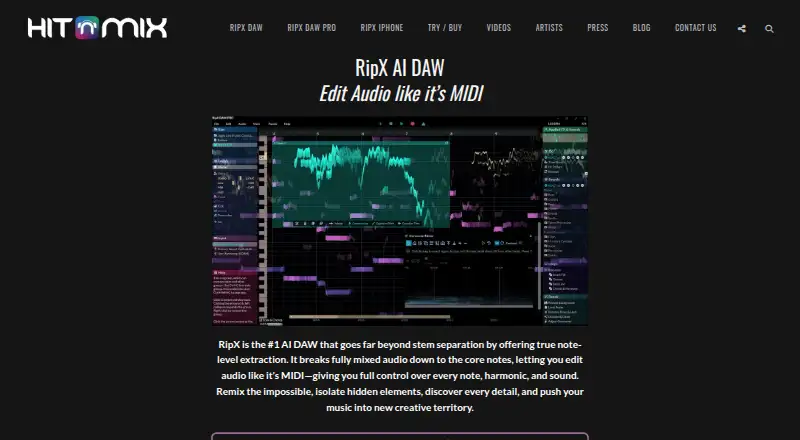
RipX DAW is a desktop audio workstation for producers, musicians, DJs, remixers, students, and educators who want to separate mixed recordings and edit the resulting audio at note level. Its AI separation covers vocals, instruments, percussion, bass, drums, and guitars. After separation, users can adjust pitch, timing, key, tempo, effects, panning, volume, and EQ, as well as create backing tracks by muting or soloing layers, replace sounds, and export audio or MIDI. It runs on Windows and macOS, making it a fit for desktop workflows rather than mobile editing.
The published plans show a one-time price of $99 for RipX DAW, which includes AI stem separation, note-level editing, and MIDI and audio export. RipX DAW PRO costs $198 one time and adds advanced harmonic editing, audio repair and cleanup, RipScripts, and RipLink integration. There is no free plan, but a 21-day trial is available. Buyers who need the core separation and editing tools can start with the standard edition; those who need repair, programmable tools, or plug-in integration should compare the PRO tier before choosing.
RipLink plug-ins support DAW workflows with Pro Tools, Studio One, Cubase, Nuendo, Reaper, Cakewalk, Logic Pro X, Ableton Live, FL Studio, ACID Pro, Digital Performer, and Mixcraft. This breadth is useful for people who want RipX alongside an existing DAW, while the standard version’s export options—WAV, MP3, AIFF, and MIDI—also support moving work between applications. RipX DAW is suited to detailed desktop editing beyond basic stem splitting. Someone seeking a free tool, or a simpler workflow without note-level manipulation, may prefer another option.
Your product? Our editors can test RipX DAW in depth and publish a review, labelled as paid · from $149/mo →
RipX DAW pricing
All 2 RipX DAW plans and prices →
RipX DAW fact sheet
| Free plan | No |
|---|---|
| Paid from | $99 one-time |
| Stem types | vocals, bass, drums, guitars, instruments, percussion |
| Max upload size | Not verified |
| Max track length | Not verified |
| Batch processing | Not verified |
| Export formats | WAV, MP3, AIFF, MIDI |
| Desktop app | Yes |
| API access | Not verified |
| Free trial | 21 days |
| Deployment | Desktop |
| Platforms | Windows, macOS |
| Integrations | 12 integrations: Pro Tools, Studio One, Cubase, Nuendo, Reaper, Cakewalk … |
| Pricing | 21-day trial (source) |
| Website | hitnmix.com |
| Facts checked | 19 Sep 2026 |
RipX DAW integrations
RipX DAW lists 12 integrations on its own site.
- Pro Tools
- Studio One
- Cubase
- Nuendo
- Reaper
- Cakewalk
- Logic Pro X
- Ableton Live
- FL Studio
- ACID Pro
- Digital Performer
- Mixcraft
Alternatives to RipX DAW
- FadrA free starting point for stem separation, remix tools, MIDI detection and API workflows.9.4
- LALAL.AIFlexible stem separation with web, app, plugin, and API access.9.3
- MoisesA broad stem-separation toolkit for musicians, with bulk processing and apps across platforms.9.2



See all RipX DAW alternatives →
Also Ranked In
RipX DAW is ranked in 3 of our directories.
Used RipX DAW? Be the first to review it
The editor score above is our own research. What this page doesn't have yet is a reader's view — what you used RipX DAW for, what worked and what didn't. No stars are seeded and no review is paid for; an editor reads every one before it appears.
Write a reviewTwo minutes · verified accounts only · read by an editor before it appears
Featured on iTechGuides

RipX DAW is listed in our Stem Separation Software directory. Add the badge to your site — it links back to this page.
<a href="https://www.itechguides.com/products/ripx-daw/"><img src="https://www.itechguides.com/best/badge/ripx-daw.svg" alt="Featured on iTechGuides" width="230" height="46"></a>
Reviewed by iTechGuides Editors · Editorial team · Updated Oct 2026
Advertiser disclosure: iTechGuides is reader-supported. Vendors can pay for top positions in our rankings and for a place on other products' pages, and we may earn a commission when you click some links. Bought places stand at the number bought; this page and our disclosure say so. Paying vendors may get a fuller, more detailed review from our editors, and that review can change their score. How we rank.
Last updated · How we research and update