
RiffToTab
RiffToTab: A low-cost web editor for converting MIDI and audio into editable guitar tabs. Ranked #9 of 32 in Guitar Tab Software by our editors (7.4/10); pricing: Free plan; best for low-cost audio and MIDI conversion.
At a glance
- Editor score7.4 / 10
- PricingFree plan
- Best forLow-cost audio and MIDI conversion
- Free planYes
- Paid from$3.25/mo
- Tab playbackYes
- Facts checked20 Sep 2026
Where it wins
- Converts MIDI and audio recordings into editable guitar tablature
- Supports standard notation, playback, tuning, capo, and fret controls
- Imports and exports Guitar Pro, MIDI, MusicXML, PDF, and text tab
Where it doesn't
- Runs as a web app rather than a desktop application
- PDF and MusicXML export require a paid plan
- Audio analysis runs in the browser while saved projects use cloud storage
Our verdict on RiffToTab
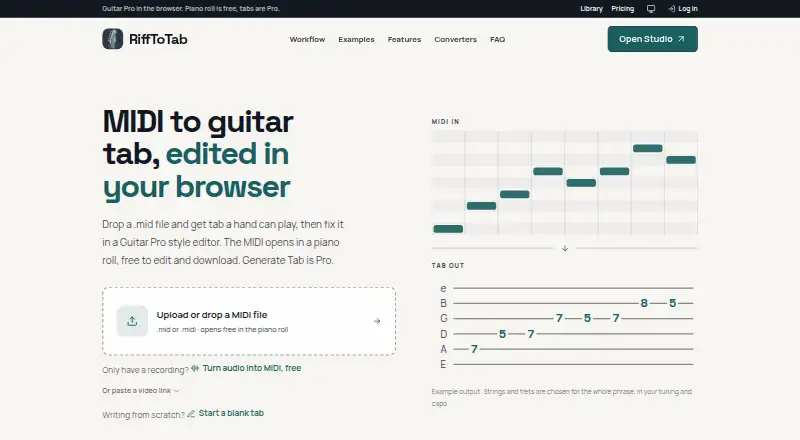
RiffToTab is a browser-based guitar tab editor and converter for musicians, guitarists, and bass players. Its main focus is turning MIDI or audio recordings into playable, editable tablature, while also supporting standard notation, playback, multi-track editing, and controls for tuning, capo, key, and neck position. Users can import Guitar Pro, MusicXML, and alphaTex files, then export Guitar Pro, MIDI, text tab, alphaTex, PDF, or MusicXML files. It suits players who want a web-based workflow for creating, cleaning up, and practicing guitar or bass parts.
The pricing structure keeps entry costs low. A free plan is available, while Pro Monthly costs $7.99 per month. Pro Yearly costs $3.25 per month when billed annually, and Pro Lifetime costs $59 as a one-time payment. The paid plans include unlimited MIDI-to-tab conversions, PDF and MusicXML export, practice tools, unlimited YouTube imports, and unlimited cloud storage for recordings. The Lifetime plan also includes future features. Buyers choosing between plans should weigh recurring access against the one-time option and whether paid export and conversion limits matter to their workflow.
RiffToTab’s standout capability is its conversion workflow. MIDI-to-tab conversion includes string and fret selection, while audio recording conversion includes piano-roll note cleanup. Playback offers speed and loop controls, which makes the editor useful for refining and practicing converted material rather than only viewing tabs. Audio analysis runs locally in the browser, while projects can be saved to an account for later access. The web-only format makes it a practical choice for users who prefer browser access, but musicians seeking a desktop application or a workflow centered on offline software should look elsewhere.
Your product? Our editors can test RiffToTab in depth and publish a review, labelled as paid · from $149/mo →
RiffToTab pricing
All 3 RiffToTab plans and prices →
RiffToTab fact sheet
| Free plan | Yes |
|---|---|
| Paid from | $3.25/mo |
| Supported platforms | web |
| Notation modes | Tab and standard |
| Tab playback | Yes |
| MIDI support | Yes |
| Audio recording | Not verified |
| Sharing or publishing | Not verified |
| Money-back guarantee | 7 days |
| Deployment | Cloud |
| Platforms | Web |
| Support | |
| Built for | Solo, Small business (editorial estimate) |
| Pricing | Free plan (source) |
| Website | rifftotab.com |
| Facts checked | 20 Sep 2026 |
Alternatives to RiffToTab
- Guitar ProA mature, deep tab editor for musicians who need notation, playback, and broad exports.9.3
- TuxGuitarA broad free tab editor with strong format support, playback, and four-platform coverage.9.0
- Guitar2TabsA flexible audio-to-tab tool with editing, playback, sharing, and broad export support.8.5



See all RiffToTab alternatives →
Used RiffToTab? Be the first to review it
The editor score above is our own research. What this page doesn't have yet is a reader's view — what you used RiffToTab for, what worked and what didn't. No stars are seeded and no review is paid for; an editor reads every one before it appears.
Write a reviewTwo minutes · verified accounts only · read by an editor before it appears
Featured on iTechGuides

RiffToTab is listed in our Guitar Tab Software directory. Add the badge to your site — it links back to this page.
<a href="https://www.itechguides.com/products/rifftotab/"><img src="https://www.itechguides.com/best/badge/rifftotab.svg" alt="Featured on iTechGuides" width="230" height="46"></a>
Reviewed by iTechGuides Editors · Editorial team · Updated Oct 2026
Advertiser disclosure: iTechGuides is reader-supported. Vendors can pay for top positions in our rankings and for a place on other products' pages, and we may earn a commission when you click some links. Bought places stand at the number bought; this page and our disclosure say so. Paying vendors may get a fuller, more detailed review from our editors, and that review can change their score. How we rank.
Last updated · How we research and update