RichText
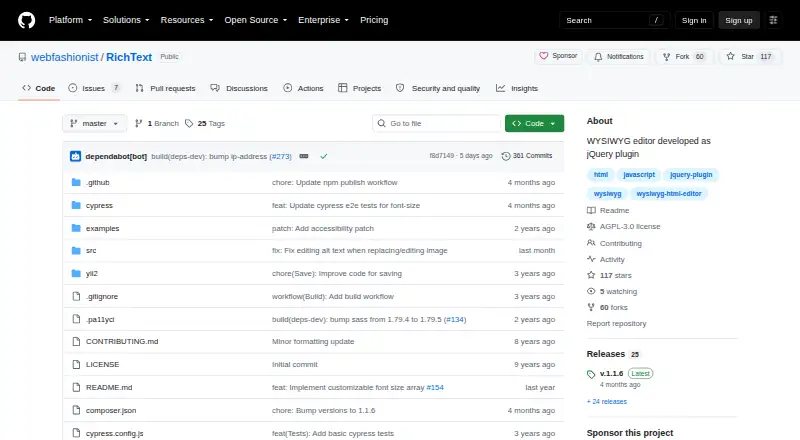
RichText: A self-hosted jQuery editor for forms that need basic formatting, tables, uploads, and embeds. Ranked #37 of 37 in Rich Text Editor Software by our editors (6.0/10); pricing: Free plan; best for simple jQuery forms with media and table editing.
At a glance
- Editor score6.0 / 10
- PricingFree plan
- Best forSimple jQuery forms with media and table editing
- Free planYes
- Paid fromFree
- DeploymentSelf_hosted
- Facts checked24 Sep 2026
Where it wins
- Supports formatting, headings, lists, links, and table editing.
- Handles image and file uploads plus videos from four named services.
- Can sync content with a form textarea and save manually or on blur.
Where it doesn't
- Its documented framework support is limited to jQuery.
- It does not provide structured-content or real-time collaboration features.
- Support is documented through docs, with no other channel listed.
Our verdict on RichText
RichText adds WYSIWYG editing to web forms through a client-side jQuery plugin. It suits solo developers and small teams building straightforward forms who want users to format text, add links and tables, and work with media without leaving the form. Developers initialize it on a textarea or input and can configure its toolbar, formatting options, and appearance. The project is open source, self-hosted, and available for the web; its documented installation options include npm, Yarn, or downloaded release files.
The editor covers everyday form content: bold, italic, underline, font, size, and color controls; alignment, headings, and ordered or unordered lists; link insertion; and table editing. It also provides image and file upload controls and video embedding for YouTube, Facebook, Vimeo, and Dailymotion. Raw HTML can be viewed and edited, and optional settings include word count, preview, undo, and redo. These options make RichText a focused choice for editable form fields rather than a broad content platform. The documented integrations are jQuery and FontAwesome, so its ecosystem fit is strongest in projects already using jQuery.
For form workflows, content can be saved manually or after a configured blur delay, with callbacks, and submission synchronizes the editor with its initialized textarea. That offers practical control over how edited content reaches a form submission. RichText is a reasonable fit when a project needs a self-hosted editor with common formatting, media, and table tools. Teams needing structured content or real-time collaboration should choose an editor with those capabilities; those are not part of RichText's documented feature set. Its docs-based support and jQuery focus also make it less suitable where a different framework or broader support channels are required.
Your product? Our editors can test RichText in depth and publish a review, labelled as paid · from $149/mo →
RichText pricing
RichText fact sheet
| Free plan | Yes |
|---|---|
| Paid from | Free |
| Deployment | Self_hosted |
| Framework support | jQuery |
| Structured content | No |
| Real-time collaboration | No |
| Table editing | Yes |
| Media handling | Image and file uploads; video embedding from YouTube, Facebook, Vimeo, and Dailymotion |
| Deployment | Self-hosted |
| Platforms | Web |
| Support | Docs |
| Built for | Solo, Small business (editorial estimate) |
| Integrations | 2 integrations: jQuery, FontAwesome |
| Pricing | Free plan |
| Website | github.com |
| Facts checked | 24 Sep 2026 |
RichText integrations
RichText lists 2 integrations on its own site.
- jQuery
- FontAwesome
Alternatives to RichText
- CKEditor 5A structured editor framework with collaboration, media, export, and flexible deployment.9.3
- TinyMCEA flexible editor with broad framework support, structured HTML, and multiple deployment options.8.8
- TiptapA flexible editor foundation for teams building structured, collaborative web applications.8.7


See all RichText alternatives →
Used RichText? Be the first to review it
The editor score above is our own research. What this page doesn't have yet is a reader's view — what you used RichText for, what worked and what didn't. No stars are seeded and no review is paid for; an editor reads every one before it appears.
Write a reviewTwo minutes · verified accounts only · read by an editor before it appears
Featured on iTechGuides

RichText is listed in our Rich Text Editor Software directory. Add the badge to your site — it links back to this page.
<a href="https://www.itechguides.com/products/richtext/"><img src="https://www.itechguides.com/best/badge/richtext.svg" alt="Featured on iTechGuides" width="230" height="46"></a>
Reviewed by iTechGuides Editors · Editorial team · Updated Oct 2026
Advertiser disclosure: iTechGuides is reader-supported. Vendors can pay for top positions in our rankings and for a place on other products' pages, and we may earn a commission when you click some links. Bought places stand at the number bought; this page and our disclosure say so. Paying vendors may get a fuller, more detailed review from our editors, and that review can change their score. How we rank.
Last updated · How we research and update